
- Products
-
Audio & Studio Equipment
See all
-
Cameras & Optics
See all
- Computers & Mobile Devices
- Drones & Aerial Imaging
-
Professional Video & AV
See all
- Security & Surveillance
- TVs & Entertainment
SubcategoriesSee all -
Audio & Studio Equipment
- About us
- Contact Us
- +1-888-219-0753
- Bulk Order

- Products
-
Audio & Studio Equipment
See all
-
Cameras & Optics
See all
- Computers & Mobile Devices
- Drones & Aerial Imaging
-
Professional Video & AV
See all
- Security & Surveillance
- TVs & Entertainment
SubcategoriesSee all -
Audio & Studio Equipment
- About us
- Contact Us
- +1-888-219-0753
- Bulk Order
HomeCatalogAudio & Studio EquipmentStudio RecordingAll Computer AudioMeldaProduction MAutoStereoFix Software (Download)
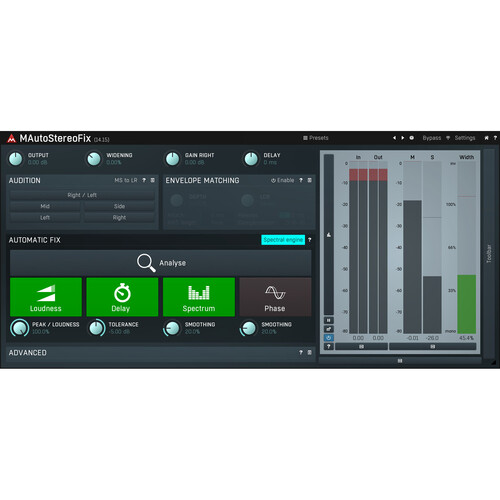
MeldaProduction MAutoStereoFix Software (Download)
In Stock
SKU #
ME1130360
Mfr #
11-30360
Manufacturer
MeldaProduction
Description
Sometimes a stereo track presents you with pesky phase, level, or frequency issues and that's where MeldaProduction's MAutoStereoFix comes in. This downloadable plug-in analyzes your audio and makes automatic adjustments to the polarity, phase, level, and timing of your signal to create the most impactful, least hazy stereo track possible. At the press of a button, MAutoStereoFix can apply spectral processing to balance out the frequency response between left and right channels as well, correcting for mismatched microphones during recording.These features can work automatically, or be controlled via the Advanced panel, which offers limitations and extra parameters that the experienced hand will surely appreciate. Also, the plug-in functions as a stereo check tool, letting you mono L/R signals independently, swapping stereo positions, and more. Use MAutoStereoFix with Mac or Windows machines operating in AU, VST, VST3, and AAX formats.Easy to Use MAutoStereoFix analyzes your audio material and automatically matches the volume, time, spectrum and phase of the right channel to the left channel. just put it on your track and let it do the magic.Automatic or Advanced Controls The plug-in can automatically make changes to your audio, or you can open up the Advanced panel to access a host of powerful features parameters that let you tweak the audio to your exact specifications.Delay, Phase, and Polarity Controls Delay, phase, and polarity controls ensure that the correlation between stereo tracks is as high as possible, so that your stereo tracks have the most clarity and impact that they can.Spectral Fixes The Spectrum control takes the spectrum analysis of the left and right channels and applies any necessary linear-phase equalization on the right signal to match the left channel. This can be helpful when the frequency spectrum recorded by one microphone is noticeably different from the other. It is caused by differences between the microphones, recording equipment, position, and surroundings.Stereo Checking Made Easy No computer can judge the stereo field better than your ears. With MAutoStereoFix, you can easily put on your best headphones and listen to individual channels, swap left and right, check the mids... and create a perfectly centered stereo field.
Product Information
Availability:
In Stock