
- Products
-
Audio & Studio Equipment
See all
-
Cameras & Optics
See all
- Computers & Mobile Devices
- Drones & Aerial Imaging
-
Professional Video & AV
See all
- Security & Surveillance
- TVs & Entertainment
SubcategoriesSee all -
Audio & Studio Equipment
- About us
- Contact Us
- +1-888-219-0753
- Bulk Order

- Products
-
Audio & Studio Equipment
See all
-
Cameras & Optics
See all
- Computers & Mobile Devices
- Drones & Aerial Imaging
-
Professional Video & AV
See all
- Security & Surveillance
- TVs & Entertainment
SubcategoriesSee all -
Audio & Studio Equipment
- About us
- Contact Us
- +1-888-219-0753
- Bulk Order
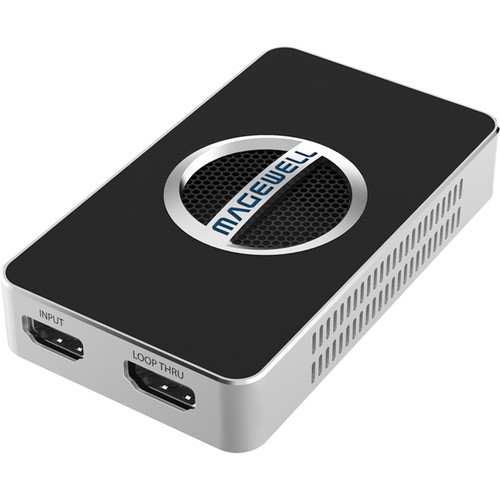
Magewell USB Capture HDMI 4K Plus
In Stock
SKU #
MA32090
Mfr #
32090
Manufacturer
Magewell
Description
The Magewell USB Capture HDMI 4K Plus connects to your computer over a USB interface and lets you capture up to a 4K DCI resolution signal (4096 x 2160) with embedded audio via an HDMI 2.0 input. It allows you to capture from cameras, game consoles, and various other devices directly to your Windows, Mac, Linux, or Chrome computer. It also features an HDMI loop-through for local monitoring, and 3.5mm audio input and output for capturing external audio and extracting embedded audio. The device also offers a variety of processing and other features, including resolution scaling and deinterlacing. It also has a status LED for displaying the status of the input, including idle, input signal locked, memory failed, or FPGA configuration.Key Features HDMI 2.0/1.4 input and loop-through, audio in/out, USB 3.0 computer interface Capture up to 4096 x 2160, 4:4:4, 60 fps Compatible with Windows, Mac, Linux, and Chrome OS Plug-and-play operation UVC protocol support Up/down scaling Deinterlacing Image control Various output color spaces Firmware upgradeable Multiple devices on one host Included USB Capture Utility V3 Capture format setting Audio volume control Mirror and flip EDID editing and importing Firmware update Export diagnose report Other functions, such as cropping, deinterlacing, and device name setting HDMI Specific Features 600 MHz HDMI receiver Adaptive HDMI equalizer Customized EDID Extraction of AVI/Audio/SPD/MS/VS/ACP/ISRC1/ISRC2/Gamut InfoFrames Full colorimetry support Up to 4096 x 2160 4:4:4 60 fps input signals 2 channel ISC60958 audio streams Extraction of audio formation information and channel status data Extraction of video timing information Extraction of 3D format information Side-by-side half, top-and-bottom, and frame packing 3D mode Analog Audio Features Extraction of stereo embedded HDMI audio for recording and output via 3.5mm stereo mini-jack Capture of analog audio via 3.5mm input jack (mic level) Playback audio via 3.5mm headphone jack Video Capture Formats Capture resolutions up to 4096 x 2160 Capture frame rates up to 120 fps (actual capture frame rate can be limited by USB bandwidth and internal working frequency; typical capture frame rates on the Intel USB 3.0 controller are as follows: 1920 x 1080 YUY2 at up to 90 fps, and 3840 x 2160 NV12 at up to 30 fps) NV12 and I420 4:2:0 8-bit (up to 4096 x 2160) YUY2 and UYVY 4:2:2 8-bit (up to 4096 x 2160) RGB24 and RGB32 4:4:4 8-bit (up to 2048 x 2160) Default capture formats are YUY2 and NV12; more capture formats can be set using the included USB Capture Utility software Video Processing Features Video processing pipelines with 640 megapixels processing bandwidth Cropping Scaling Frame rate conversion Vertical flip and mirror Video Deinterlacing Weave Blend top and bottom field Top field only Bottom field only Aspect Ratio Conversion Auto or manual selection of input aspect ratio Auto or manual selection of capture aspect ratio Three aspect ratio conversion modes: Ignore (Anamorphic), Cropping, or Padding (Letterbox or Pillarbox) Color Format Conversion Auto or manual selection of input color format and quantization range Auto or manual selection of capture color format, quantization range, and saturation range Support for RGB, YCbCr 601, and YCbCr 709 color formats Support for limited or full quantization range Support for limited, full, and extended gamut saturation range Multiple Devices On One Computer Connect multiple units to one system Set the device serial number as the device name shown in the system using the USB Capture Utility SDK USB Capture SDK provide functions including signal status extraction, capture configuration, etc.
Product Information
Availability:
In Stock