
- Products
-
Audio & Studio Equipment
See all
-
Cameras & Optics
See all
- Computers & Mobile Devices
- Drones & Aerial Imaging
-
Professional Video & AV
See all
- Security & Surveillance
- TVs & Entertainment
SubcategoriesSee all -
Audio & Studio Equipment
- About us
- Contact Us
- +1-888-219-0753
- Bulk Order

- Products
-
Audio & Studio Equipment
See all
-
Cameras & Optics
See all
- Computers & Mobile Devices
- Drones & Aerial Imaging
-
Professional Video & AV
See all
- Security & Surveillance
- TVs & Entertainment
SubcategoriesSee all -
Audio & Studio Equipment
- About us
- Contact Us
- +1-888-219-0753
- Bulk Order
HomeCatalogComputers & Mobile DevicesNotebook AccessoriesDocking StationsCalDigit E5 Element 5 Thunderbolt 5 Hub
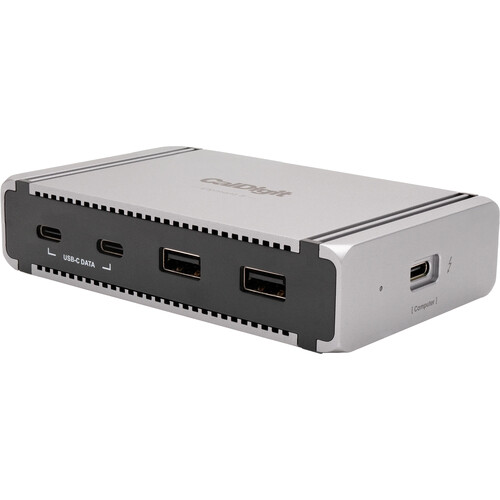
CalDigit E5 Element 5 Thunderbolt 5 Hub
In Stock
SKU #
CAE5T5H
Mfr #
501002
Manufacturer
CalDigit
Description
Let CalDigit streamline your workspace with the E5 Element 5 Thunderbolt 5 Hub. This hub connects to a Windows, macOS, iPadOS, or ChromeOS device using a Thunderbolt 5 cable and allows for up to three Thunderbolt 5 connections at once. This hub can positively impact your productivity by using the Thunderbolt 5 ports to easily create a dual or triple monitor setup. Moreover, the inclusion of three USB-A ports and USB-C ports that deliver data at speeds of 10 Gb/s means that you can include more higher powered devices to your workspace.Ultimate Compatibility This hub is backwards compatible with Thunderbolt 4, Thunderbolt 3, USB-C, and USB4.Made for You The Element Hub's four Thunderbolt 5 ports allow you to create the device you want. If you need to connect multiple SSDs, SD card readers, RAID storage, or Dual 4K monitors, there's no issue.Thunderbolt 5 The benefit of a Thunderbolt 5 hub is that you can connect many types of devices to it. The Element 5 Hub features 3 downstream Thunderbolt 5 ports that can connect to monitors, fast external storage, and more. The 15W performance of the downstream Thunderbolt 5 ports means you can charge and power devices much faster than USB hubs.Versatile USB Ports The versatility of having both USB-C and USB-A ports offers great convenience. All of the USB ports on the Element 5 Hub offer 10 Gb/s performance, and 7.5W of power. This is an ideal option for connecting high performance USB-C SSDs to the hub. Don't forget that you can also connect USB-C devices to the Thunderbolt 5 ports.Faster than Your Average Hub The Thunderbolt 5 ports on the Element 5 Hub provide up to 6200 MB/s performance for your external storage devices, which is double that of Thunderbolt 4, and much higher than typical USB hubs.3 Monitors on Windows Thunderbolt 5 allows for 3 external monitors to be connected to a Windows host computer that supports it. For macOS users, single and dual display is supported.Reversible Design The Element Hub is not only built from high quality aluminum, it also features a reversible design that allows you to utilize it on either the left or right hand side of your laptop. A quick glance at the build-in LED light allows you to instantly see if the Element Hub is in operation.Daisy Chain Thunderbolt and USB 4 laptop users can daisy-chain Thunderbolt, USB4, and USB-C devices to the Element Hub. Users on non-Thunderbolt and USB4 hosts, such as USB-C computers (USB 3.2, USB 3.1), are able to daisy-chain USB-C devices only. In order to daisy-chain Thunderbolt devices a Thunderbolt or USB4 connection is required.iPads, iPhones & Windows Tablets Not only is the Element 5 Hub compatible with laptops, it can be used with Thunderbolt or USB-C tablets and phones. This includes iPads and iPhones. You are no longer limited to connecting a single device to your table or phone's USB-C port. The Element 5 Hub will add up to 8 devices for next-level connectivity.90W: Enough Power to Fast Charge your Apple Devices Thanks to the included power supply which provides a sustained 90W of power delivery at all times to the host device, the Element 5 Hub is perfectly capable of providing reliable power to a plethora of demanding devices.Docking Station Utility CalDigit has created a macOS utility software that allows users to quickly and safely eject all of their storage devices with one click.A Powerful Offline Charging Station The Element 5 Hub can even work for you when it's not connected to your computer. Keep your USB-A or USB-C devices connected to the Element 5 Hub and it will continue to charge them. All 9 ports on the Element 5 Hub can be used at the same time for offline charging.Apple SuperDrive Many docks and hubs are not compatible with the Apple SuperDrive since it requires extra power from the connected USB port. In fact Apple recommends to connect it directly to a computer. CalDigit has solved this problem by creating a driver that will allow the SuperDrive to work through the Element 5 Hub.Compa
Product Information
Availability:
In Stock