
- Products
-
Audio & Studio Equipment
See all
-
Cameras & Optics
See all
- Computers & Mobile Devices
- Drones & Aerial Imaging
-
Professional Video & AV
See all
- Security & Surveillance
- TVs & Entertainment
SubcategoriesSee all -
Audio & Studio Equipment
- About us
- Contact Us
- +1-888-219-0753
- Bulk Order

- Products
-
Audio & Studio Equipment
See all
-
Cameras & Optics
See all
- Computers & Mobile Devices
- Drones & Aerial Imaging
-
Professional Video & AV
See all
- Security & Surveillance
- TVs & Entertainment
SubcategoriesSee all -
Audio & Studio Equipment
- About us
- Contact Us
- +1-888-219-0753
- Bulk Order
HomeCatalogProfessional Video & AVCommercial Monitors & DisplaysCommercial DisplaysLG 55TR3DQ-B CreateBoard 55" UHD 4K Touchscreen Commercial Monitor
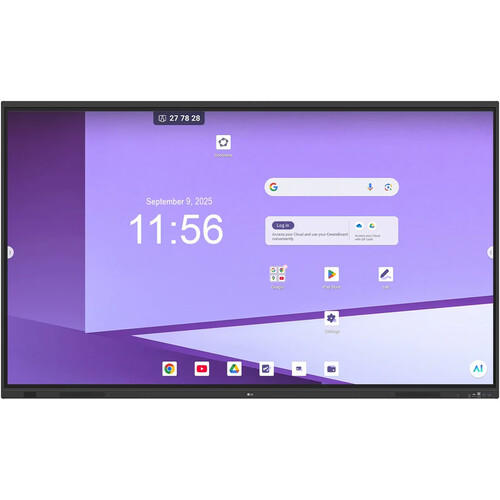
LG 55TR3DQ-B CreateBoard 55" UHD 4K Touchscreen Commercial Monitor
In Stock
SKU #
LG55TR3DQB
Mfr #
55TR3DQ-B
Manufacturer
LG
Description
The LG 55TR3DQ-B CreateBoard 55" UHD 4K Touchscreen Commercial Monitor is a 400-nit bright IPS LCD screen with 40-point IR touch and built-in microphone array made for collaborative learning spaces. This Google-certified multi-touch display provides smooth and natural writing interactions, a full suite of built-in software tools, and seamless integration with the Google ecosystem.Connect traditional sources via HDMI, VGA, and DisplayPort, or play and charge your laptop or tablet over a single cable with USB-C. Furthermore, an OPS slot allows you to mount a compatible module for all-in-one computing capability. Data and control functions are available via RS-232C, RJ-45 Gigabit Ethernet, and Wi-Fi 6 connectivity. Additionally, a variety of USB inputs support media and peripheral devices.Google Certification Seamlessly integrate the CreateBoard with your Google accounts for full access to the Google ecosystem. Users also have access to the Google Play store to download a wide range of applications.Precise Multi-Touch Functionality The LG CreateBoard can simultaneously detect up to 40 points of multi-touch input. This function offers a natural writing experience and makes collaboration easier. Whiteboard software is included with a variety of educational templates and teaching tools, such as a ruler, table, sticky notes, and more.Multi-Source Smart Viewing With the Smart Viewing feature, two or more sources can be displayed on the same screen simultaneously without having to Alt-tab, making teaching more convenient and efficient. Two materials can be displayed side-by-side (multi-window mode), or one material can be overlaid on the other one (picture-in-picture mode).Built-In OPS Slot LG CreateBoard supports OPS (Open Pluggable Specification) devices, allowing you to mount an OPS desktop easily and conveniently at the back of the LG CreateBoard. This offers you expanded functionality without the hassle of connecting to an external desktop.LG CreateBoard Software Suite With a full suite of built-in software, from classic whiteboarding tools to device management, lesson planning, and more, you will get use of your interactive flat panel as soon as you turn it on.CreateBoard Prep Interactive Learning Software enables you to manage the classroom, increase student engagement, and build lessons efficiently.LG CreateBoard Lab is a collaboration software that supports web apps and offers multi-OS support, allowing users to access it from various devices anytime and anywhere.LG CreateBoard Share enables users to show up to nine shared screens or a file on a screen in real-time when the LG CreateBoard Share app is installed on a device.Secure Functions Screen Lock: Teachers can lock the screen using the Screen Lock function and unlock it by entering a password. Users can set the Screen Lock in the Settings menu to protect the device from unidentified users.Secure Mode: LG CreateBoard supports Secure mode, which disables the LG CreateBoard Share function to prevent unauthorized content from being shown on various devices.USB Lock Mode: USB Lock mode is a security measure that helps prevent data from being copied to unauthorized devices, which is essential when being used in spaces where security is critical.Auto-Remove Files: Users can set LG CreateBoard to delete files regularly for enhanced security.Ready to Manage with LG ConnectedCare DMS Maintenance is easy and fast with the ConnectedCare service, available separately. This cloud service solution from LG remotely monitors, controls, and manages the status of displays in user workplaces. This feature enables IT managers to operate and manage important resources on operating devices without physically visiting sites.Additional Details Built-in microphone array with 8' pickup range2.1-channel sound with built-in dual 20-watt speakers and a subwooferUSB-C connectivity enables charging, video, audio, touch, and data transmission with just one cableHDMI out port allows content to be shared w
Product Information
Availability:
In Stock