
- Products
-
Audio & Studio Equipment
See all
-
Cameras & Optics
See all
- Computers & Mobile Devices
- Drones & Aerial Imaging
-
Professional Video & AV
See all
- Security & Surveillance
- TVs & Entertainment
SubcategoriesSee all -
Audio & Studio Equipment
- About us
- Contact Us
- +1-888-219-0753
- Bulk Order

- Products
-
Audio & Studio Equipment
See all
-
Cameras & Optics
See all
- Computers & Mobile Devices
- Drones & Aerial Imaging
-
Professional Video & AV
See all
- Security & Surveillance
- TVs & Entertainment
SubcategoriesSee all -
Audio & Studio Equipment
- About us
- Contact Us
- +1-888-219-0753
- Bulk Order
HomeCatalogAudio & Studio EquipmentStudio RecordingAll Analog Studio HardwareM-Live B.Beat PRO16 PLUS Audio/Video Playback Mixer and Audio Interface (1TB)
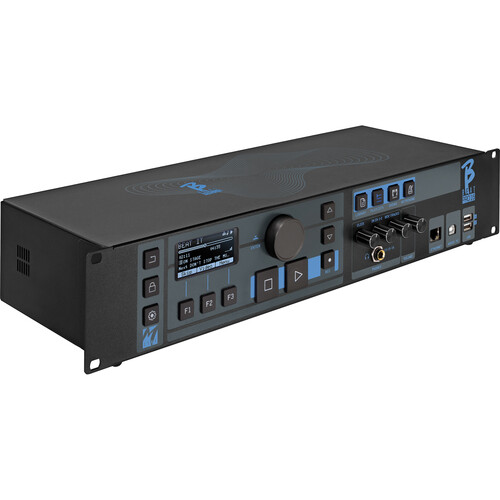
M-Live B.Beat PRO16 PLUS Audio/Video Playback Mixer and Audio Interface (1TB)
In Stock
SKU #
ML739002
Mfr #
739002
Manufacturer
M-Live
Description
Play backing tracks, synch video, engage in hands-on mixing, and create playlists or whole shows for killer performances with the M-Live B.Beat PRO16 PLUS, a portable media playback device for live performances. Compatible with a wide array of audio and video formats and sporting eight separate audio outputs with one HDMI output, you can set up complex shows and control them with ease.The B.Beat PRO16 PLUS can play back and mix up to 24 mono or 12 stereo audio tracks. The device can synchronize audio with video or photos, for transmission to video walls and projectors, and is compatible with many formats including MP3, MP4, WAV, MTA (multitrack audio), MIDI, MOV, and JPG files, just to name a few. Media can be stored on the internal 1TB memory, read directly from a USB flash stick, or streamed wireless via Wi-Fi. The twelve 1/4" TS inputs and sixteen 14" TRS outputs are provided on the B.Beat PRO16. You also get one headphone output, MIDI via 5-pin DIN, and an Ethernet port. The B.Beat PRO16 PLUS can recognize click tracks and manage metronome settings for seamless live performances. The B.Beat PRO16 PRO includes a power supply and Ethernet cable.Digital Mixer Mixer can handle up to 24 tracks12 1/4" inputs, 16 balanced 1/4" TRS outputsHeadphone output for click monitoringUse the 1/4" I/O as sends and returns for backing tracksFour dedicated control potentiometersSound Card Built In B.Beat PRO16 includes a real digital sound card for audio interface duties with 16 outs and 12 ins. The B.Beat PRO16 is compatible with Windows and iOS via downloadable drivers.This technology allows a digitally connected computer to channel the outputs of the various tracks of B.Beat PRO16 within a DAW environment. This function is very useful during sound check and in the rehearsal room, before transferring the backing tracks from the DAW directly to B.Beat.12-Channel Digital Recorder B.Beat PRO16 is a 12-channel digital recorder. Up to 12 recorded tracks can be automatically inserted into audio projects. In the PLUS version, recording can also take place while B.Beat PRO16 is playing a base. At the end of the recording, you can decide whether to insert the new tracks into the preexisting base.Reliable Onstage B.Beat PRO16 is designed to have maximum reliability during live executions. There is a special button on the Live panel that can be used the moment the show starts; from that moment, the processor of B.Beat will be committed to maximum performance without wasting resources. This minimizes the risk of an unintentional crash, and preserves the user from activating functions by mistake. B.Beat PRO16 has a Synch system to use it in conjunction with auto switch systems that prevent it from stopping in case of Crash.Two Video Outputs B.Beat PRO16 has two video outputs, allowing it to accommodate the common setup of using a video wall to accompany musical performances. You can display song lyrics as a cue card and can easily write and sychronize lyrics with the B.Beat Manager software.Sheet music can be uploaded as PDFs, and for each instrument onstage, you can have dedicated sheet music. The sheet music can be displayed on smart devices via Wi-Fi.Organizing Performances B.Beat PRO16 handles individual backing tracks that can be organized into convenient playlists or into actual shows consisting of multiple scenes of various types. Projects can contain music, videos, images, and MIDI tracks to send messages to the various devices that are used for live performances.The philosophy behind B.Beat is to simplify the management of backing tracks and videos during a show. With B.Beat there is no need to bring computers, tablets, sound or video cards, cables, and mixers to the stage.Preparing for The Show Create your backing tracks with your DAW and then transfer the music to your B.Beat via the B.Beat Manager app for Windows and Mac computers. With the Manager, you will assign outputs to the various tracks, and you can further refine your editing by adj
Product Information
Availability:
In Stock