
- Products
-
Audio & Studio Equipment
See all
-
Cameras & Optics
See all
- Computers & Mobile Devices
- Drones & Aerial Imaging
-
Professional Video & AV
See all
- Security & Surveillance
- TVs & Entertainment
SubcategoriesSee all -
Audio & Studio Equipment
- About us
- Contact Us
- +1-888-219-0753
- Bulk Order

- Products
-
Audio & Studio Equipment
See all
-
Cameras & Optics
See all
- Computers & Mobile Devices
- Drones & Aerial Imaging
-
Professional Video & AV
See all
- Security & Surveillance
- TVs & Entertainment
SubcategoriesSee all -
Audio & Studio Equipment
- About us
- Contact Us
- +1-888-219-0753
- Bulk Order
HomeCatalogCameras & OpticsVR & 360 Video360 Video CamerasRicoh THETA SC2 4K 360 Spherical Camera Business Edition
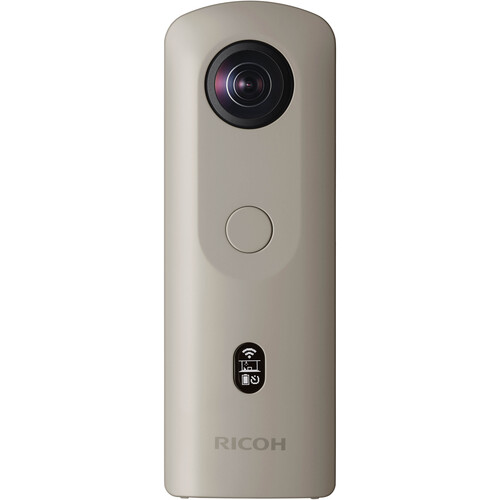
Ricoh THETA SC2 4K 360 Spherical Camera Business Edition
In Stock
SKU #
RITHETASC2B
Mfr #
910812
Manufacturer
Ricoh
Description
The Ricoh THETA SC2 Business Edition is the professional model of the THETA lineup designed for business use to capture indoor photography and footage in spherical 360 and in 4K. The THETA SC2 is simple to operate and compact enough to fit in your pocket. An exclusive ROOM preset mode is the default setting when the camera is powered on. Time-Shift shooting controls image capture so the photographer can remain unseen.None The Ricoh THETA SC2 Business Edition is the professional model of the THETA lineup designed for business use to capture indoor photography and footage in spherical 360 and in 4K. The THETA SC2 is simple to operate and compact enough to fit in your pocket. An exclusive ROOM preset mode is the default setting when the camera is powered on. Time-Shift shooting controls image capture so the photographer can remain unseen.High-Quality Video & Still Images The THETA SC2 is capable of recording 360 4K video using the same high-speed image sensors used by the advanced THETA V model. Easily shoot real estate properties and create virtual tours for prospective buyers. Accurately record worksites, check 360 images, and compare before and after photos. Capture still images up to 5376 x 2688 and stitch them together with ease. Up to 3-minute clips of 4K30 video and around 3000 photos can be captured at a time to the internal 14GB of memory.ROOM Mode Preset Best suited for indoor shooting, the ROOM mode employs HDR exposure and Time-Shift shooting for balanced exposure.Fast Lens Response Once the camera is powered on, start shooting in just 1.5 seconds thanks to the THETA SC2's fast lens response.Intuitive User Interface An OLED status display shows icons to indicate each setting mode, smartphone connections status, remaining battery, and other information. A self-timer button allows you to quickly get out of frame.High-Speed Image Data Transfer The THETA SC2 can be connected to a smartphone via Bluetooth. Smartphones can now be used for shooting with just a Bluetooth connection, and when the camera has entered the sleep state, it can be powered on from the basic app. With a wireless LAN connection, all functions can be used, including live view display and image transfer on a smartphone, which can be used separately as appropriate to the shooting circumstances.
Product Information
Availability:
In Stock