
- Products
-
Audio & Studio Equipment
See all
-
Cameras & Optics
See all
- Computers & Mobile Devices
- Drones & Aerial Imaging
-
Professional Video & AV
See all
- Security & Surveillance
- TVs & Entertainment
SubcategoriesSee all -
Audio & Studio Equipment
- About us
- Contact Us
- +1-888-219-0753
- Bulk Order

- Products
-
Audio & Studio Equipment
See all
-
Cameras & Optics
See all
- Computers & Mobile Devices
- Drones & Aerial Imaging
-
Professional Video & AV
See all
- Security & Surveillance
- TVs & Entertainment
SubcategoriesSee all -
Audio & Studio Equipment
- About us
- Contact Us
- +1-888-219-0753
- Bulk Order
HomeCatalogAudio & Studio EquipmentStudio RecordingAll Studio MonitoringSteinberg Nuendo 13 Music and Audio Postproduction Software (Upgrade from Nuendo 12 Download)
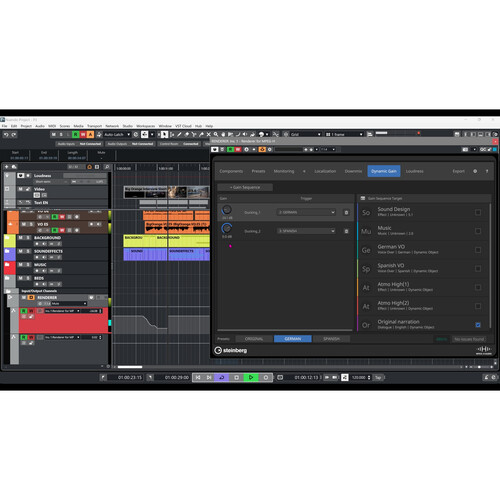
Steinberg Nuendo 13 Music and Audio Postproduction Software (Upgrade from Nuendo 12 Download)
In Stock
SKU #
ST91837
Mfr #
91837
Manufacturer
Steinberg
Description
Steinberg Nuendo 13 is music and audio postproduction workstation software designed to provide versatile workflows, task efficiency, and integration with industry-standard tools for composers, audio editors, sound designers, and mixers, in film, television, music, game audio, VR, postproduction, and immersive sound. In this latest update, Nuendo 13 introduces unique and time-saving features for dialog editors and mixing and recording engineers, new integrated workflows for authoring MPEG-H Audio content, innovative tools for dialog recording, Dolby Atmos improvements, additional plug-ins, and more than 20 extra workflow enhancements.For superior audio quality, Nuendo 13 utilizes a 64-bit audio engine compatible with resolutions up to 384 kHz. The software offers unlimited audio, instrument, and MIDI tracks, and can accommodate up to 256 physical I/O as well as 256 group channels. Nuendo 13 offers advanced mixing capabilities and a powerful film-mixing-style automation system. Over 100 professional effect and processor plug-ins are part of the package, including a convolution reverb with many impulse responses, a high-quality channel strip, and channel EQ. The convenient loudness track and loudness meter helps you keep control over your levels. Nuendo 13 is compatible with macOS and Windows systems and operates in VST2 and VST3 formats. (Only 64-bit plug-ins are supported. Nuendo does not support VST2 when running natively on Apple Silicon Macs).This upgrade is for registered users of Nuendo 12. Proof of ownership is required. What's New in Nuendo 13Dialog Recording ADR Script ReaderWith ADR Script Reader, Nuendo 13 moves away from cumbersome document-based workflows. It shows ADR takes via a web browser on any tablet or laptop on the same LAN network, letting the voice talent have a digital script and the ability for an editor or the session director to change it instantaneously.Dialog can be edited and notes added in Nuendo s marker data with no need for the inconvenience of syncing documents.A Dialog Context Preview displays the dialog lines before and after those selected, highlighting how the currently selected line is embedded in the scene.Dialog Editing TonalMatchTonalMatch is a new direct offline process (DOP), which analyses the sound characteristics of an audio recording and enables it to be transferred to other clips, matching the spectral profile (EQ) and ambient noise floor. It can be used to match an ADR session to the original production sound more quickly and precisely than has previously been achievable using EQs and/or other editing plug-ins.VoiceSeparatorVoiceSeparator is a new AI-based VST plug-in, which is trained to detect and isolate spoken dialog from complex background noises including other voices, and also reduce or remove undesired voice sounds from background and ambient recordings. Used as an insert effect or DOP, it can be used to quickly isolate the sounds that are wanted and remove those that aren t.VocalChain Plug-inDialog editing, processing, and creative voice sound design are arts of their own, needing a lot of expertise and experience to master. The new VocalChain plug-in includes dedicated modules for the different steps of voice processing, helping to deliver excellent results. With a wide range of presets exclusively for postproduction, VocalChain makes voice sound design faster and more efficient than ever.Detect Silence ExtensionsCleaning up dialog while keeping background noise for use on a different track is easier with the updated Detect Silence panel. Instead of only stripping silent parts, dialog content can now be split automatically, then events can be created for the silent and nonsilent areas. Dialog and silent events can then be edited individually, as required by the project.Bounce Empty SpaceBounce Selection now allows blank audio clips to be created from any selection, which can be useful for filling gaps or for later offline processing.Support for TTAL 1.1N
Product Information
Availability:
In Stock