
- Products
-
Audio & Studio Equipment
See all
-
Cameras & Optics
See all
- Computers & Mobile Devices
- Drones & Aerial Imaging
-
Professional Video & AV
See all
- Security & Surveillance
- TVs & Entertainment
SubcategoriesSee all -
Audio & Studio Equipment
- About us
- Contact Us
- +1-888-219-0753
- Bulk Order

- Products
-
Audio & Studio Equipment
See all
-
Cameras & Optics
See all
- Computers & Mobile Devices
- Drones & Aerial Imaging
-
Professional Video & AV
See all
- Security & Surveillance
- TVs & Entertainment
SubcategoriesSee all -
Audio & Studio Equipment
- About us
- Contact Us
- +1-888-219-0753
- Bulk Order
HomeCatalogProfessional Video & AVCommercial Monitors & DisplaysAll Commercial MonitorsLG 98TR3DK-B CreateBoard 98" UHD 4K Touchscreen Commercial Monitor
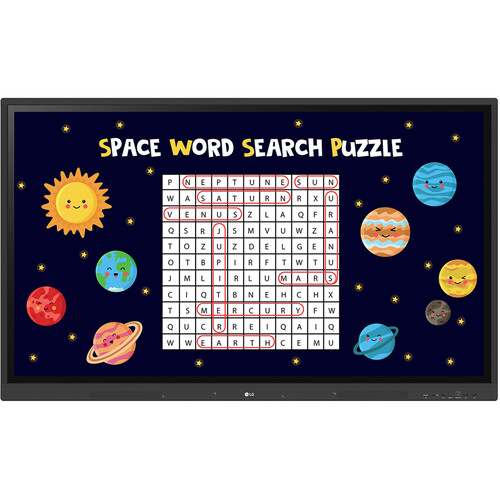
LG 98TR3DK-B CreateBoard 98" UHD 4K Touchscreen Commercial Monitor
In Stock
SKU #
LG98TR3DKBSQ
Mfr #
98TR3DK-B
Manufacturer
LG
Description
The LG 98TR3DK-B CreateBoard 98" UHD 4K Touchscreen Commercial Monitor is a 390-nit bright, interactive IPS LCD with up to 40 points of IR multi-touch input made for collaborative learning environments. Connect sources via HDMI, VGA plus 3.5mm audio, USB-C, and OPS inputs. Data and control functions are available via RS-232C, RJ45 Gigabit Ethernet, and Wi-Fi connectivity. Additionally, a variety of USB inputs support media and peripheral devices as well as touch control.None The LG 98TR3DK-B CreateBoard 98" UHD 4K Touchscreen Commercial Monitor is a 390-nit bright, interactive IPS LCD with up to 40 points of IR multi-touch input made for collaborative learning environments. Connect sources via HDMI, VGA plus 3.5mm audio, USB-C, and OPS inputs. Data and control functions are available via RS-232C, RJ45 Gigabit Ethernet, and Wi-Fi connectivity. Additionally, a variety of USB inputs support media and peripheral devices as well as touch control.Precise Multi-Touch Functionality The LG CreateBoard can simultaneously detect up to 40 points of multi-touch input. This function offers a natural writing experience and makes collaboration easier. Whiteboarding software is included with a variety of educational templates and teaching tools, such as a ruler, table, sticky notes, and more.Android 13 with Google Play The LG CreateBoard TR3DK Gen 2 with Google Play is authorized for Google Mobile Services and powered with Android 13. You have official access to the Google Play Store out of the box. A local installation for your apps means you do not need to plug in a laptop or use your browser to get started working. Use Google for Education tools like Docs, Sheets, and Slides with a simple sign-on. Remain secure with Google Play Protect Service always on the lookout for suspicious behavior. Android 13 lets you customize your apps by color, theme, and language.Wireless Screen Share LG CreateBoard Share enables users to show up to nine shared screens or a file on a screen in real time when the LG CreateBoard Share app is installed on the device. Additionally, files from the host can be easily sent to any devices connected to the LG CreateBoard Share app.Ready to Manage with LG ConnectedCare DMS Maintenance is easy and fast with the ConnectedCare service, available separately. This cloud service solution from LG remotely monitors, controls, and manages the status of displays in user workplaces. This feature enables IT managers to operate and manage important resources on operating devices without physically visiting sites. ConnectedCare DMS now supports Common Alerting Protocol-based security systems.None Frequently used controls, such as the power on/off, scheduling, brightness, and screen lock functions, can be applied using a remote control. Content, including images, videos, audio messages, or live streaming, can be remotely shared with connected devices. Additionally, broadcast messages like announcements, event updates, and bus schedules can be sent to the CreateBoard. When the message is sent out to the device, LG CreateBoard interrupts the current display and shares the message.Bluetooth Connectivity This display supports Bluetooth to connect wirelessly to various devices such as speakers, a mouse, a keyboard, and more. Construct a hybrid environment so that online and offline meetings and classes can proceed with ease.Built-In OPS Slot LG CreateBoard supports OPS (Open Pluggable Specification) devices, allowing you to easily and conveniently mount an OPS desktop at the back of the LG CreateBoard. This offers you more expanded functions without the hassle of connecting to an external desktop.Multi-Source Smart Viewing With the Smart Viewing feature, two or more sources can be displayed on the same screen simultaneously without having to repeat Alt-tab, making teaching more convenient and efficient. Two materials can be displayed side by side (multi-window mode), or one material can be overlaid on the other one (picture-in-picture mode).
Product Information
Availability:
In Stock