
- Products
-
Audio & Studio Equipment
See all
-
Cameras & Optics
See all
- Computers & Mobile Devices
- Drones & Aerial Imaging
-
Professional Video & AV
See all
- Security & Surveillance
- TVs & Entertainment
SubcategoriesSee all -
Audio & Studio Equipment
- About us
- Contact Us
- +1-888-219-0753
- Bulk Order

- Products
-
Audio & Studio Equipment
See all
-
Cameras & Optics
See all
- Computers & Mobile Devices
- Drones & Aerial Imaging
-
Professional Video & AV
See all
- Security & Surveillance
- TVs & Entertainment
SubcategoriesSee all -
Audio & Studio Equipment
- About us
- Contact Us
- +1-888-219-0753
- Bulk Order
HomeCatalogProfessional Video & AVSignal Processing & DistributionSignal ConvertersAVPro Edge MXNet 1G Evolution II Dante Decoder
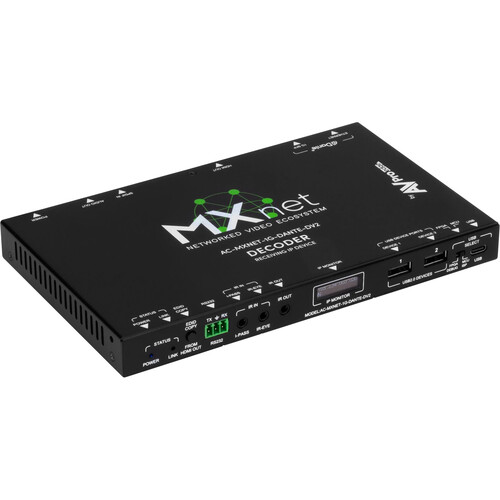
AVPro Edge MXNet 1G Evolution II Dante Decoder
In Stock
SKU #
AVMX1GDDV2
Mfr #
AC-MXNET-1G-DANTE-DV2
Manufacturer
AVPro Edge
Description
The MXNet 1G Evolution II Dante Decoder from AVPro Edge is a versatile decoder boasting native DCI 4K60 video and Dante audio support. Ethernet, SFP, and HDMI connectivity provides a broad range of support for a variety of signals, including DVI 1.0 and HDMI 2.0b. The decoded signal handles HDR10+ and Dolby Vision with 8-, 10-, and 12-bit color depth and full chroma subsampling from RGB to 4:4:4. All immersive 3D audio formats, including high-bitrate multichannel audio, are supported, and video processing is based on modified M-JPEG algorithms, minimizing bitrate errors while employing ample signal headroom and optimized compression for visually lossless imaging that is free of artifacts. The unit is compatible with HDCP 2.2 copy protection.Proprietary Motion JPEG-Based CODEC The MXnet Evolution II incorporates a proprietary video algorithm that carefully optimizes compression rates per multicast packet size. Genlock is supported, syncing a video source by frame rate to decoders comprising a video wall for a simul-sync, tear-free appearance.Native DCI 4K60 Support Supports video resolutions up to DCI 4K60 fps, 4:4:4, RGB/YCbCr, 8-, 10-, and 12-bit natively or with dynamic metadata. A proprietary, advanced M-JPEG algorithm applies limited, ultralight compression to signals exceeding the lossless threshold. When decoded, the result is an artifact-free image, including Dolby Vision and HDR10+ content.High-Bitrate Multichannel Audio Support 3D immersive audio codecs, including Dolby Atmos and DTS:X for IMAX Enhanced, are supported via the HDMI input.USB & KVM Support The unit features a USB-B 2.0 female host connection, enabling MXNet Mentor software to configure easy routing for bidirectional USB signals from a designated host encoder to a downstream decoder with a connected USB device. USB video downstream processing has been improved and supports resolutions up to 1080p30.External Device Light Control Light emission may be controlled via MXNet Mentor. Any status light, including network link LEDs and the OLED Data Window, may be optionally disabled to prevent unwanted distractions, enabling discreet placement where desired. Device lights may also be continuously flashed for high visibility when troubleshooting.
Product Information
Availability:
In Stock