
- Products
-
Audio & Studio Equipment
See all
-
Cameras & Optics
See all
- Computers & Mobile Devices
- Drones & Aerial Imaging
-
Professional Video & AV
See all
- Security & Surveillance
- TVs & Entertainment
SubcategoriesSee all -
Audio & Studio Equipment
- About us
- Contact Us
- +1-888-219-0753
- Bulk Order

- Products
-
Audio & Studio Equipment
See all
-
Cameras & Optics
See all
- Computers & Mobile Devices
- Drones & Aerial Imaging
-
Professional Video & AV
See all
- Security & Surveillance
- TVs & Entertainment
SubcategoriesSee all -
Audio & Studio Equipment
- About us
- Contact Us
- +1-888-219-0753
- Bulk Order
HomeCatalogProfessional Video & AVSignal Processing & DistributionSignal ConvertersAVPro Edge MXNet 1G Dante Encoder/Transmitter
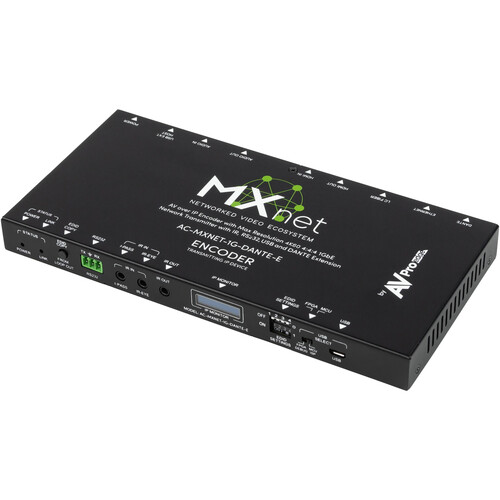
AVPro Edge MXNet 1G Dante Encoder/Transmitter
In Stock
SKU #
AVMXNET1GDNE
Mfr #
AC-MXNET-1G-DANTE-E
Manufacturer
AVPro Edge
Description
Add the MXNet 1G Dante Encoder/Transmitter Device from AVPro Edge to your network to send IP video for video walls, digital signage, or high-resolution monitoring. This Dante audio-compatible encoder inputs up to 4K60 4:4:4 video from the MXNet switch or a multicast-capable L3 switch over Gigabit Ethernet, and outputs HDMI video up to 4K60. The transmitter encodes and transmits it with near-zero latency with a maximum 1 Gb/s data rate, outputting visually lossless video and audio.Video/Audio Encoding This version of AVPro Edge's MXNet 1G Encoder/Transmitter features support for Dante audio processing. It takes advantage of a Dante Ultimo chipset for near-zero latency delivery of voice and music signals.JPEG 2000 is the essential video encoding choice when picture quality is critical. JPEG 2000 supports progressive decoding and delivers both lossy and lossless compression within a code stream and it supports genlock, so that the frames of a video source are synced to all decoders, resulting in tear-free video walls. It also enables the handling of color-space information, 10-bit color, and interactivity in networked applications.Data Displays The Data Window displays the IP address and the MAC address, or you can modify the name, using MXNet Mentor to display custom names such as LG-OLED-TV, WEST-BAR-12, TW-PROJ-3, etc. You have up to 12 characters available to use for your custom name. When you install an encoder in a discreet location, you have the option to turn off all the lights on the device, including network link lights and the Data Window OLED light. This way, the end-user will never even know it's there.USB and KVM Support Both RS-232 and IR signals can be directly routed from the AC-MXNET-1G-E encoder. When you route these signals through a network switch, you can specify which decoder to send these control signals. Each encoder unit has two USB ports, and you may also connect a USB hub if needed to expand the number of USB ports. Connect and route any USB signals back to the encoder host and use the MXNet Mentor software to specify to that host.
Product Information
Availability:
In Stock