
- Products
-
Audio & Studio Equipment
See all
-
Cameras & Optics
See all
- Computers & Mobile Devices
- Drones & Aerial Imaging
-
Professional Video & AV
See all
- Security & Surveillance
- TVs & Entertainment
SubcategoriesSee all -
Audio & Studio Equipment
- About us
- Contact Us
- +1-888-219-0753
- Bulk Order

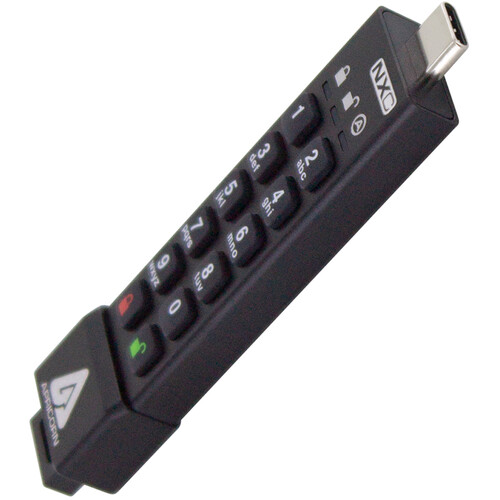
Apricorn 4GB Aegis Secure Key 3NXC Encrypted USB Type-C Flash Drive
In Stock
SKU #
APASK3NXC4GB
Mfr #
ASK3-NXC-4GB
Manufacturer
Apricorn
Description
Keep data safe with the 4GB Aegis Secure Key 3NXC Encrypted USB Type-C Flash Drive from Apricorn. Designed for use in data-sensitive environments, this USB 3.2 Gen 1 Type-C encrypted flash drive uses the same cryptography standard as the federal government. Using hardware-based encryption, this flash drive incorporates brute force defenses, as well as an unattended auto lock feature and a self-destruct PIN. Featuring separate user and admin roles and two read-only modes, this drive is easy to deploy thanks to setup software, programmable PIN lengths, and a drive reset feature.Built to handle adverse conditions, the Aegis Secure Key is IP68 dust and water resistant, while the extruded aluminum body is crush resistant. Furthermore, the tamper-evident design prevents the drive from being physically compromised. An internal battery allows users to enter their PIN on the wear-resistant keypad before plugging it in, at which point the drive automatically switches over to bus power. This device is compatible with Windows, Mac, Linux, Android, Symbian, and any powered USB OS with a storage file system.Tough Protection Software-free, this drive features 100% hardware-based 256-bit AES XTS encryption, onboard keypad PIN authentication, and high-speed USB 3.2 Gen 1 data transfer speeds. All data is encrypted on the fly and the device's PINs and data remain encrypted while the drive is at rest. Cross-platform compatible and OS agnostic, the Aegis Secure Key is compatible with Windows, Linux, Mac, Android, Chrome, embedded systems, and equipment possessing a powered USB port and storage file system. All internal components are protected from physical tampering with a layer of hardened epoxy, and locked-down firmware brings immunity to malware attacks such as BadUSB.Aegis Configurator Compatible This Windows-based app allows for the quick setup of multiple devices at once. Create custom profiles and mass-configure multiple devices in a matter of seconds.Separate Admin and User Modes The Aegis Secure Key supports independent Admin and User PINs. The Admin mode controls the universal programmable settings of the device and can only be accessed with the Admin PIN. The User mode is limited to basic external drive functions like read /write, unlock / lock, etc. The data on the drive can also be accessed with the Admin PIN in the User mode.Polymer-Coated, Wear-Resistant Keypad Unlocked by entering a PIN on the keypad, this drive does not rely on the host computer's keyboard. Until the device is unlocked via its keypad, it remains invisible to the host. The embedded keypad circumvents hardware- and software-based key-logging attempts to capture passwords by excluding the host system from the authentication process. Polymer-coated buttons are wear-resistant and designed to not reveal commonly used buttons.Admin Forced Enrollment Out of the box, there are no factory pre-set default PINs. In order to set up and use the drive, a unique PIN must first be established by the Admin, from within the Admin mode.User Forced Enrollment Once a device is configured by the Admin, it can then be deployed in a state in which the User must first establish his or her own User PIN before the drive can be accessed or used.Data Recovery PINs In the event that a User PIN is forgotten, Recovery PINs can be programmed into the device to permit access to the drive's data by creating a new state of User Forced Enrollment while the Admin PIN and the drive's data remain intact. Once a replacement User PIN is generated, access to the drive and its contents is restored to the user.Two Read-Only Modes These modes can be employed in situations that require the drive's contents to be kept intact and unaltered for later examination. A universal read-only mode is set by the admin from within the admin mode and can't be modified or disabled by anyone but the admin, while a second read-only mode can be set and disabled by a user but can also be enabled or disabled by the admin as well
Product Information
Country of Origin:
TW
Availability:
In Stock
Unit of Measure:
EA