
- Products
-
Audio & Studio Equipment
See all
-
Cameras & Optics
See all
- Computers & Mobile Devices
- Drones & Aerial Imaging
-
Professional Video & AV
See all
- Security & Surveillance
- TVs & Entertainment
SubcategoriesSee all -
Audio & Studio Equipment
- About us
- Contact Us
- +1-888-219-0753
- Bulk Order

- Products
-
Audio & Studio Equipment
See all
-
Cameras & Optics
See all
- Computers & Mobile Devices
- Drones & Aerial Imaging
-
Professional Video & AV
See all
- Security & Surveillance
- TVs & Entertainment
SubcategoriesSee all -
Audio & Studio Equipment
- About us
- Contact Us
- +1-888-219-0753
- Bulk Order
HomeCatalogProfessional Video & AVMultimedia Projector AccessoriesWireless Presentation ComponentsAirtame 3 + Core Wireless Screen Sharing Device
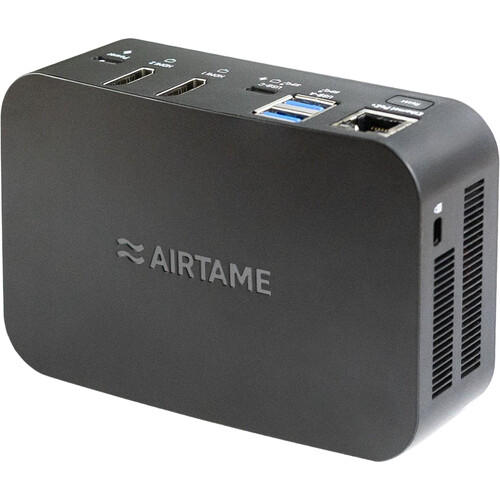
Airtame 3 + Core Wireless Screen Sharing Device
In Stock
SKU #
AIA3CORE3Y
Mfr #
AT-DG3-CORE-3Y
Manufacturer
Airtame
Description
Turn your meeting room display into a comprehensive communication tool with the Airtame 3 + Core Wireless Screen Sharing Device. The Core version of this device allows for screen sharing and digital signage functions. Wi-Fi 6 and Bluetooth 5.3 wireless technology let you connect devices of your choice to your office display. Two HDMI ports, two USB-A ports, and one USB-C port ensure wide compatibility with various displays, cameras, microphones, and other preexisting devices in your space. Power is delivered to the Airtame 3 via USB-C or PoE.None Turn your meeting room display into a comprehensive communication tool with the Airtame 3 + Core Wireless Screen Sharing Device. The Core version of this device allows for screen sharing and digital signage functions. Wi-Fi 6 and Bluetooth 5.3 wireless technology let you connect devices of your choice to your office display. Two HDMI ports, two USB-A ports, and one USB-C port ensure wide compatibility with various displays, cameras, microphones, and other preexisting devices in your space. Power is delivered to the Airtame 3 via USB-C or PoE.Dual-Screen Support A single Airtame 3 device can support two displays at once. Show the same content on both or split the view during video calls with one screen for participants and the other screen for shared content.Screen Sharing Screen share to your HDMI display from any laptop, tablet, or phone. Share your browser tab, window, or whole screen without requiring an additional app. The Airtame 3 supports native Miracast, AirPlay, and Google Cast protocols, as well as both video and audio sharing.Digital Signage Create a playlist of third-party content for your display. Integrate Google Slides, PowerPoint, Canva, and other platforms. Customize the home screen with room status and instructions for connecting. Schedule content to appear at certain times. The Airtame 3 also supports vertical aspect ratios.Remote Management Access Airtame 3 screens from anywhere for effortless control. Schedule power management and automatic firmware updates. Troubleshoot signage using the live view function. Organize multiple Airtame 3 devices into groups. Receive alerts when devices go offline.Emergency Alerts Emergency alerts interrupt screen sharing and video calls. They are supported with APIs for easy integration with CAP and custom setups. The device already works with Raptop, CrisisGo, InformaCast, Omnilert, and other platforms. Show custom "all clear" messages once the emergency is over. Trigger alerts via Airtame Cloud.Bluetooth Setup & Zero-Touch Deployment Get the Airtame 3 online by sending Wi-Fi credentials from the Airtame Cloud to your device via Bluetooth 5.3 technology. IT can pre-claim your Airtam2 and name it remotely, so once they're plugged in, it's quick to finish setting up.
Product Information
Availability:
In Stock