
- Products
-
Audio & Studio Equipment
See all
-
Cameras & Optics
See all
- Computers & Mobile Devices
- Drones & Aerial Imaging
-
Professional Video & AV
See all
- Security & Surveillance
- TVs & Entertainment
SubcategoriesSee all -
Audio & Studio Equipment
- About us
- Contact Us
- +1-888-219-0753
- Bulk Order

- Products
-
Audio & Studio Equipment
See all
-
Cameras & Optics
See all
- Computers & Mobile Devices
- Drones & Aerial Imaging
-
Professional Video & AV
See all
- Security & Surveillance
- TVs & Entertainment
SubcategoriesSee all -
Audio & Studio Equipment
- About us
- Contact Us
- +1-888-219-0753
- Bulk Order
HomeCatalogComputers & Mobile DevicesComputer PeripheralsKVMTripp Lite B006-DP2UA2 2-Port DisplayPort KVM Switch
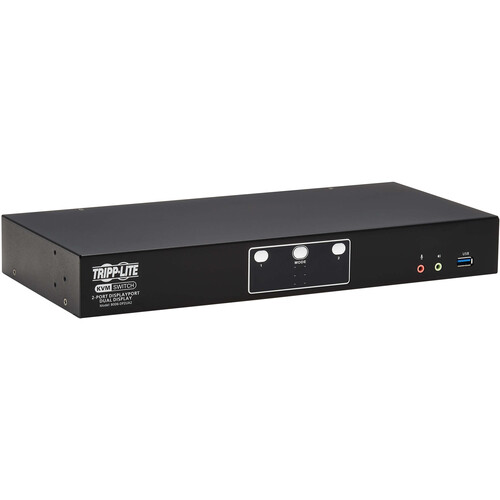
Tripp Lite B006-DP2UA2 2-Port DisplayPort KVM Switch
In Stock
SKU #
TRB006DP2UA2
Mfr #
B006-DP2UA2
Manufacturer
Tripp Lite
Description
Switch control between multiple computers with ease using the Tripp Lite B006-DP2UA2 2-Port DisplayPort KVM Switch. This KVM switch supports up to two computers, which may be controlled a single mouse and keyboard set connected to the console ports. Dual DisplayPort 1.2 ports allow you to connect two UHD 4K 3840 x 2160 resolution, 60 Hz monitors for extended viewing and efficient multitasking.Use the front panel push buttons, keyboard hotkeys, or mouse movements to easily switch between computers. In addition to mice and keyboards, the USB 3.2 Gen 1 ports support up to 5 Gb/s compatible storage drives and other peripherals. Use the 3.5mm audio jacks to connect headphones, microphones, and speakers. There is also a RJ45 Ethernet port that provides stable wired connections to compatible networks. The Daisy Chain Control (DCC) port lets you connect two B006-DP2UA2 KVM switches for a quad-display setup. This KVM Switch works with Windows, Mac, and Linux devices.Two Computer, Dual 4K Display Support This dual-monitor KVM switch lets you access, control, boot and reboot two computers or other devices with DisplayPort connectors and switch back and forth between them. It's ideal for work-from-home applications in which you'd like to share two monitors between your home and work computers. Both computers share two DisplayPort 4K monitors and one USB keyboard and mouse set, which saves space on your desk or workspaceCrystal-Clear 4K Video with Digital Audio The B006-DP2UA2 supports video resolutions up to two 4K UHD, 3840 x 2160 resolution at 60 Hz and 4K DCI 4096 x 2160 at 60 Hz DisplayPort monitors, as well as 2.1-channel surround sound for music, movies and games. Independent audio switching lets you listen to music or a podcast on one computer, while simultaneously working on a second computer. Front-panel audio jacks have priority over the rear-panel jacks. A DCC (Daisy Chain Control) port lets you connect two B006-DP2UA2 KVM switches for a quad-display installation.USB Hub Two USB 3.2 Gen 1 hub ports allow you to share USB peripherals, such as printers, hard drives, scanners, webcams and flash drives, between all connected computers.Fast and Easy Switching Use the front-panel push buttons, hotkey commands, or mouse movement commands for quick and easy toggling between computers. You can also use the Auto Scan feature to scan all connected computers in five-second intervals automatically. LEDs indicate which computer is currently selected.
Product Information
Availability:
In Stock