
- Products
-
Audio & Studio Equipment
See all
-
Cameras & Optics
See all
- Computers & Mobile Devices
- Drones & Aerial Imaging
-
Professional Video & AV
See all
- Security & Surveillance
- TVs & Entertainment
SubcategoriesSee all -
Audio & Studio Equipment
- About us
- Contact Us
- +1-888-219-0753
- Bulk Order

- Products
-
Audio & Studio Equipment
See all
-
Cameras & Optics
See all
- Computers & Mobile Devices
- Drones & Aerial Imaging
-
Professional Video & AV
See all
- Security & Surveillance
- TVs & Entertainment
SubcategoriesSee all -
Audio & Studio Equipment
- About us
- Contact Us
- +1-888-219-0753
- Bulk Order
HomeCatalogComputers & Mobile DevicesComputer ComponentsDesktop ComponentsGigabyte B550I AORUS PRO AX Wi-Fi AM4 Mini-ITX Motherboard
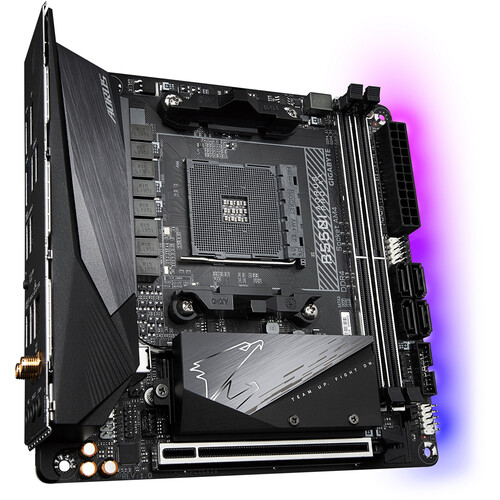
Gigabyte B550I AORUS PRO AX Wi-Fi AM4 Mini-ITX Motherboard
In Stock
SKU #
GIB550IAPAX
Mfr #
B550I AORUS PRO AX
Manufacturer
Gigabyte
Description
With an advanced thermal design with a fins-array heatsink and a direct touch heatpipe, the Gigabyte B550I AORUS PRO AX Wi-Fi AM4 Mini-ITX Motherboard is designed around the AMD B550 chipset, supporting 3rd Gen AMD Ryzen processors with an AM4 socket. Connect to the internet wirelessly with Wi-Fi 6 (802.11ax). You can also connect compatible peripherals and accessories wirelessly with Bluetooth 5.0. It has two memory slots, supporting up to 64GB of dual-channel RAM, which can run at up to 5300 MHz (O.C.). This motherboard features a mini-ITX form factor, which fits in smaller tower cases. Other integrated features include Realtek 2.5GbE Ethernet, Realtek 7.1-channel audio support, RGB Fusion 2.0 support, and Gigabyte Q-Flash Plus.PCIe 4.0 Bandwidth This motherboard pairs third-generation AMD Ryzen processors with high PCIe 4.0 memory bandwidth through the B550 chipset for maximum performance.Dual NVMe PCIe 4.0/3.0 M.2 Connectors With NVMe PCIe 4.0/3.0 x4 and PCIe 3.0 x4 M.2 connectors, this motherboard allows you to experience NVMe mode or SATA mode connectivity. Delivering up to 64 Gb/s data transfer speed, the dual M.2 connectors support RAID 0/1/10 modes.Realtek LAN Realtek LAN provides high performance for gamers and features automatic bandwidth allocation to ensure highest network priority.Smart Fan 5 Smart Fan 5 keeps your system cool, allowing you to interchange the fan headers to reflect different thermal sensors at different locations on the motherboard. Smart Fan 5 supports both PWM and Voltage mode fans, making this motherboard more liquid-cooling friendly.RGB Fusion 2.0 RGB Fusion 2.0 gives you full control of onboard RGB and external RGB devices and lights. Already feature filled with customizable colors and patterns, RGB Fusion 2.0 also has addressable LED support.Q-Flash Plus Update the BIOS easily without installing the CPU, memory, and graphics card with Gigabyte Q-FLASH PLUS. You don't have to install components or enter the BIOS menu to flash the BIOS. Just download and save a new BIOS file on the USB flash drive, then press the dedicated Q-FLASH PLUS button.
Product Information
Availability:
In Stock