
- Products
-
Audio & Studio Equipment
See all
-
Cameras & Optics
See all
- Computers & Mobile Devices
- Drones & Aerial Imaging
-
Professional Video & AV
See all
- Security & Surveillance
- TVs & Entertainment
SubcategoriesSee all -
Audio & Studio Equipment
- About us
- Contact Us
- +1-888-219-0753
- Bulk Order

- Products
-
Audio & Studio Equipment
See all
-
Cameras & Optics
See all
- Computers & Mobile Devices
- Drones & Aerial Imaging
-
Professional Video & AV
See all
- Security & Surveillance
- TVs & Entertainment
SubcategoriesSee all -
Audio & Studio Equipment
- About us
- Contact Us
- +1-888-219-0753
- Bulk Order
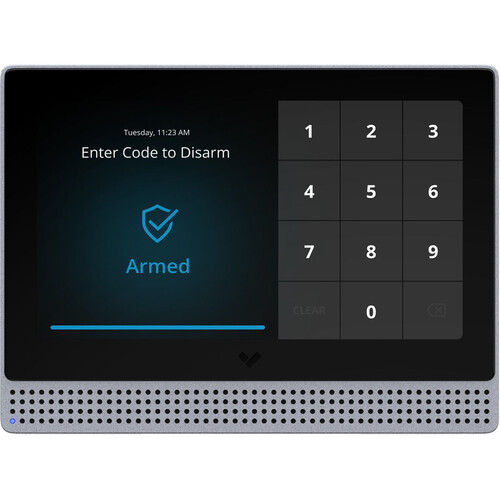
Verkada Alarm Keypad
In Stock
SKU #
VEBK11HW
Mfr #
BK11-HW
Manufacturer
Verkada
Description
Control alarms and monitor camera feeds with the Verkada Alarm Keypad. This device features a 7" multi-touch display that shows your security camera feeds and accepts situational keypad inputs; use keypad entry to arm and disarm alarms, enter a duress code, or hit a panic button, depending on the circumstances. Communicate across your facility with the integrated speaker and microphones. Users have the option to use their facility's existing alarm wiring rather than installing new cables. Stay connected in the event of an internet outage when you add the Verkada Cellular Backup Module, available separately.Arm & Disarm Keypad Touchscreen keypad to arm and disarm a site A duress code can be entered to silently raise an alarm while disarming the system View Live Camera Feeds & Device Status Employees can view live camera feeds from around the property for added security and visibility See the status of every alarm device in the building to easily find if an active device is preventing the system from being armed Panic Button Easily accessible panic button for emergency situations Connect via Existing Alarm Wiring Choose whether to use RS-485 to connect keypads to the BP41 Alarm Panel using existing alarm wiring, rather than installing new cables Optional Cellular Backup Compatible with the ACC-CEL-LTE Cellular Backup Module in case of internet outage, available separately
Product Information
Availability:
In Stock