
- Products
-
Audio & Studio Equipment
See all
-
Cameras & Optics
See all
- Computers & Mobile Devices
- Drones & Aerial Imaging
-
Professional Video & AV
See all
- Security & Surveillance
- TVs & Entertainment
SubcategoriesSee all -
Audio & Studio Equipment
- About us
- Contact Us
- +1-888-219-0753
- Bulk Order

- Products
-
Audio & Studio Equipment
See all
-
Cameras & Optics
See all
- Computers & Mobile Devices
- Drones & Aerial Imaging
-
Professional Video & AV
See all
- Security & Surveillance
- TVs & Entertainment
SubcategoriesSee all -
Audio & Studio Equipment
- About us
- Contact Us
- +1-888-219-0753
- Bulk Order
HomeCatalogComputers & Mobile DevicesComputer PeripheralsKVMATEN CE775 Dual View KVM Extender with Deskew
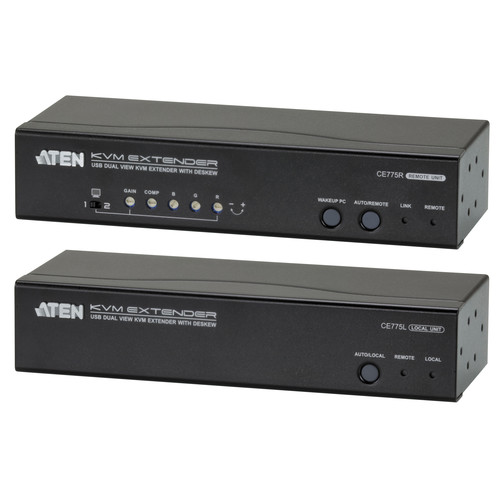
ATEN CE775 Dual View KVM Extender with Deskew
In Stock
SKU #
ATCE775
Mfr #
CE775
Manufacturer
ATEN
Description
The CE775 Dual View KVM Extender from Aten with Deskew allows access to a computer system from a remote dual view console up to 1000' away. The dual view function provides support for two displays, allowing the video output to seamlessly display on two monitors. Its advanced computer wake-up feature allows you to push a button from the remote dual view console to wake a computer at the local site via RS-232, without going to the local site. You can use the built-in front panel tuners to adjust the picture quality, and you can automatically synchronize the time delay of RGB signals in order to compensate for distance.None Dual view support - connect two screens to transmit two video output signals to a remote site up to 1000' away using Cat 5e/6 cablesNone Dual console operation - control your system from both the local and remote USB keyboard, monitor, and mouse consolesNone Deskew function - automatically synchronizes the time delay of RGB signals to compensate for distanceNone Computer wakeup support - from the remote console, simply push a button to wake a computer at the local site via RS-232None 1920 x 1200 @ 60Hz (500'), 1280 x 1024 @ 60Hz (1000')None Gain / compensation control - adjusts signal strength in order to compensate for distanceNone On screen display - conveniently adjust video quality with the intuitive OSD menu systemNone RS-232 channel - allows you to connect to a serial terminal, or serial devices such as touchscreens and barcode scannersNone Built-in 8KV/15KV ESD protection (contact voltage 8KV; air voltage 15KV)None Sun/Mac keyboard support and emulation Note: Windows keyboard combinations emulate Sun/Mac keyboards. Sun/Mac keyboards only work with their own computersNone Supports widescreen formats Note: The EDID data for a widescreen is sent from the local video output port. For widescreen modes and displays connect the monitor to the local video output port or use an optional EDID emulator.
Product Information
Country of Origin:
TW
Availability:
In Stock
Unit of Measure:
EA