
- Products
-
Audio & Studio Equipment
See all
-
Cameras & Optics
See all
- Computers & Mobile Devices
- Drones & Aerial Imaging
-
Professional Video & AV
See all
- Security & Surveillance
- TVs & Entertainment
SubcategoriesSee all -
Audio & Studio Equipment
- About us
- Contact Us
- +1-888-219-0753
- Bulk Order

- Products
-
Audio & Studio Equipment
See all
-
Cameras & Optics
See all
- Computers & Mobile Devices
- Drones & Aerial Imaging
-
Professional Video & AV
See all
- Security & Surveillance
- TVs & Entertainment
SubcategoriesSee all -
Audio & Studio Equipment
- About us
- Contact Us
- +1-888-219-0753
- Bulk Order
HomeCatalogAudio & Studio EquipmentLighting ControllersLighting Consoles & ControllersJands Stage CL Lighting Console (512 Channels Edison Plug)
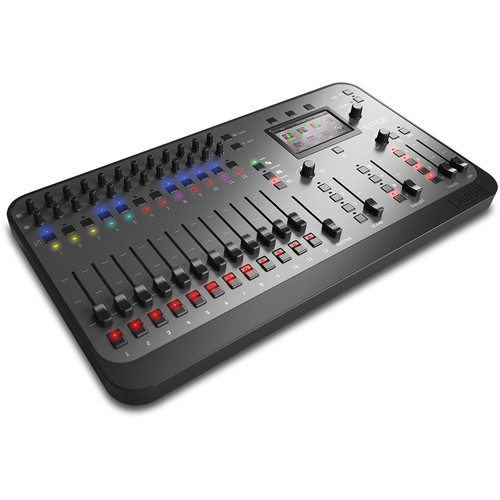
Jands Stage CL Lighting Console (512 Channels Edison Plug)
In Stock
SKU #
JASTAGECL
Mfr #
CQ1524-1000
Manufacturer
Jands
Description
Take advantage of the capabilities of your DMX- / Art-Net controllable LED lighting with the Jands Stage CL Lighting Console. Design, control, and program scenes and chases with this portable LED lighting console that takes advantage of the color and brightness adjustments in LED fixtures (compared to tungsten lighting). Connect to your lights using DMX512 via a 5-pin AXR connector, or to an Art-Net network using the integrated RJ45 connector. A built-in display screen helps to fine-tune your configuration. You can create and record complex sequences, then play them out at the touch of a button. High-quality 60mm faders, push-button encoders, tactile buttons, and multicolor LED indicators provide control and feedback to help you create the lighting setup of your dreams.Made for LEDs The Stage CL gives you all the manual controls and automation you need to get the most out of your LEDs512 Channel Control With the Stage CL you can control up to 512 DMX channels, connecting either through the DMX-512 output or the Ethernet output for Art-netFunction The Stage CL has high-quality 60mm faders, push-button encoders, responsive tactile buttons, and multi-color LED indicators, all packaged in a smooth and compact chassis that you can carry in one handDisplay Screen the Stage CL touch-screen display provides an easy to use interface for control and patching lights, monitor playback, edit scenes, chases & cues, adjust fade times, apply preset colors, and set up the console preferencesManual Control Each of the twelve channels has a sturation encoder and a Hue encoder that you can adjust to set the color you want. As you turn the dials, a LED on the channel shows the color you're creatingSnapshot Function Tap the Snapshot button to save the look you have on stage and the Stage CL holds that look while you adjust any of the other controls to create your next look, then fades into it when you tap the button againOne-Press Recording To record a sequence, simply press the record button, adjust your lights, then press one of the Scene, Chase, or Cuelist buttons to store itTo play it back, just tap the button where you stored itYou can adjust the playback speed and chase rate manually with the fade time and chase speed controlsTo set up a chase, you can save each step or create a pattern and the Stage CL will automatically build the chase to run across the lights you've chosenYou can save multiple cues and organize them however you like using the touch screen, then back them up to a memory stick or portable drive through the USB ports on the back panelGrouping You can group any number of channels together and use just one set of pots to set the color for all of themColor Presets Featuring a selection of color presets to choose from, you can switch between full and half saturation, both at the click of a single button
Product Information
Availability:
In Stock