
- Products
-
Audio & Studio Equipment
See all
-
Cameras & Optics
See all
- Computers & Mobile Devices
- Drones & Aerial Imaging
-
Professional Video & AV
See all
- Security & Surveillance
- TVs & Entertainment
SubcategoriesSee all -
Audio & Studio Equipment
- About us
- Contact Us
- +1-888-219-0753
- Bulk Order

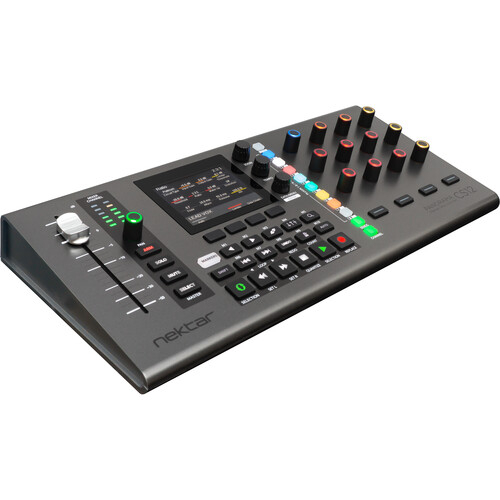
Nektar Technology Panorama CS12 Channel Strip and DAW Plug-In Controller for Logic Pro Cubase and Nuendo
In Stock
SKU #
NECS12
Mfr #
CS12
Manufacturer
Nektar Technology
Description
Take control of your Logic Pro, Cubase, or Nuendo session with the Nektar Panorama CS12, a dedicated and customizable channel strip controller that's designed for Apple's Logic Pro and Steinberg's Nuendo and Cubase DAW software. With its entire workflow built from the ground up, the CS12 provides full control over any native AU or VST plugin as well as third-party instruments and effects.The controller offers many advanced functions to speed up your session's workflow. You can set volume and insert automation points at the current play position by touching the 100mm motorized ALPS fader. There are 13 endless encoders and a 3.5" TFT color display for instant feedback of your hands-on control. It's also easy to create your own custom plug-in maps thanks to the units easy-to-use learn capabilities as well as the Nektarine Map Creation application/plug-in. The CS12 is USB bus powered and ships with a USB-C to USB-A cable.At a Glance Long-throw 100mm motorized fader with up to 14-bit control resolutionSet volume and insert automation point at the current play position, by touching the faderDedicated pan control with channel color illumination, arm, mute, and soloOption to use fader or pan control to click and adjust any parameter in the current channel, including plug-insAdvanced direct insert plug-in control of both AU and Logic Pros included insert effectsControl up to 12 sends per channelInstrument control via selected parameter, SmartControl, or Logic Pro learn user pages11 color-illuminated buttons for selection of plug-in slots, sends, and channel menusFine control at up to 10 (14-bit) times normal resolutionZoom and tempo controlsAccess to 26 transport, navigation, and Logic Pro functionsHigh-Resolution Fader A 100mm ALPS motorized fader follows the selected mixer channel when you work. With up to 14-bit resolution, you get detailed control with touch sensing enabling automation override and update captures in real time.Paired with a dedicated pan control as well as buttons for solo, mute, and record arm, you have instant access to all main mixer parameters on the selected channel.Control any Parameter Control any parameter by simply clicking on it. The 100mm ALPS fader immediately jumps to the clicked parameters position and you take over from there. The fader or pan rotary, can be used to control any parameter in the currently selected Logic Pro channel, at any time.Activate the Select button and the motorized fader now controls any parameter you click. Any mixer channel, instrument, or insert effect plug-in parameters. Click, control, click control. Super easy.Easily Create Clean Automation Recording automation can get messy with lots of data generated, even when a simple fader is needed. Panorama CS12 solves the problem by giving you the option to insert automation points.Touch the fader, set the value with the fader, and done!Jump to the next position in the timeline and insert another automation point. Clean, easy, and fast.Complete Insert FX Plug-In Control Panorama CS12 excels at controlling plug-ins. You can control any plug-in without looking at the plug-ins UI, so you can focus on creating, composing, and editing.Many commonly used plug-ins are pre-mapped, including of course Logic Pro s own. Panorama CS12 dedicates 12 RGB illuminated 360 pots, 4 display buttons, and an additional 4 RGB LED buttons to plug-in control. Every control can be assigned on multiple pages, ensuring a complete plug-in experience, with no parameter left behind.Via the ControlCore mapping system, it stores all settings in unique files, so they can be ported to other computer systems and ensure compatibility with other DAWs in the future. Works with All Plug-Ins Any plug-in that presents its parameters for automation in Logic Pro, can be controlled from Panorama CS12. That includes Logic Pro s own plug-ins and any AU plug-in hosted in Logic Pro.There is no wrapper or plug-in host. It just works.Plug-In Slot Selection CS12 control insert
Product Information
Availability:
In Stock