
- Products
-
Audio & Studio Equipment
See all
-
Cameras & Optics
See all
- Computers & Mobile Devices
- Drones & Aerial Imaging
-
Professional Video & AV
See all
- Security & Surveillance
- TVs & Entertainment
SubcategoriesSee all -
Audio & Studio Equipment
- About us
- Contact Us
- +1-888-219-0753
- Bulk Order

- Products
-
Audio & Studio Equipment
See all
-
Cameras & Optics
See all
- Computers & Mobile Devices
- Drones & Aerial Imaging
-
Professional Video & AV
See all
- Security & Surveillance
- TVs & Entertainment
SubcategoriesSee all -
Audio & Studio Equipment
- About us
- Contact Us
- +1-888-219-0753
- Bulk Order
HomeCatalogProfessional Video & AVPost ProductionComputer Video HardwareBlackmagic Design DaVinci Resolve Advanced Panel
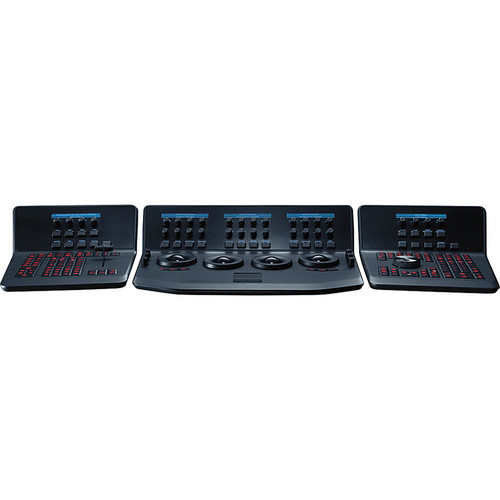
Blackmagic Design DaVinci Resolve Advanced Panel
In Stock
SKU #
BLDVRCP
Mfr #
DV/RES/AADPNL
Manufacturer
Blackmagic Design
Description
The DaVinci Resolve Advanced Panel from Blackmagic Design is a significant step up in functionality from the Micro or Mini panel. It consists of a main console and two auxiliary consoles, one on each side, as well as a slide-out keyboard in the center console. It enables one-touch access to virtually every control and parameter within the DaVinci Resolve software. The center console incorporates four high-resolution, weighted trackballs and 30 soft, customizable control knobs for accessing color-correction tools in the Resolve software. The custom control knobs feature 4096 steps per rotation and push-button reset so you can achieve high-quality and precise color correction using the DaVinci Resolve system. The Resolve control surface incorporates a slide-out keyboard that is useful when naming or renaming files, and it can be neatly tucked away when not in use. All functions are accessible via separate keys, such as the reference keys, and the fader T-bar that allows you to wipe between reference stills. You can easily control the image sections via keys located for easy access at your natural hand positions. Lift, gamma, and gain adjustments along with RGB control are achieved via trackballs. Menus and indicators are visible via five high-resolution LCD screens that offer a view of the functions of all the knobs and buttons. Soft knobs that can precisely control parameters via single touch are provided, and no electrical contact eliminates wearing out of the knobs. Aesthetically illuminated keys are backlit using RGB color and intensity. Complete control of the project timeline or deck is offered via the jog/shuttle knob and transport controls.Menus, Soft Keys, and Soft Knob Control All Resolve panels have soft keys and variable control knobs within the LCD panel, which provide an accurate visual reference to the control without the risk of error.Trackball Panel The center panel has four trackballs, each with a surrounding control ring. The three trackballs to the left control lift, gamma, and gain when Resolve is set for primary grading. When in Log grading, they adjust lowlights, mid-tones, and highlights. The fourth trackball works similar to a mouse for moving the on-screen cursor. It can also be used to draw Power Windows, control color curve point position, and act as an offset control for the primary grade.Keyboard The center panel incorporates a slide-out keyboard that is useful when naming or renaming files, and it can be neatly tucked away when not in use.Luminance Y lift control: Adjust the contrast of the image in the darker areas, specifically in the Y (luminance) channel only. This adjustment allows for changing the black point without changing saturation.Y gamma control: Adjust the contrast of the image in the mid-tone areas, specifically in the Y (luminance) channel only. This control helps add depth and extra vibrancy to shots.Y gain: You can reduce hot spots or tweak the whites to define a look.Contrast Contrast control: Increase contrast to make the blacks darker and the whites brighter, or decrease contrast to do the opposite.Pivot: Change the center of tonality about which dark and bright parts of the image are stretched or narrowed during a contrast adjustment.Mid-tone detail: Affect the contrast of regions of the image with high edge detail to increase or decrease the perception of image sharpness and definition. It's often used for softening facial features, making it popular for beauty shots.Detail Color boost control: Raise the saturation in regions of the image with low saturation while leaving properly saturated areas alone. Also known as a vibrance operation, this is useful for adding color without oversaturating the image.Shadow control: Selectively lighten or darken shadow detail without affecting your image's mid-tones.Highlight control: Enable retrieving blown-out highlight detail in high dynamic range media by lowering this parameter. This allows you to achieve a smooth blend between the ret
Product Information
Availability:
In Stock