
- Products
-
Audio & Studio Equipment
See all
-
Cameras & Optics
See all
- Computers & Mobile Devices
- Drones & Aerial Imaging
-
Professional Video & AV
See all
- Security & Surveillance
- TVs & Entertainment
SubcategoriesSee all -
Audio & Studio Equipment
- About us
- Contact Us
- +1-888-219-0753
- Bulk Order

- Products
-
Audio & Studio Equipment
See all
-
Cameras & Optics
See all
- Computers & Mobile Devices
- Drones & Aerial Imaging
-
Professional Video & AV
See all
- Security & Surveillance
- TVs & Entertainment
SubcategoriesSee all -
Audio & Studio Equipment
- About us
- Contact Us
- +1-888-219-0753
- Bulk Order
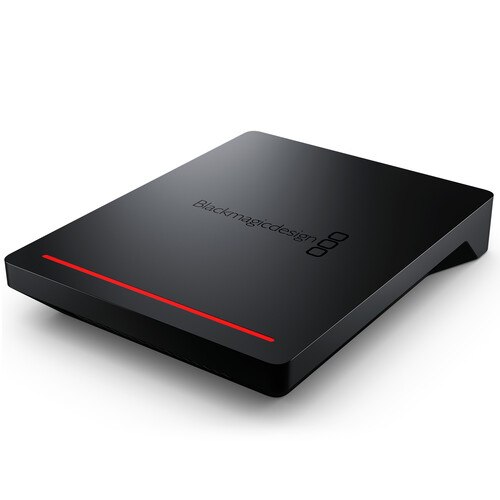
Blackmagic Design Cloud Pod
In Stock
SKU #
BLCP
Mfr #
DWCLDA/POD
Manufacturer
Blackmagic Design
Description
Turn virtually any USB Type-C disk into a network storage drive with the Cloud Pod from Blackmagic Design. The Cloud Pod can host two USB Type-C drives using its two 5 Gb/s USB Type-C ports, then provides network access using its 10GbE RJ45 port, which lets you share media with up to 50 simultaneous users on your network. Furthermore, Dropbox Live Sync lets you distribute files globally and syncs to your Cloud Pod automatically, while an HDMI monitoring output lets you keep track of your Cloud Pod's status, including a storage map, speed graphics, sync, active users, and power status. Compatible with Windows and Mac, the Cloud Pod lets you work with broadcast-quality video in DaVinci Resolve. When paired with the proper storage media, 12K raw workflows are supported. Included is a universal power supply with international adapters.Designed for Film and Television The Blackmagic Cloud Pod will transform customer's work. It's perfect for film and television because you can record onto USB Type-C flash disks and then use the Blackmagic Cloud Pod to make the disk available on the network for multiple editors and colorists to use. Depending on the brand of USB Type-C flash disk used, it even handles massive 12K Blackmagic raw digital cinema files. USB Type-C flash disks are handy because they are affordable, have low seek times, and can be bought almost anywhere. Dropbox sync allows you to place pods in different locations so everyone can have a fast, local copy of their files. Then each location gets the fastest editing experience possible.Portable and Quiet Design The Blackmagic Cloud Pod features an extremely small and thin design because it doesn't have any internal storage. It's also very quiet and very portable. It features two USB Type-C ports so it can host two separate USB disks on your network at the same time. The 10G Ethernet port means you get extremely high performance. There is also an HDMI monitoring output so you can watch a live graphic view of the storage operating on a TV or monitor. Along the front there is a status light that shows disk activity, so you know when the USB Type-C disk is being accessed. There's also a DC power connection so you can use the included power supply, or run it from a battery when it's used on location. DC Power A 12 VDC power supply is included with Blackmagic Cloud Pod. All international AC voltages are supported so you can use it globally. Adapters for international power sockets are also included. 10G Ethernet 10G Ethernet allows high-speed computers to be connected. It's fast, even when lots of users are connected, all at the same time. It's perfect for connecting to the latest 10G Ethernet switches. USB Type-C Connections There are two USB Type-C ports so you can host two disks on each Blackmagic Cloud Pod. Connect any type of USB Type-C storage, such as mechanical or flash disks. USB Type-C is also used for settings and updates. HDMI Monitor Output The HDMI monitor output lets you see the status of your Cloud Pod in real time. Simply plug in a TV or monitor and you'll be able to see a storage map, speed graphics, active users, and power status.Live Sync to Dropbox Now you can set up a local cache of your Dropbox files. This makes working much faster because files are instantly available without needing to be downloaded from the Internet. Blackmagic Cloud Pod will constantly work to stay in sync. You can save space on your computer by moving cached Dropbox files to the Blackmagic Cloud Pod so everyone on your network can share them. You can even sync multiple Blackmagic Cloud Pods or Cloud Stores via Dropbox so people in different geographic locations can collaborate without latency because everyone has a local copy of the files. That makes it a good home or offsite solution.Add Cloud Service Make sure your Blackmagic Cloud Pod is connected to the internet. Enter in your Dropbox account details, so the Cloud Pod can gain access to allow sync.Set Sync Folders Next you need to set
Product Information
Availability:
In Stock