
- Products
-
Audio & Studio Equipment
See all
-
Cameras & Optics
See all
- Computers & Mobile Devices
- Drones & Aerial Imaging
-
Professional Video & AV
See all
- Security & Surveillance
- TVs & Entertainment
SubcategoriesSee all -
Audio & Studio Equipment
- About us
- Contact Us
- +1-888-219-0753
- Bulk Order

EarthCam Control Center 8 Photography Documentation Software (1-Month Subscription Download)
In Stock
SKU #
EAECSS99103
Mfr #
ECSS99103
Manufacturer
EarthCam
Description
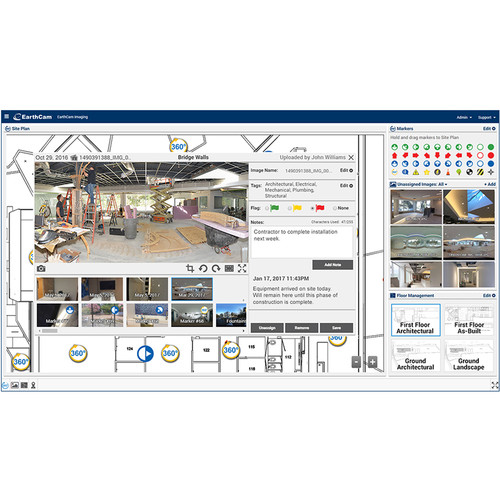
EarthCam's Control Center 8 Photography Documentation Software provides access to a desktop portal for all EarthCam construction cameras. Control Center 8 allows you to upload and integrate jobsite photos to site plans over the life of any construction project to quickly communicate interior progress and much more. The application supports live streaming video and time-lapse photos and offers a variety of tools and features for managing content. Control Center 8 works out of a browser and can be used on a Mac or Windows computer. Additionally, a mobile Control Center app is included for iOS/Android that's designed for use on the jobsite. It allows you to view all your cameras on your phone and syncs up with the desktop version. Control Center 8 also supports integrating content from EarthCam's VR 360 Site Tour app (not included), which is used to capture images with EarthCam 360 cameras.Desktop Portal Control Center 8 is a desktop portal for all EarthCam construction cameras. Control Center 8 lets you view and manage critical photo/video evidence of pre-existing and as-built conditions at your jobsite.Mobile App Included with Control Center 8 is the Control Center mobile app for iOS/Android that is designed to be used at the jobsite and which syncs up with the desktop version. All markers and jobsite photos are uploaded from the app to the desktop version for effective project management. The app allows viewing, control, and marketing of your EarthCam cameras. It provides real-time control of your camera's pan, tilt, and even wiper functions from your mobile device. Snap a live photo and share it within seconds. Post your favorite pictures to the Hall of Fame (an exclusive EarthCam feature more below) and receive critical up-to-date weather, solar, and network connection data.VR 360 Site Tour Support Control Center 8 also supports integrating content from EarthCam's VR 360 Site Tour app (not included), which is used to capture images with EarthCam 360 cameras.Instant Time Lapse View date-specific segments on your time-lapse movies, ideal for quick progress reports and team updates. Your time-lapse movies can be shared on social media or to YouTube with your logo overlay, and even royalty-free music.Live Streaming Video The software offers full support for robotic or fixed position cameras. You can even pan, tilt, and zoom, or share your cameras' footage from your mobile devices. EarthCam provides streamlined developer tools that produce custom HTML code for you to embed live video on your public website.Photo Assignment Using geotagging mapping technology, captured photos are automatically organized by location within architectural site plans. Additionally, you can drag and drop existing images within your Control Center 8 online dashboard to your site plan markers for a complete visual history of interior progress. Markers and photos can be managed in more detail using the tools provided in the online dashboard.Image Viewer and Photo Editing 360 jobsite photos provide a virtual walk through of your jobsite every day, giving users the ability to inspect each room and remotely explore via the click of a mouse or the tap of an Oculus headset. This detailed visual record acts as a virtual x-ray of the jobsite, creating an indisputable record of as-built and pre-existing conditions. With user-friendly editing tools in Control Center 8, it's simple to mark-up any of your photos to call out a specific area of interest.Image Tagging Add notes, tags, and flags to your uploaded images for efficient search and filtering purposes. Assign tags to each image, such as mechanical, plumbing, or structural. You can also highlight certain images by assigning a colored flag (red, amber, or green) to indicate an urgent issue or mark an important milestone. Search, filter, and view only images marked with those specific tags and create a virtual punch list for quick analysis and progress reports.Analyze and Compare Images Images can be marked and
Product Information
Availability:
In Stock