
- Products
-
Audio & Studio Equipment
See all
-
Cameras & Optics
See all
- Computers & Mobile Devices
- Drones & Aerial Imaging
-
Professional Video & AV
See all
- Security & Surveillance
- TVs & Entertainment
SubcategoriesSee all -
Audio & Studio Equipment
- About us
- Contact Us
- +1-888-219-0753
- Bulk Order

- Products
-
Audio & Studio Equipment
See all
-
Cameras & Optics
See all
- Computers & Mobile Devices
- Drones & Aerial Imaging
-
Professional Video & AV
See all
- Security & Surveillance
- TVs & Entertainment
SubcategoriesSee all -
Audio & Studio Equipment
- About us
- Contact Us
- +1-888-219-0753
- Bulk Order
HomeCatalogProfessional Video & AVVideo Tripods, Supports & RigsCamera Slidersedelkrone Controller v2
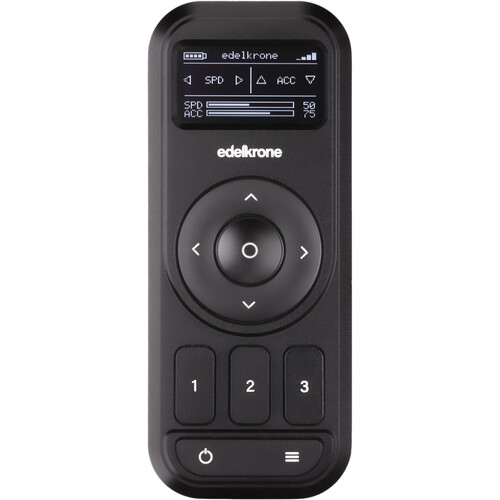
edelkrone Controller v2
In Stock
SKU #
EDCV2
Mfr #
EDSBX
Manufacturer
edelkrone
Description
Automate your camera workflow without the need for an app with the edelkrone Controller v2. This updated pocket-sized controller is engineered to work with edelkrone motion-controlled sliders, jibs, heads, and dollies. The controller v2 now allows you to control the rig wirelessly from up to 82' away or via a separately available 3.5mm wired link cable from up to 131' away. It features a larger OLED display and can also utilize the Link Hub to control multiple wired devices at the same time.The controller is powered using two separately available AA batteries, and the v2 model has been updated to have a battery life for 10+ hours when using wireless control and 23+ hours when using wired control (depending on the type of AA batteries used). Simply use the directional pad to move your device into position and press one of the three buttons to record the position. Positions can also be set manually and recorded with devices that allow hand control. For each position, speed, acceleration, and any axis can be adjusted, such as slide, swing, pan, tilt, and focus.New in Controller v2 Double wireless battery life (10+ hours depending on the type of battery used)Quadrupled wired battery life (23+ hours depending on the type of battery used)Bigger, easier-to-read OLED displayWired connection option to a single device, or multiple-device wired connection when used with Link Hub131' total cable length for a fully wired optionGesture control modeAdditional Features Up to an 82' wireless rangeWired control via optional 3.5mm link cableInstant wireless pairing with your edelkrone deviceJoin paired groupFirmware upgradeable to gain new functionalityPowered by two AA batteries (not included)Wrist strap includedWireless Connection Compatibility HeadPLUS v2HeadPLUS PRO v2Slide Module v2/v3JibONE v1/v2DollyONEDollyPLUSDollyPLUS PROHeadONESliderONE v2SliderONE PRO v2Pan PROFocusPLUS PRO Wired Connection Compatibility Slide Module v3JibONE v2Pan PROHeadPLUS v2HeadPLUS PRO v2FocusPLUS PROTime-Lapse Programming The Controller v2 gives you the ability to easily create smooth time-lapse shots with your motion-controlled device. Enter the duration, shutter speed, and interval with the controller, then set the start and end poses with two of the three buttons. Simply press and hold the select button to begin the time-lapse movement.
Product Information
Availability:
In Stock