
- Products
-
Audio & Studio Equipment
See all
-
Cameras & Optics
See all
- Computers & Mobile Devices
- Drones & Aerial Imaging
-
Professional Video & AV
See all
- Security & Surveillance
- TVs & Entertainment
SubcategoriesSee all -
Audio & Studio Equipment
- About us
- Contact Us
- +1-888-219-0753
- Bulk Order

- Products
-
Audio & Studio Equipment
See all
-
Cameras & Optics
See all
- Computers & Mobile Devices
- Drones & Aerial Imaging
-
Professional Video & AV
See all
- Security & Surveillance
- TVs & Entertainment
SubcategoriesSee all -
Audio & Studio Equipment
- About us
- Contact Us
- +1-888-219-0753
- Bulk Order
HomeCatalogProfessional Video & AVRecorders & DuplicationProfessional Video Studio RecordersBlackmagic Design HyperDeck Shuttle 4K Pro
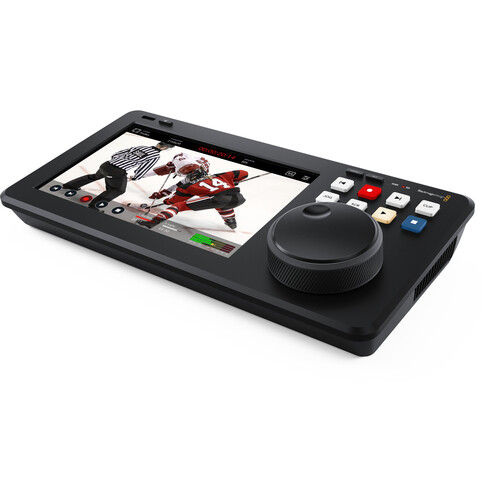
Blackmagic Design HyperDeck Shuttle 4K Pro
In Stock
SKU #
BLHDS4KP
Mfr #
HYPERD/PTSKD
Manufacturer
Blackmagic Design
Description
Add a desktop shuttle with a comprehensive video playback interface to your live production with this HyperDeck Shuttle 4K Pro from Blackmagic Design. The HyperDeck Shuttle 4K Pro features a compact design that allows you to run multiple I/O and connect to a computer or ATEM switch to control media playback using its 7" touchscreen display, large search dial, and buttons. It also features a built-in teleprompter for using text files without requiring third-party software.The Shuttle 4K Pro runs Blackmagic OS, supports ProRes and DNx file formats, and is compatible with a wide range of editing software such as Premiere Pro, Avid, and DaVinci Resolve. It can also be used to stream H.264/265 video to streaming services such as YouTube or Vimeo. Record video using its SD card slot, M.2 PCIe card slot, or USB-C output to an optional drive or connect to the Blackmagic MultiDock to record to multiple SSDs. The Ethernet port provides external control and file transfers over a network.Mastering Recorder With support for H.264/265, ProRes, and DNx files, you can record true broadcast masters. You can even select between PCM or AAC audio. That's great for higher-quality mastering when used with ATEM Mini switchers. You get everything needed to send shows to broadcasters and for uploading to streaming services like YouTube.Media Player The large search dial lets you visually browse your clip library; you can then use the previous clip button to cue the start of the clip. After playing, you can use the clip button to stop the playback at the end of the clip. ATEM switchers can even remote control HyperDeck Shuttle via Ethernet.Built-In 7" Touchscreen A 7" touch interface allows for interactive control, built-in monitoring, and menu adjustment. Buttons for playback, pause, and recording functions, as well as a mini playback timeline for clip scrubbing, make for an intuitive control experience. A heads-up display (HUD) overlays timecode, media status, and audio meter information. Enable full broadcast scopes like focus assist and RGB exposure histogram. Settings can be changed via the on-screen menus, and you can save and load 3D LUTs.Traditional Broadcast Deck Controls HyperDeck Shuttle includes a control panel that's very fast to use, and the buttons are similar to a traditional broadcast deck. Simply press the record button, and you will instantly start recording the video input to a file. The large machined metal search dial supports shuttle, jog, and scroll so you can find clips fast. Plus, all deck control functions can be triggered remotely using the Ethernet network. Use the intuitive touchscreen interface to toggle different visual overlays and scrub media files to find what you need.Record to Internal or External Network Storage HyperDeck Shuttle has been designed to record directly to network storage, keeping all your media in a central place. Plus, the HyperDeck Shuttle 4K Pro model has space for M.2 flash storage cards, so the network storage is built in. This means any editing system can just log into the HyperDeck Shuttle 4K Pro and access all the media in one location. DaVinci Resolve can also edit media while it's being recorded.Supports SD Cards and USB-C Disks The HyperDeck Shuttle supports recording to standard SD Cards and UHS-II Cards. You can also record on external USB disks, which can be instantly unplugged and transported. When using H.264, the files are so incredibly small you get very long recordings even on smaller, low-cost cards. This means you can record up to 157 hours of H.264 in 1080p59.94 on a 1 TB card for over 6 days of recorded content. The USB-C expansion port lets you plug in an external flash disk for recording. You can even add a Blackmagic MultiDock 10G that has four separate SSD media slots, so you can add compatibility with SSD media. There are also options for managing external disks in the settings menu.Popular ProRes, DNx, and H.264/265 Files HyperDeck Shuttle 4K Pro supports the most popular
Product Information
Availability:
In Stock