
- Products
-
Audio & Studio Equipment
See all
-
Cameras & Optics
See all
- Computers & Mobile Devices
- Drones & Aerial Imaging
-
Professional Video & AV
See all
- Security & Surveillance
- TVs & Entertainment
SubcategoriesSee all -
Audio & Studio Equipment
- About us
- Contact Us
- +1-888-219-0753
- Bulk Order

- Products
-
Audio & Studio Equipment
See all
-
Cameras & Optics
See all
- Computers & Mobile Devices
- Drones & Aerial Imaging
-
Professional Video & AV
See all
- Security & Surveillance
- TVs & Entertainment
SubcategoriesSee all -
Audio & Studio Equipment
- About us
- Contact Us
- +1-888-219-0753
- Bulk Order
HomeCatalogAudio & Studio EquipmentMusical InstrumentsGuitars & Stringed InstrumentsAalberg KOR KO-1 Chorus/Flanger Pedal with Wireless Control
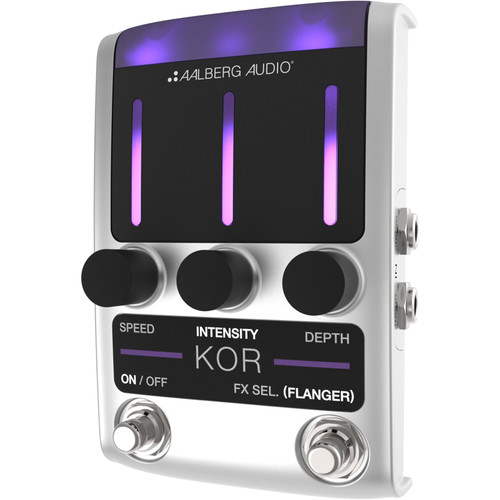
Aalberg KOR KO-1 Chorus/Flanger Pedal with Wireless Control
In Stock
SKU #
AAKO1U
Mfr #
KO-1-U
Manufacturer
Aalberg
Description
The KOR KO-1 Chorus/Flanger Pedal from Aalberg Audio is a high-quality stereo in/out combined chorus and flanger stompbox that can be controlled wirelessly with the optional AERO AE-1 controller. The pedal offers different mono and stereo configurations including a dry/wet split and stereo panning from left to right, giving a more spacious feel to the flanger or chorus effect. The KOR Chorus/Flanger can also be controlled by a free iOS/Android remote app that provides easy editing and allows the saving of presets for later recall. All the electronics are contained in a rugged, custom-made aluminum housing, while the onboard purple LED bars at the top provide actual parameter settings, easily seen from a distance or in low light. The KOR is powered by an optional 9V adapter.General Features Parameters: Speed, Intensity, and DepthToggle between chorus and flangerTrue bypassCompatible with AERO AE-1 Wireless ControllerUpgrade firmware and sound algorithms by using the Aalberg Update app (iOS only)Control pedal and get extended functionality using the Aalberg Remote App (Coming soon)Controls Speed: Adjust the speed of the chorus/flanger effectIntensity: Adjust the dry/wet mix between the input signal and the effect signal. In Flanger mode, this parameter also adjusts the feedback amountDepth: Adjust the degree of pitch shifting in the chorus/flanger effect; Depth set to minimum means no effectFX-Select/ FlangerFX-Select: Choose active effect parameter (Speed, Intensity, or Depth) for wireless control (optional)Flanger: Press and hold the FX-Select footswitch to toggle between the two modesFLANGER (no light): Chorus mode activeFLANGER (light): Flanger mode activeOn/Off: Set the pedal to ON (activated) or OFF (true bypass)Input/Output Setups Mono In/Mono Out: Connect your instrument to Mono In and the amplifier to Mono OutMono to Stereo Spread: Connect your instrument to Mono In, then connect one amplifier to Mono Out, and another amplifier to Stereo Out. The stereo spread effect is a combination of phase inversion and a continuous panning of the signal from side to side, resulting in a wide stereo effectDry/Wet Split: Connecting your instrument to Stereo In will split the dry wet signal as followsMono Out: 100% wet signalStereo Out: 100% dry signalStereo to Stereo Spread: By plugging into both the mono and stereo inputs, and both mono and stereo outputs, you will obtain the same stereo spread effect achieved with the Mono to Stereo Spread connections. This is useful if you want to maintain the stereo image from the output of another pedal in your signal chain
Product Information
Availability:
In Stock