
- Products
-
Audio & Studio Equipment
See all
-
Cameras & Optics
See all
- Computers & Mobile Devices
- Drones & Aerial Imaging
-
Professional Video & AV
See all
- Security & Surveillance
- TVs & Entertainment
SubcategoriesSee all -
Audio & Studio Equipment
- About us
- Contact Us
- +1-888-219-0753
- Bulk Order

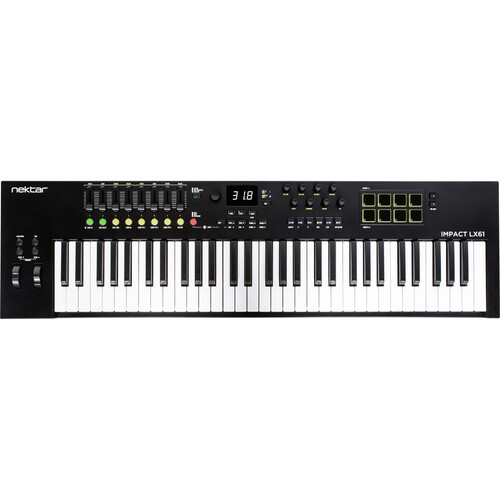
Nektar Technology Impact LX61 mk3 USB MIDI Controller Keyboard
In Stock
SKU #
NELX61MK3
Mfr #
LX61 MK3
Manufacturer
Nektar Technology
Description
Engineered to provide a customized, DAW-integrated workflow that enhances both performance and production, the Nektar Impact LX61 mk3 is a 61-key MIDI controller with a reengineered keybed that offers expressive, clean action with a refined velocity response, full-resolution encoders, and color LED buttons that support intuitive parameter control and DAW navigation.The LX61 features a dedicated DAW Looper, which enables hands-free loop creation and editing directly from the controller. Eight velocity-sensitive LED pads are pre-mapped to common drum instruments, but can be fully customized. Mixer and Instrument modes offer hands-on control of faders, encoders, sends, pan, and plug-in parameters, with pre-mapped templates for popular virtual instruments. DAW IntegrationLooper and Timeline Navigation Designed to augment the power of supported DAWs, Impact LX mk3 includes unique timeline options enabling fast navigation, as well as loop creation, throughout a project. Activating loop record via the dedicated Impact LX mk3 looper button is a creativity boosting experience in a linear DAW. With loop recording complete, loop points are automatically set, perfectly truncated to the part, and then playback of the recording begins. Artists no longer need to decide the length of a loop before recording starts and can move on to immediately overdub or record the next part more quickly.Loop points can be set or moved at any time and adjusted in length by just pressing LED buttons. The large encoder can scroll through the timeline, while the display bar position updates as the play head or loop moves.DAWs with clip launchers are supported to record and activate clips on the selected track.Global Control The large encoder is a global control that doesn't change operation when Mixer, Instrument, or Preset modes are selected.With Nektar DAW integration, the associated button toggles 3 encoder states:Channel volume.Cutoff (instrument).Selected parameter.The Selected parameter enables control of any DAW or plug-in parameter by simply clicking to select, then control. With multiple plug-in windows open, it s a gratifying tactile control experience when moving from instrument to effect parameters.Fine Control and Displaying Parameter Values. The Impact LX mk3's global encoder offers precise parameter control at either standard MIDI or a finer 10-bit resolution.This fine control option, pioneered on the Nektar Panorama CS12, delivers a level of UI-precise control that's typically not possible from a controller keyboard.To support this accuracy, Impact LX mk3 receives parameter values directly from your DAW, with the display updating instantly as controls are moved. For example, if a parameter is centered at 0 with +/- values on either side, the display will reflect that. Similarly, if values range from 20 Hz to 20 kHz, the display shows that range. These formatted values provide comfort during use and are especially helpful when dealing with detailed parameter adjustments.NKS Support Native Instruments developed the Native Kontrol Standard (NKS), which is supported by thousands of plug-ins including the entire NI Komplete Select package, which is now part of the Impact LX mk3 software bundle.Navigating presets, plug-ins and control pages can all be done from Impact LX mk3, with the 8 encoders dedicated to page parameter control.Working alongside Nektar DAW integration, Impact LX mk3 automatically switches to NKS control whenever it s detected, when selecting a track. The experience can be augmented by combining NKS with the global encoder's selected parameter feature and with Nektar's grab mode controlling other parameters using the faders.Pads: Mapped to Drums and Percussion Plug-Ins Press Mixer, and the eight pots are assigned to control the eight channels of your DAW's mixer. The alternate Bank up/down function moves control assignments to the next or previous group of eight channels. Press the Mixer button, and they switch to control panning. T
Product Information
Availability:
In Stock