
- Products
-
Audio & Studio Equipment
See all
-
Cameras & Optics
See all
- Computers & Mobile Devices
- Drones & Aerial Imaging
-
Professional Video & AV
See all
- Security & Surveillance
- TVs & Entertainment
SubcategoriesSee all -
Audio & Studio Equipment
- About us
- Contact Us
- +1-888-219-0753
- Bulk Order

- Products
-
Audio & Studio Equipment
See all
-
Cameras & Optics
See all
- Computers & Mobile Devices
- Drones & Aerial Imaging
-
Professional Video & AV
See all
- Security & Surveillance
- TVs & Entertainment
SubcategoriesSee all -
Audio & Studio Equipment
- About us
- Contact Us
- +1-888-219-0753
- Bulk Order
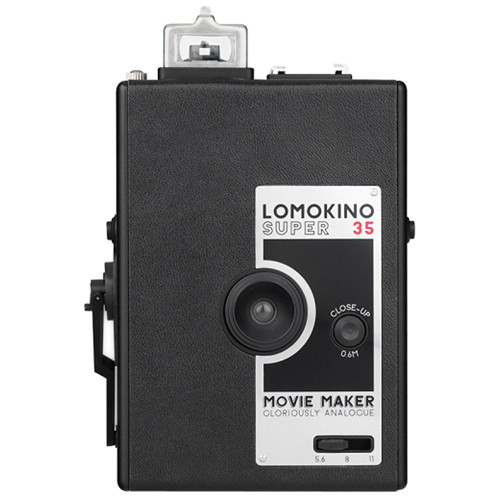
Lomography LomoKino 35mm Film Camera
In Stock
SKU #
LOK35
Mfr #
MC100BN
Manufacturer
Lomography
Description
Making movies actually can be a pleasure, and you don't have to create your own personal deficit crisis--say hello to the LomoKino 35mm Film Camera from Lomography. The low-tech, high-fun LomoKino camera uses 35mm film to produce short films (using actual film, not video). The LomoKino is a hand-crank-driven camera, so you control the frame rate, up to 3-5 frames per second. If you turn the crank very, very slowly, you ll get a jagged, stop-motion effect; turn it fast and you ll get a smoother, more fluid-looking movie. Each 36-frame roll of 35mm film gives you 144 movie frames (exposure area: 24mm x 8.5mm), with volume display to tell you how much film you have left. The focal length of the lens is 25mm--you don't have to focus the camera if your subject is more than 3.28' away. If it's closer than that, you can use the close-up button to focus as close as 2'. There's a hot shoe on the LomoKino, so you can use flash (not included) for stop-action movies, and the standard 1/4" tripod mount screw means you can mount the LomoKino to a tripod (not included) for rock-solid images when you want them. The continuous aperture gives you flexibility to adjust your exposure precisely between f/5.6 and f/11. With LomoKino, making a unique, analog film is just as much fun as watching one.Use Any Kind of 35mm Film Load the LomoKino with any kind of 35mm film that takes your fancy--color negative, slide, black and white--the choice is yours.Fast Focusing Shooting a subject over 1m away? You don't have to do a thing to focus. Want to shoot closer than 3.28' (1m)? Just hold down the close-up button on the front of the camera and you can focus as close as 1.96' (0.6m).Easy Aperture Controls The LomoKino has continuous aperture settings from f/5.6 to f/11 - There is no step between each aperture, so you can effortlessly adjust the aperture setting at any time during shooting.Simple Shooting Shooting a movie with the LomoKino is easy - After you've loaded your film, just rotate the advancing crank to start making your movie - Rotate the crank slowly for a low frame rate or fast for a higher frame rate - With the LomoKino you can shoot up to 3-5 frames per second at full speed!Check Your Movie Progress Use the handy volume display on the LomoKino to see how much film you have left on the roll--when the red flag on top of the camera pops up, the show's over folks.Grab a Tripod Want to look like a true analogue Director when shooting your LomoKino movies? Attach the camera to a tripod and get ready for some steady Lomographic movie action.Look Through the Viewfinder (If You Want To) Use the LomoKino viewfinder to get an idea of what you are shooting - Or just ignore it and shoot from the hip.Light Up Your Movie Use the hot-shoe mount on the top of the LomoKino to attach your favorite Lomography flashes.
Product Information
Availability:
In Stock