
- Products
-
Audio & Studio Equipment
See all
-
Cameras & Optics
See all
- Computers & Mobile Devices
- Drones & Aerial Imaging
-
Professional Video & AV
See all
- Security & Surveillance
- TVs & Entertainment
SubcategoriesSee all -
Audio & Studio Equipment
- About us
- Contact Us
- +1-888-219-0753
- Bulk Order

- Products
-
Audio & Studio Equipment
See all
-
Cameras & Optics
See all
- Computers & Mobile Devices
- Drones & Aerial Imaging
-
Professional Video & AV
See all
- Security & Surveillance
- TVs & Entertainment
SubcategoriesSee all -
Audio & Studio Equipment
- About us
- Contact Us
- +1-888-219-0753
- Bulk Order
HomeCatalogComputers & Mobile DevicesComputer ComponentsComputer CasesLian Li O11 Vision Mid-Tower Case (Black)
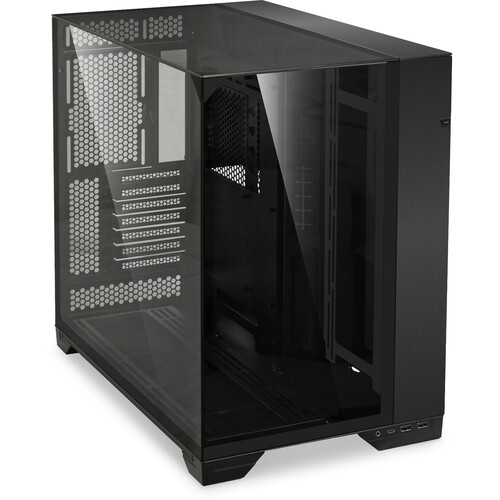
Lian Li O11 Vision Mid-Tower Case (Black)
In Stock
SKU #
LIO11VXUS
Mfr #
O11VX.US
Manufacturer
Lian Li
Description
House your next PC build with style using the black Lian Li O11 Vision Mid-Tower Case. With a steel frame and tempered glass on the top, front, and side panels, this case is durable while putting your components and RGB on full display as the centerpiece of your desk setup. The dual chamber layout packs room for up to eight fans, seven expansion slots, and space to hide cabling in the back.Dual-Chamber Design Thanks to the dual chamber design, the PSU is tucked in the back with the cables, meaning there is more room for bottom fans and airflow in the chassis. The tempered glass panels around the main chamber provide unobstructed viewing on internal components due to the lack of a pillar or column.Component Compatibility With a large main chamber, you can fit a GPU up to 455mm long, a CPU cooler up to 174mm in height, and E-ATX, ATX, Micro-ATX, or Mini-ITX motherboard sizes. The second chamber houses the PSU with support for ATX form factor power supply units up to 220mm long.Cooling Compatibility While this case does not include preinstalled fans, the chassis can fit up to eight fans along the rear, bottom, and side. Three 120mm or two 140mm fans fit at the side. Three 120 or 140mm fans fit at the bottom, and the rear holds up to two 120mm fans. For liquid cooling radiators, the side and bottom accommodate up to 360mm in size, and the rear fits up to 240mm in size.Storage Compatibility Three 2.5" drive bays are available for mounting at the back of the case, and a drive tray at the back fits two 2.5 or 3.5" drives.Adjustable Motherboard Tray Mount the motherboard, CPU pump, and graphics card outside the chassis for easier installation before setting the components in the case.I/O A USB-C 3.2 Gen 1 port allows for external drives and high end accessories to connect to your motherboard. The two USB-A 3.0 ports are perfect for peripherals like keyboards, mice, or flash drives. Use the 3.5mm combo audio jack for headsets with microphones.Cable Management Thanks to the 15mm protrusion of the PSU mounting bracket, there is more room for cable management at the back of the case. Two cable ties are also attached to the back of the motherboard tray to help funnel and organize cables. If you are not using extra storage drives, the rear drive cage can be removed to add more space for cables.
Product Information
Availability:
In Stock