
- Products
-
Audio & Studio Equipment
See all
-
Cameras & Optics
See all
- Computers & Mobile Devices
- Drones & Aerial Imaging
-
Professional Video & AV
See all
- Security & Surveillance
- TVs & Entertainment
SubcategoriesSee all -
Audio & Studio Equipment
- About us
- Contact Us
- +1-888-219-0753
- Bulk Order

- Products
-
Audio & Studio Equipment
See all
-
Cameras & Optics
See all
- Computers & Mobile Devices
- Drones & Aerial Imaging
-
Professional Video & AV
See all
- Security & Surveillance
- TVs & Entertainment
SubcategoriesSee all -
Audio & Studio Equipment
- About us
- Contact Us
- +1-888-219-0753
- Bulk Order
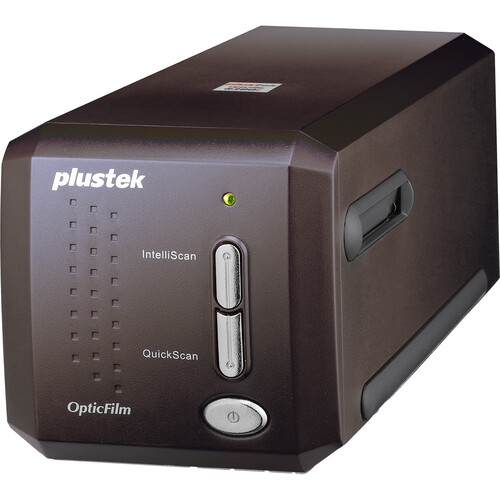
Plustek Optic-Film 8300I AI Scanner
In Stock
SKU #
PLOF8300IAI
Mfr #
OF8300IAI
Manufacturer
Plustek
Description
The OpticFilm 8300i Ai Film Scanner from Plustek converts all your 35mm negatives and mounted slides into digital files you can edit and view on the computer. The scanner uses a high-resolution 7200dpi sensor with 48-bit color depth to capture all the detail from your originals. The scanner's built-in infrared channel provides dust and scratch removal. Additionally, the included IT 8 calibration slide ensures accurate color results the first time, reducing the need for repeated scans or extensive post-processing color correction. This scanner processes film roughly 38% faster than the 8200i Ai and uses an advanced IT8 target with more measuring points for less interpolation. The included SilverFast Ai Studio 9 works together with the scanner to improve your workflow and ensure proper results, making it easier to create a digital image archive of your analog images.Additional Details Scan speed increased by roughly 38% over OpticFilm 8200i Ai Resolution: 7200 dpi Color Depth: 48-bit 64-bit hardware & software support Enhanced with Multi-Exposure Function for improved image quality Built-in Infrared channel IT8 color calibration USB Hi-Speed 2.0 connection Compatible with Windows and Mac computers Plustek QuickScan Plus Plustek QuickScan Plus is a button utility software for scanning 35mm negative films and positive slides. It is ideal for digitizing snapshots with just one click. It is speedy to scan and easy to operate on Windows and Mac.SilverFast SE Plus 9 SilverFast is a professional-grade scan software. It provides users and professionals with a powerful tool for scanning, editing, and color reproduction. Share files by converting them to portable file formats such as PDF and Presto Wrapper. Easily organize files. View files without opening other applications, with PageManager document and image viewers. Stack related image and document files - even with different file formats. Quickly find backup files, annotations, title, author, and memo information with the efficient search function. Add annotations without affecting the original file with handy annotation tools, such as text, stamp, highlighter, freehand line, straight line, sticky note, and bookmark. Enhance images with a set of image tools such as crop, rotate, flip, invert color, auto-enhancement, brightness and contrast, color adjustment, and remove noise.
Product Information
Availability:
In Stock