
- Products
-
Audio & Studio Equipment
See all
-
Cameras & Optics
See all
- Computers & Mobile Devices
- Drones & Aerial Imaging
-
Professional Video & AV
See all
- Security & Surveillance
- TVs & Entertainment
SubcategoriesSee all -
Audio & Studio Equipment
- About us
- Contact Us
- +1-888-219-0753
- Bulk Order

- Products
-
Audio & Studio Equipment
See all
-
Cameras & Optics
See all
- Computers & Mobile Devices
- Drones & Aerial Imaging
-
Professional Video & AV
See all
- Security & Surveillance
- TVs & Entertainment
SubcategoriesSee all -
Audio & Studio Equipment
- About us
- Contact Us
- +1-888-219-0753
- Bulk Order
HomeCatalogProfessional Video & AVPTZ Cameras & SolutionsPTZ Camera Kitsikan OTTICA 3 x NDI HX3 4K 30x PTZ Cameras and Controller Bundle
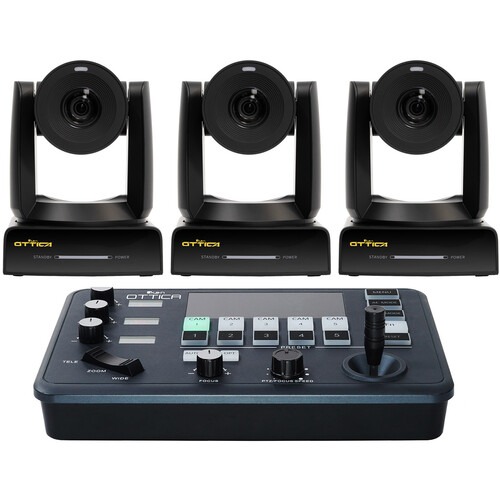
ikan OTTICA 3 x NDI HX3 4K 30x PTZ Cameras and Controller Bundle
In Stock
SKU #
IKOTC4K33PTZ
Mfr #
OTTICA-4K3-3PTZ
Manufacturer
ikan
Description
Add a high-resolution, triple camera setup to your meeting room, classroom, or house of worship with the OTTICA 3 x NDI HX3 4K 30X PTZ Cameras and IP Controller Bundle from ikan. This bundle comprises three OTTICA NDI HX3 4K 30x PTZ cameras and the OTTICA V2 IP camera controller. The cameras have built-in NDI HX3, support up to UHD 4K60 video, and feature auto-tracking and autofocus. The PTZ controller features a joystick control and four LED screens.None The OTTICA V2 IP PTZ Camera Controller from ikan features four LED screens, various controls, and is compatible with any PTZ camera that uses IP VISCA, serial port VISCA, and Pelco-D/P protocols. It can be set up to control up to 5 cameras over Ethernet, DB-9 RS-232, and 4-pin Phoenix RS-422 ports simultaneously. Three dedicated knobs control camera parameters like iris, zoom, and gain. Camera presets have been streamlined for intuitive configuration. The controller comes with a Phoenix 4-pin terminal and a power adapter for easy integration into your broadcast setup.Interface The OTTICA V2 has an RJ45 port, DB-9 RS-232 port, and a 4-pin RS-422 port for both analog and IP control protocols. Other connectors include a 12V barrel power input and a micro USB connector for firmware updates.Precise Controls A 2-axis joystick on the OTTICA V2 facilitates smooth control of pan and tilt movements. A zoom rocker easily zooms your camera in or out. Two separate knobs control the focus and PTZ/focus speed. Select from 7 different speed levels for PTZ movements. Reset your camera parameters to the default positions by holding down the function button.Quick Adjustment Three dedicated side knobs and corresponding LED screens can adjust different parameters depending on the operating mode you are in. Enter AE mode to change the auto exposure mode of your connected camera. The side knobs will then allow you to adjust shutter, iris, and exposure compensation. When in WB mode, change the white balance of your camera by adjusting the knobs for color temperature, red gain, and blue gain. Other possible parameters controlled by the knobs include brightness, focus, and gain limit.Preset Positions Creating camera presets is intuitive, simply press and hold one of the preset buttons. When you wish to recall the preset, tap the corresponding button and your camera will adjust accordingly. The OTTICA V2 is capable of programming 5 presets or a maximum of 10 presets for selection per channel.
Product Information
Availability:
In Stock