
- Products
-
Audio & Studio Equipment
See all
-
Cameras & Optics
See all
- Computers & Mobile Devices
- Drones & Aerial Imaging
-
Professional Video & AV
See all
- Security & Surveillance
- TVs & Entertainment
SubcategoriesSee all -
Audio & Studio Equipment
- About us
- Contact Us
- +1-888-219-0753
- Bulk Order

- Products
-
Audio & Studio Equipment
See all
-
Cameras & Optics
See all
- Computers & Mobile Devices
- Drones & Aerial Imaging
-
Professional Video & AV
See all
- Security & Surveillance
- TVs & Entertainment
SubcategoriesSee all -
Audio & Studio Equipment
- About us
- Contact Us
- +1-888-219-0753
- Bulk Order
HomeCatalogComputers & Mobile DevicesMonitor & Display AccessoriesComputer Display Cables & AdaptersOWC USB-C to Dual HDMI 4K Display Adapter with DisplayLink
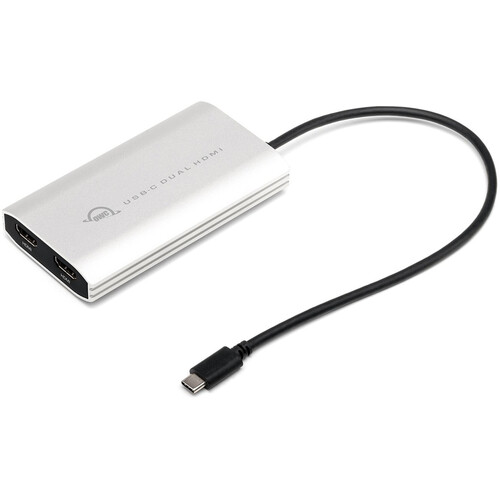
OWC USB-C to Dual HDMI 4K Display Adapter with DisplayLink
In Stock
SKU #
OWCCADPDL2HD
Mfr #
OWCCADPDL2HDMI
Manufacturer
OWC
Description
Streamline your workflow with the USB-C to Dual HDMI 4K Display Adapter with DisplayLink from OWC / Other World Computing. This adapter allows you to connect up to two 4K/60 Hz (3840 x 2160) HDMI displays to your Windows or Mac computer through a single USB-C cable. Multitask more efficiently by extending your primary display, or mirror your primary display for presentations.Dual Displays for All Besides creating delightful dual-display nirvana with Apple M1, M2, and M3 Silicon Macs, you can easily use this nifty, pixel multiplying adapter with your USB-C or Thunderbolt equipped Mac or PC. Just connect the built-in USB-C cable to your machine, download the DisplayLink Manager application (Mac) or driver (Windows), and bam, dual 4K "Plug and Display" magnificence is yours to revel in.Display-It-All + Power-It-Up With its compact travel-friendly size and bus-powered convenience, you'll always be ready to wow an audience or a team with your newfound multi-display capability. No longer will you have to choose between power and dual displays, or take up a second USB-C port to charge your laptop - this handy little adapter features a power pass-thru port. Simply plug in your laptop's USB-C power adapter to keep the electrons flowing.USB-C / Thunderbolt 3 / Thunderbolt 4 / USB4 Connectivity Universal compatibility means one thing - if your port matches the plug, you're all set. You don't have to fiddle around to see if you have the right interface, the correct port, or the correct cable.Planetary Exploration Encouraged About the size and weight of a compact smartphone, the OWC USB Type-C Dual HDMI hides away in bags, pockets, and camera packs, and tucks neatly out-of-sight at your workstation. Wherever your adventures take you, plugging dual displays into your Mac or PC doesn't get any easier.OS Compatibility macOS 14.x Sonoma macOS 13.x Ventura macOS 12.x Monterey macOS 11.x Big Sur macOS 10.15 Catalina Windows 11 Windows 10 (32-/64-bit) Windows 8.1 (32-/64-bit) Windows 7 (32-/64-bit) Android 10.x to 13.x Chrome OS Ubunti 20.04 or later Dual Display Support Dual display support, including available resolution and refresh rates, is dependent on host hardware and drivers Apple Silicon M1/M2/M3 Pro, M1/M2/M3 Max, and M1/M2 Ultra Mac models, Apple Intel-based Mac models, and Thunderbolt 4 PCs can support up to two displays at up to 4K/60 Hz via Thunderbolt Apple Silicon M1/M2/M3 Mac models can support one external display up to 4K/60Hz via Thunderbolt Single Display Support The following Apple silicon M1/M2/M3 Mac models support a single display over a Thunderbolt port: MacBook Pro (14", M3, 2023) MacBook Pro (13", M1, 2020) - MacBookPro17,1 MacBook Pro (13", M2, 2022) - Mac14,7 MacBook Air (M1, 2020) - MacBookAir10,1 MacBook Air (M2, 2022) - Mac14,2 Mac mini (M1, 2020) - Macmini9,1 Macs with Partial Support for DisplayPort 1.4 The following Mac models provide only partial support for DisplayPort 1.4, including limiting resolution to 5K or 6K at 60 Hz. Please review Apple's display specifications for your specific Mac to determine the maximum supported resolution and color depth: MacBook Pro (15", 2018) - MacBookPro15,1 MacBook Pro (13", 2018, Four Thunderbolt 3 ports) - MacBookPro15,2 MacBook Pro (13", 2019, Four Thunderbolt 3 ports) - MacBookPro15,2 MacBook Pro (15", 2019) - MacBookPro15,1 and MacBookPro15,3 MacBook Pro (13", 2019, Two Thunderbolt 3 ports) - MacBookPro15,4 MacBook Pro (16", 2019) - MacBookPro16,1 and MacBookPro16,4 MacBook Pro (13", 2020, Four Thunderbolt 3 ports) - MacBookPro16,2 MacBook Pro (13", 2020, Two Thunderbolt 3 ports) - MacBookPro16,3 MacBook Air (Retina, 13", 2018) - MacBookAir8,1 MacBook Air (Retina, 13", 2019) - MacBookAir8,2 MacBook Air (Retina, 13", 2020) - MacBookAir9,1 iMac (Retina 5K, 27", 2019) - iMac19,1 iMac (Retina 4K, 21.5", 2019) - iMac19,2 iMac (Retina 5K, 27", 2020) - iMac20,1 and iMac20,2 Mac mini (2018) - Macmini8,1 Mac Pro (2019) - MacPro7,1 Mac Pro (Rack, 2019) - MacPro7,1
Product Information
Availability:
In Stock