
- Products
-
Audio & Studio Equipment
See all
-
Cameras & Optics
See all
- Computers & Mobile Devices
- Drones & Aerial Imaging
-
Professional Video & AV
See all
- Security & Surveillance
- TVs & Entertainment
SubcategoriesSee all -
Audio & Studio Equipment
- About us
- Contact Us
- +1-888-219-0753
- Bulk Order

- Products
-
Audio & Studio Equipment
See all
-
Cameras & Optics
See all
- Computers & Mobile Devices
- Drones & Aerial Imaging
-
Professional Video & AV
See all
- Security & Surveillance
- TVs & Entertainment
SubcategoriesSee all -
Audio & Studio Equipment
- About us
- Contact Us
- +1-888-219-0753
- Bulk Order
HomeCatalogComputers & Mobile DevicesMonitors & DisplaysComputer Monitor & DisplaysASUS ProArt PA169CDV 15.6" Multi-Touch 4K HDR Portable Monitor & Pen Display
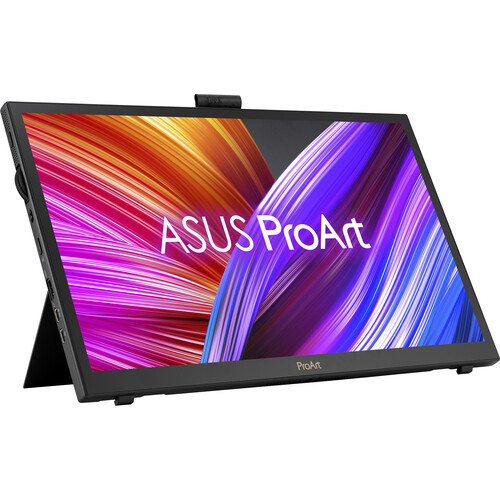
ASUS ProArt PA169CDV 15.6" Multi-Touch 4K HDR Portable Monitor & Pen Display
In Stock
SKU #
ASPA169CDV
Mfr #
PA169CDV
Manufacturer
ASUS
Description
Take your creative workflow to the next level with the ASUS ProArt PA169CDV 15.6" Multi-Touch 4K HDR Portable Monitor & Pen Display. Designed for professionals, this portable 3840 x 2160 resolution UHD 4K display is factory calibrated for Delta E A dual adjustable kickstand system allows you to position the display for viewing or drawing. The ASUS dial, located on the side of the display, may be customized with functions such as zoom and brush size adjustments to streamline your workflow. Similarly, the ASUS Control Panel software turns the touchscreen into a dedicated controller with supported applications. With its slim, lightweight design, the ProArt PA169CDV is ready to go with you on your travels while stored in the included carrying bag.Natural Drawing The ASUS ProArt Pen uses Wacom electromagnetic resonance (EMR) technology, meaning that it's battery-free and accurately detects your hand movements. Support for 4096 pressure levels and a 40 tilt allow you to naturally draw thick, thin, and angled lines. Two interchangeable pen nibs are also included to change the frictional feel between a pen or brush. There are also two customizable side buttons and a digital eraser.Precise Color Featuring a 15.6" IPS panel, this PANTONE Validated and Calman Verified portable display is designed to provide 1.07 billion colors with a 1200:1 static (15,000:1 HDR) contrast ratio and 500 nit peak brightness that delivers true-to-life visuals.Built-in Adjustable Kickstands The ProArt Display PA169CDV features two built-in ergonomic kickstands. The lower kickstand provides the ideal viewing angle for everyday productivity, while engaging the upper prop tilts the display at a shallow 17 angle for comfortable creativity.Creativity with a Spin An integrated ASUS Dial provides precise fingertip control over different parameters in creative apps. A switch by the dial allows you to select either stepped or stepless mode for intuitive control. Customized shortcuts enable you to zoom in and out of images or adjust brush size by simply turning the ASUS Dial.Intuitive Control at Your Fingertips ASUS Control Panel software provides a virtual interface that's designed to give you intuitive, precise control over creative apps such as Adobe software, DaVinci Resolve, Clip Studio Paint, and more. With the fully customizable dial, slider, button, and scroll touch controls, you can assign controls to change brush size or saturation. There's also a Color Management function to optimize color tools.
Product Information
Availability:
In Stock