
- Products
-
Audio & Studio Equipment
See all
-
Cameras & Optics
See all
- Computers & Mobile Devices
- Drones & Aerial Imaging
-
Professional Video & AV
See all
- Security & Surveillance
- TVs & Entertainment
SubcategoriesSee all -
Audio & Studio Equipment
- About us
- Contact Us
- +1-888-219-0753
- Bulk Order

- Products
-
Audio & Studio Equipment
See all
-
Cameras & Optics
See all
- Computers & Mobile Devices
- Drones & Aerial Imaging
-
Professional Video & AV
See all
- Security & Surveillance
- TVs & Entertainment
SubcategoriesSee all -
Audio & Studio Equipment
- About us
- Contact Us
- +1-888-219-0753
- Bulk Order
HomeCatalogComputers & Mobile DevicesFeatured LaptopsLaptopsAcer 14.5" Predator Triton 14 AI Multi-Touch Laptop Copilot+PC
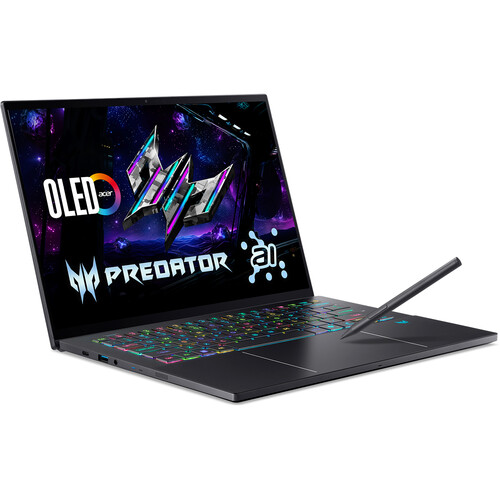
Acer 14.5" Predator Triton 14 AI Multi-Touch Laptop Copilot+PC
In Stock
SKU #
ACPT1452T96T
Mfr #
PT14-52T-96T3
Manufacturer
Acer
Description
Harness the power of AI with the Acer 14.5" Predator Triton 14 AI Multi-Touch Laptop Copilot+PC. Optimized to take full advantage of Microsoft Copilot, the Predator Triton 14 AI is powered by an Intel Core Ultra 9 processor with a built-in Intel AI Boost NPU that can handle up to 48 TOPS. Add 32GB of LPDDR5X RAM, 2TB M.2 SSD, and a dedicated NVIDIA GeForce RTX 5070 laptop graphics card, and the Predator Triton 14 AI can utilize the integrated AI features in Windows 11.The AI Experience With the Intel Core Ultra 9 processor as the centerpiece of its build, this laptop can take full advantage of AI features in Windows and supported third-party apps to enhance and streamline your workflow. The CPU also has an integrated Intel AI Boost NPU providing local AI processing with up to 48 TOPS.NVIDIA GeForce RTX 50-Series Graphics The dedicated NVIDIA GeForce RTX 5070 laptop graphics card in this laptop delivers the performance you need for high frame rates and high-res visuals for the latest games. Utilize real-time raytracing and DLSS 4 to make sure you get the most out of your gameplay.14.5" OLED Touchscreen The 14.5" display features a 2880 x 1800 resolution, a 16:10 aspect ratio, and a 120 Hz refresh rate. The OLED panel and glossy finish allow for deep black levels and vibrant colors. The screen also has multi-touch support.Work Smarter with the Copilot+ PC Experience Recall Searching for a document, email, or web page on your PC can be time-consuming. Now, just describe how you remember something, and Recall will find it, instantly. Cocreator Become an artist by describing or drawing your vision with text or image prompts and watch Cocreator generate it. Microsoft OneNote Get help from Copilot to summarize your handwritten notes in Microsoft OneNote. Adobe Photoshop With simple text prompts in everyday language, you can create, edit, transform, and bring your imagination to life with the power of generative AI. Live Captions Whether video calls or dialogue in a streaming video, get accurate subtitles in real-time with automatic Live Captions. Translate 44 languages to English. Windows Studio Effects Improve lighting, cancel noises, and blur distractions during video calls. When presentation matters, turn on Windows Studio Effects.Windows 11 Home Microsoft simplified the design and user experience with Windows 11. It has a modern, clean design with a new Start Menu position. Snap Layouts, Groups, and Desktops allow you to multitask with ease. Microsoft has also integrated some of their apps, such as Microsoft Teams. The redesigned Microsoft Store makes it easier to look for supported apps.
Product Information
Availability:
In Stock