
- Products
-
Audio & Studio Equipment
See all
-
Cameras & Optics
See all
- Computers & Mobile Devices
- Drones & Aerial Imaging
-
Professional Video & AV
See all
- Security & Surveillance
- TVs & Entertainment
SubcategoriesSee all -
Audio & Studio Equipment
- About us
- Contact Us
- +1-888-219-0753
- Bulk Order

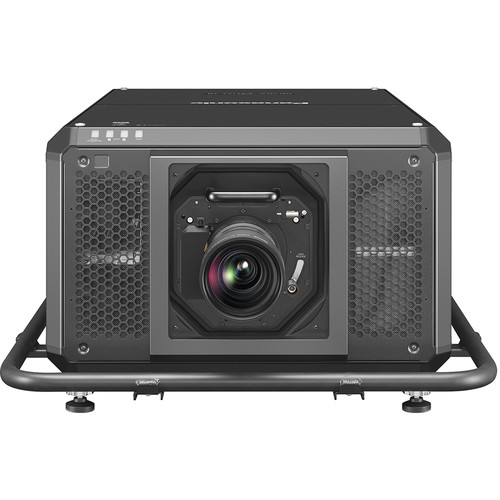
Panasonic PT-RQ50K 50000-Lumen DCI 4K Laser 3DLP Projector (No Lens)
In Stock
SKU #
PAPTRQ50KU
Mfr #
PT-RQ50KU
Manufacturer
Panasonic
Description
Project bright, vibrant images in nearly any setting with the Panasonic PT-RQ50K 50,000-Lumen DCI 4K Laser 3DLP Projector. It outputs up to 50,000 lumens at 240V (up to 10,000 lumens at 120V) using a multi-laser array and features an HDBaseT port and two expansion slots for adding your inputs of choice, and a 12G-SDI expansion card is included. The PT-RQ50K requires a lens, and options ranging from 1.11 to 1.7:1 to 4.97 to 7.76:1 throw ratios are available to produce images up to 1500" diagonal. The projector can be controlled over LAN or with the onboard RS-232, 1/8", and BNC control ports or via the Smart Projector Control app.Bright, DCI 4K Images The PT-RQ50K produces DCI 4K (4096 x 2160) images with a laser engine that consists of one red laser and two blue lasers operating at different wavelengths to provide rich color for use at sporting events, arena concerts, outdoor mapping attractions, or museum exhibitions.Expanded Color Gamut The three-laser array is designed to produce lush, vibrant hues to pull audiences into the artist's world. The two blue lasers output light at different wavelengths to enhance color accuracy, and the red laser helps provide more vivid reds. Digital frame-by-frame control technology manages light output according to the scene's contrast and brightness requirements for further image augmentation.All-in-One Body with Built-In Cooling The airflow path and finless radiator help boost the efficiency of the liquid cooling system, while separate cooling for the red laser is regulated by Dynamic Digital Control for enhanced image consistency and reliability. This space-saving design helps bring the logistic efficiencies of all-in-one projection to large-venue staging.Remote Preview Helps Save Time Remote Preview lets you check the content being received by the projector via your Wi-Fi or LAN-connected laptop. It works with the projector in Standby Mode, with the shutter on, or when direct sunlight makes inspecting on-screen images difficult, giving you a chance to fix errors between the source and the projector before setup is complete.Built-In, Pre-Activated Upgrade Kits for Geo Pro Software Upgrade features for Geometry Manager Pro are built into the software and do not require paid activation. Just download and install Geo Pro to a Windows computer to simplify multi-screen geometric adjustments. Built-in capabilities include uniformity correction and Auto Screen Adjustment for automatic and simultaneous calibration of multiple screens (including curved-screen correction) using a compatible camera. These features help expedite edge blending and color matching in mapping applications with automatic calibration for black level, brightness uniformity, and stacking.Geometric Adjustment with Free Grid Correction via Remote Control Free Grid is a function in Geometric Adjustment that enables convenient grid-based image adjustment using the included remote control. Grid resolutions of 2x2, 3x3, 5x5, 9x9, or 17x17 can be projected and areas of the image reshaped or geometrically altered to compensate for screen distortions by adjusting control points located at grid-line intersections. Move freely between grid resolutions to achieve the desired level of granularity without losing work progress. This allows technicians to smoothly create a distortion-free projection in a variety of situations.Remote App with NFC The Smart Projector Control app for Android and iOS includes the NFC (Near Field Communication) function to pair your compatible smartphone to the projector with just a touch. Once linked the app accesses an information settings menu for easy adjustment without turning on the projector. In addition to showing data and allowing certain settings to be changed, the app features an auto-focus function that uses the phone's camera and app UI to achieve quick, precise image focus. App functionality is limited on iOS devices.Information Monitor To further simplify setup and operation of the projector, an In
Product Information
Availability:
In Stock