
- Products
-
Audio & Studio Equipment
See all
-
Cameras & Optics
See all
- Computers & Mobile Devices
- Drones & Aerial Imaging
-
Professional Video & AV
See all
- Security & Surveillance
- TVs & Entertainment
SubcategoriesSee all -
Audio & Studio Equipment
- About us
- Contact Us
- +1-888-219-0753
- Bulk Order

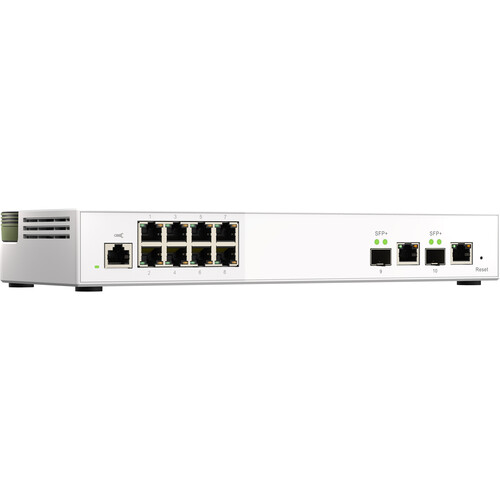
QNAP QSW-M2108-2C 10-Port 10GbE and 2.5GbE Managed Switch
In Stock
SKU #
QNQSWM21082C
Mfr #
QSW-M2108-2C-US
Manufacturer
QNAP
Description
Built with two 10GbE SFP+/RJ45 combo ports and eight 2.5GbE ports, the QSW-M2108-2C 10-Port 10GbE and 2.5GbE Managed Switch from QNAP lets you upgrade to 10GbE or 2.5GbE networking while optimizing bandwidth and ensuring secure network maintenance. It supports Layer 2 switching and network management via a user-friendly web interface and offers flexible deployment in hybrid high-speed network environments while providing an entry-level network management solution. Compatible with 10GbE and NBASE-T technologies that support 10GbE, 5GbE, 2.5GbE, 1GbE, and 100MbE, the QSW-M2108-2C provides higher transmission speeds with existing Cat 5e and 6a cables. An integrated fan helps keep things running cool, while IEEE 802.3az compliance helps reduce power usage and IEEE 802.3x Flow Control in full-duplex mode helps avoid packet loss. Additional features include plug-and-play functionality, port trunking, link aggregation, loop prevention, and more. Please note that while there are two physical 10GbE SFP+ and two physical 10GbE RJ45 ports, for a total of four, one SFP+ and one RJ45 port are paired together as a combo port, meaning only one port in each pair may be used at a time. General FeaturesFlexible Deployment with Multiple 10GbE SFP+ Fiber and Gigabit Ports The QSW-M2108-2C provides two 10GbE SFP+/RJ45 combo ports and eight 2.5 Gigabit ports for connecting various devices and enabling hybrid high-speed networks. With SFP+ interfaces, Direct Attach Copper (DAC) cables can be used for connecting directly to SFP+ devices. You can also use RJ45 ports to connect 10GBASE-T/NBASE-T devices through RJ45 Category 6 (or better) cabling. The switching capacity of the QSW-M2108-2C is 80 Gb/s. Note: 10GbE SFP+ ports are backward compatible with 1GbE SFP; the RJ45 (copper) combo port supports 10GbE, 5GbE, 2.5GbE, 1GbE, and 100MbE.Flexible Deployment Combo Ports and 10GbE/NBASE-T The QSW-M2108-2C is compatible with 10GbE and NBASE-T technologies to support five speeds (10GbE / 5GbE / 2.5GbE / 1GbE / 100MbE) using existing Cat 5e and Cat 6a cables. The SFP+/RJ45 (copper) combo ports provide higher transmission speeds with existing cables. Depending on cable type and lengths, different speeds can be achieved for faster, more efficient data transfer. Note: If the distance between the switch and the device is less than 148 feet, a Cat 6 cable can be used to achieve 10 Gb/s speeds.Embrace High-Speed Networking with QNAP A Fast NAS A QNAP NAS with multiple 2.5GbE ports and Port Trunking allows you to combine multiple ports for greater bandwidth potential. Upgrade Desktops and Servers Servers and desktops can install QNAP PCIe network cards that support 10GbE, 5GbE, 2.5GbE, 1GbE, and 100MbE Multi-Gig. Add a 5GbE Port to Laptops Laptops and upgrade-limited computers can use the portable QNAP USB 3.2 Gen 1 to 5GbE adapter that allows you to connect to 5GbE, 2.5GbE, 1GbE, and 100MbE networks via USB.QSS: Intuitive Network Management Software The QNAP Switch System (QSS) features an easy-to-use Web GUI with value-added functions to simplify network set up and management. Sleek Design Use the at-a-glance major functions, flat control layers, and one-click login to simplify set up and management. GUI The visual illustration matches physical ports for greater usability. Value Added With the settings guide, status chart reference, online firmware update, learning, and management costs are greatly reduced.QSS: Human-Centered Settings Guide QSS provides an overview dashboard, port management, and setting guide to help administrators control Layer 2 networks. Overview Dashboard View real-time system information, port connection status, and port traffic. Port Management View port status, port packet statistics, and configure port speeds. Setting Guide Quickly learn how to set up the networking using the introduction and step-by-step guide. Exclusive Status Chart Referencing Refer to four major status charts during each configuration to avoid going back and forth be
Product Information
Country of Origin:
TW
Availability:
In Stock
Unit of Measure:
EA