
- Products
-
Audio & Studio Equipment
See all
-
Cameras & Optics
See all
- Computers & Mobile Devices
- Drones & Aerial Imaging
-
Professional Video & AV
See all
- Security & Surveillance
- TVs & Entertainment
SubcategoriesSee all -
Audio & Studio Equipment
- About us
- Contact Us
- +1-888-219-0753
- Bulk Order

- Products
-
Audio & Studio Equipment
See all
-
Cameras & Optics
See all
- Computers & Mobile Devices
- Drones & Aerial Imaging
-
Professional Video & AV
See all
- Security & Surveillance
- TVs & Entertainment
SubcategoriesSee all -
Audio & Studio Equipment
- About us
- Contact Us
- +1-888-219-0753
- Bulk Order
HomeCatalogAudio & Studio EquipmentMusical InstrumentsGuitars & Stringed InstrumentsAalberg ROM RO-1 Reverb Pedal with Wireless Control
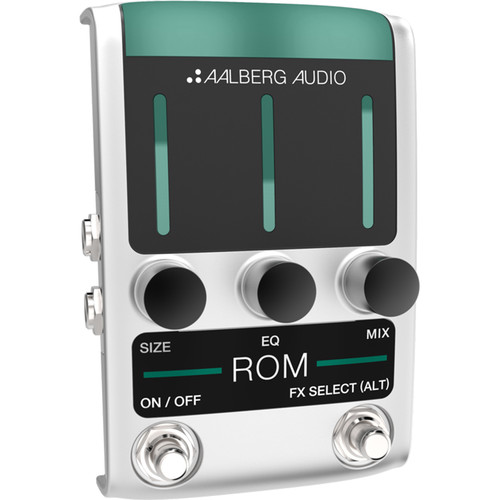
Aalberg ROM RO-1 Reverb Pedal with Wireless Control
In Stock
SKU #
AARO1U
Mfr #
RO-1-U
Manufacturer
Aalberg
Description
The ROM RO-1 Reverb Pedal from Aalberg Audio uses complex algorithms to recreate an endless variety of warm and realistic-sounding reverb effects, both mono and stereo, in a stompbox that can be controlled wirelessly with the optional AERO AE-1 controller. The ALT footswitch toggles between different pre-configured user settings, allowing you to switch between two different types of reverbs or use different pre-delay values. The ROM RO-1 Reverb Pedal can also be controlled by a free iOS / Android remote app that provides easy editing and allows the saving of presets for later recall. All the electronics are contained in a rugged, custom-made aluminum housing, while the onboard green LED bars at the top provide actual parameter settings, easily seen from a distance or in low light. The ROM is powered by an optional 9V adapter.General Features Parameters: Size, EQ, and MixSwitch between plate and hall reverbTrue bypassCompatible with AERO AE-1 Wireless ControllerUpgrade firmware and sound algorithms by using the Aalberg Update app (iOS only)Control pedal and get extended functionality using the Aalberg Remote App (Coming soon)Controls Size: From small room to an extreme big hall soundEQ: Low Pass Filter to change between a bright tone to a darker reverb toneMix: Dry/wet mix: from completely dry sound to completely wet reverb soundFX-Select (ALT)FX-Select: Choose active effect parameter (Size, EQ or Mix) for wireless control with AERO controller (optional)ALT: Lets you change between two modes for the ROM pedal. Press and hold the FX-Select footswitch to toggle between the two modesALT (no light): Short pre-delayALT (light): Long pre-delayOn/Off: Set the pedal to ON (activated) or OFF (true bypass)Input / Output Setups Mono In / Mono Out: Connect your instrument to Mono In and the amplifier to Mono OutMono In / Stereo Out: Connect your instrument to Mono In and use both Mono and Stereo Outputs. This gives a stereo spread between the two outputsDry / Wet Split: Connecting your instrument to Stereo In will split the dry wet signal as followsMono Out: 100% wet signalStereo Out: 100% dry signalStereo In / Stereo Out: For a more spacious reverb using two amplifiers. Connect stereo signal to both inputs, then connect one amplifier to Mono Out, and another amplifier to Stereo Out
Product Information
Availability:
In Stock