
- Products
-
Audio & Studio Equipment
See all
-
Cameras & Optics
See all
- Computers & Mobile Devices
- Drones & Aerial Imaging
-
Professional Video & AV
See all
- Security & Surveillance
- TVs & Entertainment
SubcategoriesSee all -
Audio & Studio Equipment
- About us
- Contact Us
- +1-888-219-0753
- Bulk Order

- Products
-
Audio & Studio Equipment
See all
-
Cameras & Optics
See all
- Computers & Mobile Devices
- Drones & Aerial Imaging
-
Professional Video & AV
See all
- Security & Surveillance
- TVs & Entertainment
SubcategoriesSee all -
Audio & Studio Equipment
- About us
- Contact Us
- +1-888-219-0753
- Bulk Order
HomeCatalogComputers & Mobile DevicesComputer ComponentsComputer CasesASUS Republic of Gamers Strix Helios II Mid-Tower Case (White)
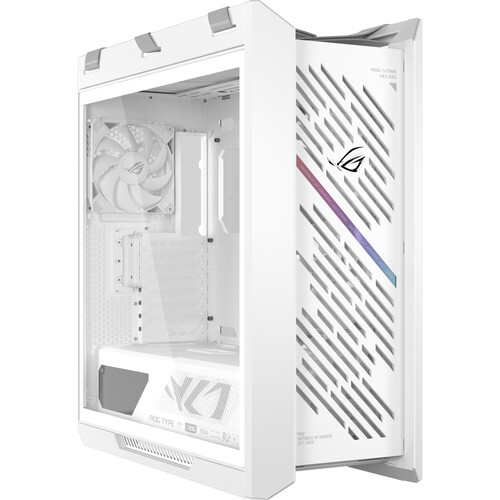
ASUS Republic of Gamers Strix Helios II Mid-Tower Case (White)
In Stock
SKU #
ASHL2GX601SW
Mfr #
ROG STRIX HELIOS II GX601S WHITE
Manufacturer
ASUS
Description
With space for up to E-ATX motherboards, the ASUS ROG Republic of Gamers Strix Helios II Mid-Tower Case allows you to equip your build with a powerful graphics card and advanced cooling to take on demanding content creation projects and turn up the graphics settings for games. The interior has space for an E-ATX, ATX, mATX, or mini-ITX motherboard with up to eight horizontal and two vertical expansions, including a 17.7" long graphics card. For storage, two 3.5" drives can be installed into the drive cage and there are four 2.5" drive mounts located behind the motherboard tray. The stylishly ventilated front panel includes three preinstalled 140mm fans with one on the rear providing strong airflow and minimal noise. Up to three more 120mm or two 140mm fans may be mounted on the top. The tool-Free design and modular fan mounts make it easy to install components.Front Panel The front panel features two USB-C 3.2 Gen 2x2 ports for up to 20 Gb/s compatible devices while providing up to 60W charging. There are also four USB-A 3.2 Gen 1 ports for up to 5 Gb/s devices.Preinstalled Fans Four preinstalled 140mm PWM fans deliver up to 103 CFM airflow with 2.3mm H2O static pressure and a 29 dBA max noise level. Dust filters are located on the front, top, and bottom.Advanced Cooling Support A 420mm radiator may be mounted on the front with room for a 360mm radiator on the top. The rear panel supports a 140mm radiator.Premium Design In addition to featuring a lightweight brushed anodized aluminum frame, the ROG Strix Helios II features a tempered glass side panel that allows you to showcase your internal components and lighting.Tool-Free Side Panel Pushing a button at the rear of the case releases one of the side panels for easy access to the interior. The tempered glass panel is hinged on the bottom, which allows it to swing away and rest at an angle. Or you can remove the panel completely and set it aside while you work.Modular Fan and Radiator Mounts Two removable brackets let you mount fans and radiators before installing them into the case.Graphics Card Slot Clamp A tool-free graphics card slot clamp lets you secure your graphics card into place with a snap.Easy PSU Installation For easier installation, a rear bracket detaches from the case so that an up to 8.7" long power supply can slide in. The movable two-piece PSU shroud has a front cut-out to enable compatibility with PSU lighting and effects.Multifunction Cover A multifunction internal cover hides cabling while providing sturdy support to graphics cards. Its position can be adjusted to accommodate an ATX or E-ATX motherboard.Cable Management A cable cover conceals wiring, resulting in a clean and organized build. A cable grommet bar with three large straps and rear cable clips help you organize your cables.Built-In Control Integrated ARGB lighting and fan speed controls are located on the front panel.Ergonomic Case Straps Carry your desktop to parties and events using the X shape woven fabric straps across the top. They are tested to support up to 110 lb.
Product Information
Availability:
In Stock