
- Products
-
Audio & Studio Equipment
See all
-
Cameras & Optics
See all
- Computers & Mobile Devices
- Drones & Aerial Imaging
-
Professional Video & AV
See all
- Security & Surveillance
- TVs & Entertainment
SubcategoriesSee all -
Audio & Studio Equipment
- About us
- Contact Us
- +1-888-219-0753
- Bulk Order

- Products
-
Audio & Studio Equipment
See all
-
Cameras & Optics
See all
- Computers & Mobile Devices
- Drones & Aerial Imaging
-
Professional Video & AV
See all
- Security & Surveillance
- TVs & Entertainment
SubcategoriesSee all -
Audio & Studio Equipment
- About us
- Contact Us
- +1-888-219-0753
- Bulk Order
HomeCatalogProfessional Video & AVProduction Switchers & ControllersControl Panel Modules & AccessoriesAnalog Way Control Box for LivePremier & Midra 4K Presentation Systems
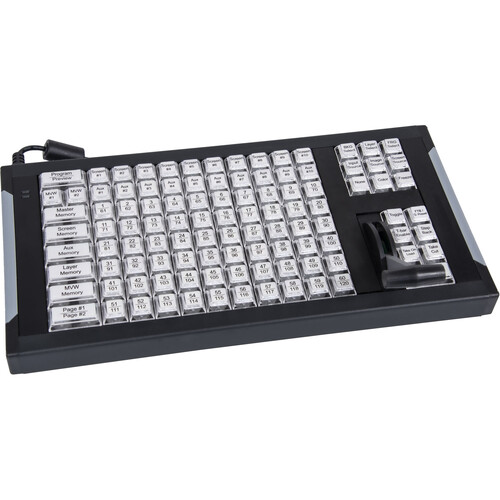
Analog Way Control Box for LivePremier & Midra 4K Presentation Systems
In Stock
SKU #
ANSB124T3
Mfr #
SB124T-3
Manufacturer
Analog Way
Description
Control your video wall or presentation sources and screens when using LivePremier or Midra 4K presentation systems with this Control Box control surface from Analog Way. The surface can be connected directly to your presentation system via USB, or it can plug into a macOS or Windows computer via USB and connect to a system via the computer's LAN port. The included AW Shotbox Control software installs onto the computer to configure each of the 105 color-backlit buttons and T-bar to assign transitions, functions, current screen, sources, and freeze/unfreeze live input. The Control Box features a durable aluminum chassis, and a rugged carry case is included for storage and transport. Key FeaturesNone Select the current screen and/or AUX destination(s)None Load instantly any kind of memory (master, screen, multiviewer, AUX, and layer)None Change the source of a layer or backgroundNone Change the source of an auxiliary outputNone Manual transition (T-bar), immediate (CUT), or programmed (TAKE)None Select the current destination (Preview or Program)None Freeze/unfreeze live inputsNone Heavy-duty extruded aluminum caseNone 105 function-labeled keysNone T-Bar for manual smooth transitionsNone Blue and red backlighting for each key buttonNone Compatible with all LivePremier Series and Midra 4K Series presentation systemsNone Direct USB connection to the switcher front panel or remote connection via a computer with USB and LAN connection (control software included for Windows and macOS)None Robust carrying case included
Product Information
Availability:
In Stock