
- Products
-
Audio & Studio Equipment
See all
-
Cameras & Optics
See all
- Computers & Mobile Devices
- Drones & Aerial Imaging
-
Professional Video & AV
See all
- Security & Surveillance
- TVs & Entertainment
SubcategoriesSee all -
Audio & Studio Equipment
- About us
- Contact Us
- +1-888-219-0753
- Bulk Order

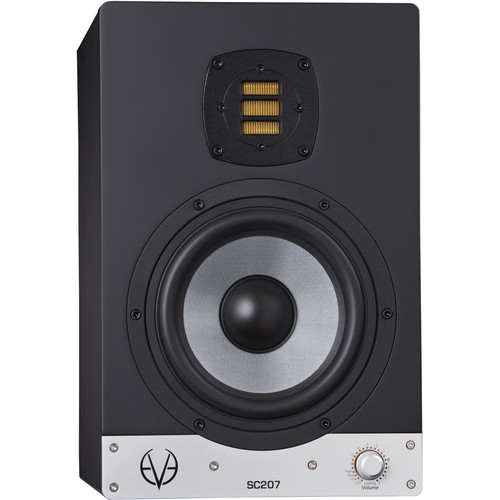
Eve Audio SC207 Active 2-Way 6.5" Nearfiled Studio Monitor (Silver / Black Single)
In Stock
SKU #
EVSC207
Mfr #
SC207
Manufacturer
Eve Audio
Description
Designed for home or professional studio applications, the EVE Audio SC207 is a two-way active nearfield studio monitor that's equipped with a bi-amplifier with a short-term total output of 150W for powering its 6.5" woofer and an AMT RS1 tweeter. The SC207 is designed to offer maximum headroom with minimal distortion. The custom-made SilverCone woofer, which is driven by a 1.5" voice coil, provides bass frequency response down to 44 Hz. The SC207 also features both balanced XLR inputs and unbalanced RCA inputs for flexible connectivity, and a selector knob on the front that gives access to volume control and filter settings to help you tailor your monitors to the way you work.Driver Technology The Air Motion Transformer (AMT)A unique driver technology, distinct from other audio drivers. It utilizes a lightweight, hand-folded diaphragm that is thinly coated with aluminum. The current of the music signal flows through these conductive strands.The diaphragm is placed in a powerful magnetic field leading to movement in the folds caused by the Lorentz force. Due to the opposing direction of the current the walls of each single fold work against each other. The air between the folds is squeezed in and out at a ratio of 1:4, compared to the 1:1 ratio of a regular dome tweeter.This results in higher resolution and dynamics in the tweeter section, along with a very low distortion level, allowing superior sound quality with enhanced detail and clarity.The 6.5" SilverCone woofer is designed for an extended bass response. It features a very stiff diaphragm is honeycomb structured and glass fiber coated. It is driven by a sophisticated low-distortion copper cap magnet system that uses a 1.5" voice coil, resulting in a tight and dynamic bass, along with the usual greater linear excursion.DSP and SMART Knob All EVE Audio monitors feature a high-resolution DSP electronics. A high-quality analog/digital converter from BurrBrown (24-bit/192 kHz) converts the analog input signal supplied via RCA or XLR. The DSP provides latency-free filtering while protecting tweeter and woofer against overload across the entire frequency range. When switched on, the volume of the monitor increases slowly to leave enough time to reduce the source volume if the input signal is too loud.Adjustments to the acoustic environment can be made via the front rotary/pressure encoder, the SMART-knob with rotating LED ring. This knob allows the leveling of system volume as well as the adjustment of filters for room variables (low shelf, mid eq, and high shelf filters). All settings are displayed on the LED ring, providing instant information about the selected values. The brightness of the LED ring can be adjusted for dark studios or video applications.High-quality Class-D amplifiers complete the system and deliver enough power to the demands of modern music production. Selected volume and/or filter settings can be independently fixed with DIP-switches that are positioned on the rear of the amplifier to prevent unauthorised or unintentional adjustments.SMART-Knob Powering On/Off: Standby ModePress and hold the control three seconds in order to put the monitor in Standby mode. The volume will decrease gradually while the LED ring lights up once around the Volume control. Afterwards, the LED on the right end will remain dimly lit and the power consumption is reduced to 1 watt.VolumeThe volume can be adjusted by turning the knob. Depending on the LED mode selected, the volume will be displayed as a dim/bright circle or as a dim/bright point.MuteTo put the monitor in Mute Mode, turn the volume control counterclockwise until you reach the minimum level. When the LED on the left end lights up dimly the Mute Mode is activated.SettingsPress the SMART-knob once to enter the Settings menu. Here you can set different filters as well as the LED ring s behavior. The LED of the currently active function blinks.High Setting The High-Shelf Filter helps you adjust frequencies above 3 kHz i
Product Information
Availability:
In Stock