
- Products
-
Audio & Studio Equipment
See all
-
Cameras & Optics
See all
- Computers & Mobile Devices
- Drones & Aerial Imaging
-
Professional Video & AV
See all
- Security & Surveillance
- TVs & Entertainment
SubcategoriesSee all -
Audio & Studio Equipment
- About us
- Contact Us
- +1-888-219-0753
- Bulk Order

- Products
-
Audio & Studio Equipment
See all
-
Cameras & Optics
See all
- Computers & Mobile Devices
- Drones & Aerial Imaging
-
Professional Video & AV
See all
- Security & Surveillance
- TVs & Entertainment
SubcategoriesSee all -
Audio & Studio Equipment
- About us
- Contact Us
- +1-888-219-0753
- Bulk Order
HomeCatalogProfessional Video & AVProduction Switchers & ControllersProduction Switcher SoftwarevMix Live Production Software Pro
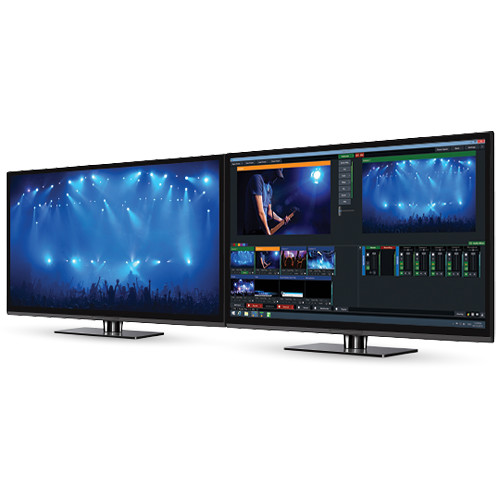
vMix Live Production Software Pro
In Stock
SKU #
VMSCSIVMXPRO
Mfr #
SCSI-VMIX-PRO
Manufacturer
vMix
Description
Simultaneously display, record, and live-stream your production, all with your PC, using vMix Live Production Software Pro. The Pro version of the vMix Live Production Software contains all the features available in the program and supports up to DCI and UHD 4K resolutions for sharp video imagery. Up to 1000 inputs are available and all inputs can be used for camera/NDI sources. The system is completely scalable, so you can use it for one-man shows or for a professional broadcast-grade situation.Exclusive to the Pro version of the software is the ability to do instant replay on up to four cameras. Effectively, the camera feeds are recorded in the MPEG-2 format, and can be played back in real-time or with time manipulation. In addition, the Pro tier has other professional-level features such as support for 2 external outputs via interfaces and 2 full-screen outputs for direct graphics card output. Advanced scripting presets can be set up for speeding up your workflow, and PTZ controls can take control of studio cameras during your production.Other powerful features of this software include video playback, audio mixing, chroma-keying, virtual sets, and more. See below for more features available with this software.Versatile Input Selection External video: 4K, HD, and SD capable. Support for external inputs from capture devices such as DeckLink, Intensity Pro, and WebcamsVideo files: Support for popular formats including AVI, MP4, H264, MPEG-2, WMV, and QuickTimeDVDs: With menu navigationAudio file support: MP3 and WAVAudio devices: Mix multiple audio sources such as SoundCards and DeckLink audioVideo and audio playlists: Combine multiple videos and/or audio files into a single InputRTSP, PowerPoint, Photos, Flash, RTMP, Solid Color, and moreSimultaneous Streaming, Recording, and Output Livestream to your favorite streaming providers including UStream, YouTube, and TwitchLive record in Full HD to AVI, MP4, MPEG-2, or WMVOutput via DeckLink-capable cards to professional recording decks and monitorsVirtual capture support for streaming to 3rd-party software such as Skype, Google Hangout, and VLC13 Transition Effects Four customizable transition buttons allow for easy access to your favorite effects:CutFadeZoomWipeSlideFlyCrossZoomFlyRotateCubeCubeZoomVertical WipeVertical SlideMergeEfficient Hardware Optimization Hardware optimization reduces stress on the CPU, especially when dealing with multiple HD or 4K sources with simultaneous 3D effectsDesktop Sources Utilize screen capture from remote desktops running on your network; great for PowerPoint and SkypeAudio capture support for Skype and other videoconferencing software is available under Windows 7Built-In Title Templates Easily add and edit a Title or ScoreBoard from the many built-in templates or build your own using any graphics or vector editing softwareAdjust text, font size, and color and real time with instant updatesVideo Delay / Instant Replay Create a video delay input and assign it to any available camera or outputSave multiple video clips of notable events for playback at a later timeConfigurable slow-motion playback from 5 to 400%Built-In Audio Mixer The audio mixer allows you to easily keep track of all audio sources and includes the ability to mute, follow (auto mixing), and delay any sourceA VU meter is also included with a peaking display to ensure each input's level is broadcast readyReal-Time Video Effects Color correct, deinterlace, sharpen, zoom, rotate, pan, and crop any input in real timeAll effects are processed in 4:4:4 32-bit color spaceMultiview Combine multiple inputs using the different multiview presets or customize the position of each element with the available zoom, pan, rotate, and crop controlsFour Overlay Channels vMix includes four overlay channels in addition to the multiview feature; each overlay channel can have its own transition effect, position, and borderRemote Control Control vMix remotely using the vMix web controller on your Surface
Product Information
Availability:
In Stock