
- Products
-
Audio & Studio Equipment
See all
-
Cameras & Optics
See all
- Computers & Mobile Devices
- Drones & Aerial Imaging
-
Professional Video & AV
See all
- Security & Surveillance
- TVs & Entertainment
SubcategoriesSee all -
Audio & Studio Equipment
- About us
- Contact Us
- +1-888-219-0753
- Bulk Order

- Products
-
Audio & Studio Equipment
See all
-
Cameras & Optics
See all
- Computers & Mobile Devices
- Drones & Aerial Imaging
-
Professional Video & AV
See all
- Security & Surveillance
- TVs & Entertainment
SubcategoriesSee all -
Audio & Studio Equipment
- About us
- Contact Us
- +1-888-219-0753
- Bulk Order
HomeCatalogComputers & Mobile DevicesNetworkingAll Wired NetworkingCisco SF250-48 48-Port Fast Ethernet Smart Switch
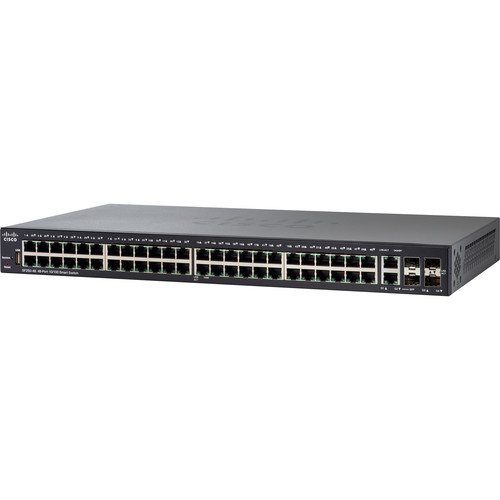
Cisco SF250-48 48-Port Fast Ethernet Smart Switch
In Stock
SKU #
CISF25048K9
Mfr #
SF250-48-K9-NA
Manufacturer
Cisco
Description
Add more switching capacity to your corporate network with the SF250-48 48-Port Fast Ethernet Smart Switch from Cisco. This switch comes equipped with 48 10/100 Mb/s Ethernet ports, a pair of 10/100/1000 Mb/s RJ45/SFP combo ports, and two SFP ports, while a USB Type-A port allows for image and configuration transfers. Powered by an 800 MHz ARM processor with 512 MB of RAM and 256 MB of flash memory, the SF250-48 Smart Switch boasts network security features such as 802.11x user authentication, denial-of-service attack prevention, and access control lists. The SF250-48's support for the Energy Efficient Ethernet standard allows the switch to conserve power during periods of low data traffic. ManagementWeb User Interface Built-in switch configuration utility for easy browser-based device configuration (HTTP/HTTPS). Supports configuration, wizards, system dashboard, system maintenance, and monitoring. Basic and advanced mode.Smart Network Application (SNA) A network-level monitoring and management tool, SNA can discover network topology, display link status, monitor events, apply configurations, and upgrade software images across multiple switches in the network.SNMP Support for versions 1, 2c, 3, traps, and SNMP v3 User-based Security Model (USM).FindIT Network Manager and Probe Designed to manage select Cisco switches, routers, and wireless access points, the FindIT Network Manager and Probe let you proactively manage the network, eliminating the need to set up a separate hardware or virtual machine on site.FindIT Network Discovery Utility Accessible through a simple toolbar on the user's web browser, the FindIT Network Discovery Utility lets you discover Cisco devices on the network and find basic device information, inventory, and firmware updates.Cisco Smartports Technology A feature that facilitates zero-touch deployments, Smartports technology automatically configures ports with specific levels of security, QoS, and availability according to the type of connected device, based on Cisco best practices and pretested configurations. The Auto Smartports feature automatically applies the intelligence delivered through the Smartports roles to the port based on the device types discovered over Cisco Discovery Protocol or Link Layer Discovery Protocol-Media Endpoint Discovery (LLDP-MED).Remote monitoring (RMON) Embedded RMON software agent supports 4 RMON groups (history, statistics, alarms, and events) for enhanced traffic management, monitoring, and analysis.IPv4 and IPv6 Dual Stack Coexistence of both protocol stacks to ease migration.Firmware Upgrade Web browser upgrade (HTTP/HTTPS) and TFTP and upgrade over SCP running over SSH. Dual images for resilient firmware upgrades.Port Mirroring Traffic on a port can be mirrored to another port for analysis with a network analyzer or RMON probe. Up to 4 source ports can be mirrored to one destination port.VLAN Mirroring Traffic from a VLAN can be mirrored to a port for analysis with a network analyzer or RMON probe. Up to 4 source VLANs can be mirrored to one destination port.Dynamic Host Configuration Protocol (DHCP) DHCP options facilitate tighter control from a central point (DHCP server), to obtain IP address, autoconfiguration (with configuration file download), DHCP Relay, and host name.Secure Copy (SCP) Securely transfers files to and from the switch.Autoconfiguration with SCP File Download Enables mass deployment with protection of sensitive data.Text-Editable Configs Config files can be edited with a text editor and downloaded to another switch, facilitating easier mass deployment.Textview Command-Line Interface (CLI) Scriptable CLI. A full CLI as well as a menu-based CLI is supported. User privilege levels 1, 7, and 15 are supported for the CLI.Cisco Network Plug and Play (PnP) Agent Provides a simple, secure, unified, and integrated tool to aid new branch or campus device rollouts or for provisioning updates to an existing network. The solution provides a unified approach t
Product Information
Availability:
In Stock