
- Products
-
Audio & Studio Equipment
See all
-
Cameras & Optics
See all
- Computers & Mobile Devices
- Drones & Aerial Imaging
-
Professional Video & AV
See all
- Security & Surveillance
- TVs & Entertainment
SubcategoriesSee all -
Audio & Studio Equipment
- About us
- Contact Us
- +1-888-219-0753
- Bulk Order

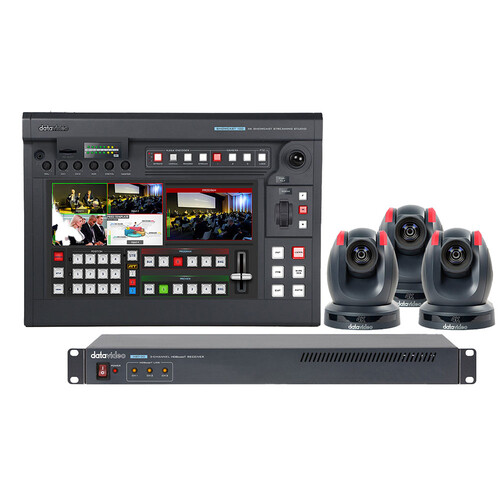
Datavideo SHOWCAST 100-TRK 1 All-in-One Production Bundle
In Stock
SKU #
DASC100TRK1
Mfr #
SHOWCAST 100-TRK 1
Manufacturer
Datavideo
Description
Move your productions to 4K origination and deliver streams in stunning HD with the SHOWCAST 100-TRK 1 All-in-One Production Bundle from Datavideo aimed at the education, house of worship, and event market, the power of this kit is you get a streaming and recording switcher that supports four 4K inputs and comes with three PTC-305T 4K PTZ cameras and a 3-channel HDBaseT receiver for the cameras. The switcher supports the PTZ functionality of the cameras and allows you to switch between inputs using the built-in touchscreen interface.Video Switching The four HDMI input/output channels are designed for basic video production workflow of meetings, corporate conferences, church events, etc.Camera Control The SHOWCAST 100's built-in camera control functions allow you to simultaneously control three PTZ cameras. You can directly save the lens position presets, pan and tilt camera lens in real time, zoom in and out of an image, and adjust the white balance, iris and mirror mode.Subtitles The SHOWCAST 100 offers two ways to overlay subtitles. A lumakeyed subtitle is usually used for logos, animated texts, etc. Another way is to overlay subtitles using the built-in network streaming encoder.Video Streaming and Recording The built-in dual live streaming encoder allows you to record and stream simultaneously. With the SHOWCAST 100's recording capability, you can easily back up the recorded video files for post production edits without much effort.Virtual Buttons Virtual buttons on the large touch screen panel makes it easy for operating the switcher as well as setting up presets for cameras. Operating the SHOWCAST 100 is as easy as using a tablet. Produce professional video productions without having a huge learning curve on how to use and operate a switcher.Useful and Simple Transition Effects Cut, Mix and Wipe are the three useful and simple transition effects built into the switcher. Via an easy-to-use 14 inch touchscreen UI, the transition settings will be immediately accessible after selection of a particular effect. For example, if you've selected WIPE, you can easily adjust the transition speed by dragging a slider with your finger or tap to select a color for the border.PIP and Split PIP is often required in video production. Most of the time, the PIP window size need to be adjusted for the program view. The SHOWCAST 100 allows you to drag different sliders on the touchscreen UI with your finger to set the aspect ratio of the PIP window. The split window is usually used for live interview, corporate presentations, and panel discussions.Camera Presets Even though SHOWCAST 100 can control only three PTZ cameras, you can save up to four presets per camera, giving you a total of 12 different angles for your production. The 12 memory presets allow the director to instantaneously switch between different camera angles on SHOWCAST 100 by pushing corresponding preset buttons.Fine Tuning the Camera Parameters On the intuitive touchscreen UI, you can easily adjust the camera's focus, iris and white balance settings. Settings of a particular program can be saved in memory presets for future use.Two Ways to Overlay Subtitles The SHOWCAST 100 offers two ways to overlay subtitles. A lumakeyed subtitle is usually used for logos, animated texts, etc. Lumakeyed subtitles can be previewed on the multiview screen and transitioned to program. Another way is to overlay the subtitles using the built-in network streaming encoder. On the web UI of the streaming encoder, enter the subtitle texts in the text field of the CG page after which the subtitle will be shown on your streamed video as streaming starts and recorded on the SD card along with the video. If lumkeyed subtitle and CG texts are shown at the same time, they will all be recorded on the SD card.Lumakeyed Subtitle Luma key is an image processing technique that deals with the brightness level of an image or a video, thereby generating a foreground subtitle or logo. SHOWCAST 100's luma key fun
Product Information
Availability:
In Stock