
- Products
-
Audio & Studio Equipment
See all
-
Cameras & Optics
See all
- Computers & Mobile Devices
- Drones & Aerial Imaging
-
Professional Video & AV
See all
- Security & Surveillance
- TVs & Entertainment
SubcategoriesSee all -
Audio & Studio Equipment
- About us
- Contact Us
- +1-888-219-0753
- Bulk Order

- Products
-
Audio & Studio Equipment
See all
-
Cameras & Optics
See all
- Computers & Mobile Devices
- Drones & Aerial Imaging
-
Professional Video & AV
See all
- Security & Surveillance
- TVs & Entertainment
SubcategoriesSee all -
Audio & Studio Equipment
- About us
- Contact Us
- +1-888-219-0753
- Bulk Order
HomeCatalogComputers & Mobile DevicesMonitors & DisplaysComputer Monitor & DisplaysSideTrak 14" Swivel V2 Portable Laptop Monitor
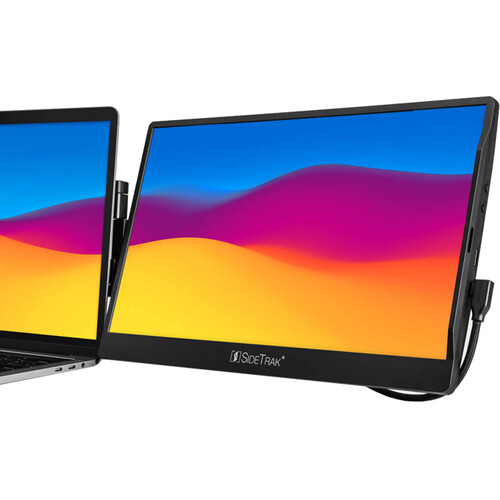
SideTrak 14" Swivel V2 Portable Laptop Monitor
In Stock
SKU #
SISTTL14BL
Mfr #
STTL14BL
Manufacturer
SideTrak
Description
Expand screen space with the 14" Swivel V2 Portable Laptop Monitor from SideTrak. Attach the Swivel V2 to your laptop using the included metal mounting plates or use the monitor's integrated kickstand for easy deployment while on the go. Utilizing a 14" Thin-Film-Transistor (TFT) panel, this portable laptop monitor provides a 1920 x 1080 Full HD resolution. Plus, a 1000:1 static contrast ratio and 250 nits brightness ensure crisp, clear views, while a 60 Hz refresh rate and 30 ms response time allow for smooth video playback. When attached to your laptop, the Swivel V2can be rotated 270 and swiveled 360 to find the perfect viewing angle. Use the included USB Type-C cable to connect to a compatible host with DisplayPort Alt Mode and take advantage of power and video via a single cable. Or use the USB Type-C cable for power and connect to an HDMI port on your laptop using the included Mini HDMI to HDMI cable. A USB Type-A to Type-C adapter is also included for easy compatibility with a wide range of laptops running on Windows, Mac, or Chrome.Unleash Productivity Whether attending a zoom call or working on an important project, two screens allow you to easily reference documents and take notes with more screen real estate.Work Anywhere This portable monitor stays attached to your laptop and doesn't require a table, allowing you to take your setup wherever you want. Set up your dual monitor workspace in seconds and easily move it with you throughout the day. The mount is designed for secure attachment, and two included mounting plates facilitate easy deployment.Built to Collaborate Rotate the display 270 and swivel it 360 when attached to your laptop for easy collaboration. Mirror your laptop's display to share it with those nearby.Portable Design Utilizing a lightweight, durable, and slim design, the Swivel V2 is intended to fit most work bags for easy transport.USB Type-C and Mini HDMI Connectivity Connect to a USB Type-C host with DisplayPort Alt Mode support to take advantage of power and video via a single cable. Or use the USB Type-C cable for power and use the Mini HDMI input for video. A Mini HDMI to HDMI cable and USB Type-A to Type-C adapter are included for easy connectivity with a range of laptops running on Windows, Mac, and Chrome.
Product Information
Availability:
In Stock