
- Products
-
Audio & Studio Equipment
See all
-
Cameras & Optics
See all
- Computers & Mobile Devices
- Drones & Aerial Imaging
-
Professional Video & AV
See all
- Security & Surveillance
- TVs & Entertainment
SubcategoriesSee all -
Audio & Studio Equipment
- About us
- Contact Us
- +1-888-219-0753
- Bulk Order

- Products
-
Audio & Studio Equipment
See all
-
Cameras & Optics
See all
- Computers & Mobile Devices
- Drones & Aerial Imaging
-
Professional Video & AV
See all
- Security & Surveillance
- TVs & Entertainment
SubcategoriesSee all -
Audio & Studio Equipment
- About us
- Contact Us
- +1-888-219-0753
- Bulk Order
HomeCatalogAudio & Studio EquipmentMusical InstrumentsKeyboards4ms Spherical Wavetable Navigator Eurorack Module (26 HP)
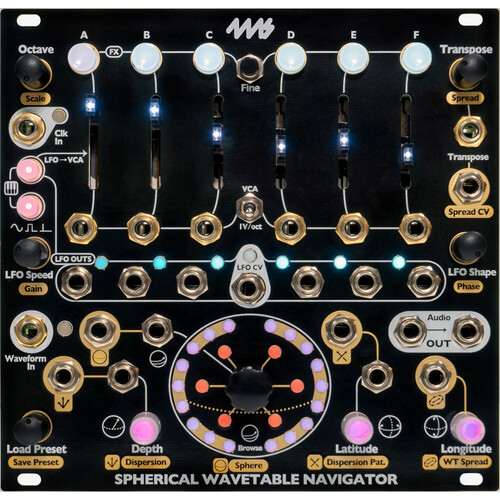
4ms Spherical Wavetable Navigator Eurorack Module (26 HP)
In Stock
SKU #
4MSPHWVTBLNV
Mfr #
SWN
Manufacturer
4ms
Description
Create morphing drones, polyphonic melodies, evolving sequences, and rich textures with the 4ms Spherical Wavetable Navigator, a six-channel Eurorack modular synthesizer voice. The SWN features six wavetable oscillators with independent pitch, level, and waveform controls and six LFOs that can be used as modulation sources and/or envelopes, adding instant dynamic motion to your patch. Each channel is a full voice and can be played using the top row of buttons, the internal LFOs, or note-change detection on the 1V/oct jacks.Each of the six channels includes a programmed 3-dimensional (sphere) wavetable with 27 waveforms arranged in a 3x3x3 shape, allowing for sophisticated tonal maneuvering for out-of-this-world sounds and atmospheres. There are 12 factory installed spheres and 108 custom user slots for saving your own. You can record into the module in real time or use the free SphereEdit software (Mac/Windows/Linux), which allows you to create, edit, and convert WAV files into spherical wavetables. The Spherical Wavetable Navigator ships with a ribbon power cable and mounting screws.Pitch Controls All pitch features can be controlled globally or per-channel.Octave: shifts pitch of channel(s) up or down by octavesTranspose: shifts pitch of channel(s) up or down by semitonesFine+Transpose: shifts pitch of channel(s) up or down by microtonal amountsScale: selects quantization: major, minor, semitones, or no quantizationSpread: creates chords by spreading channel pitches apartFine+Spread: detunes each channel a different amount for phasing effects1V/oct jacks: pitch control jack for each channelTranspose jack: global 1V/oct pitchSpread CV jack: global chord selectionLFO/Envelope Controls All LFO features can be controlled globally or per channel.LFO Output jacks: Each channel has a dedicated LFO/envelope output jackLFO Speed: Rate/tempo of each LFO. Divides/Multiplies main clock by integer amounts unless Fine button is pressed. In audio range, adjusts by semitonesLFO Shape: Selects from 25 LFO waveshapes (ramps, saw, sine, complex shapes, etc)LFO Gain: Control amplitude of LFO on LFO output jacks. Useful for self-patching LFOs to other SWN jacksLFO Phase: Adjusts when each LFO fires relative to the down beat. Example: 60 degrees of phase shift per channel creates a 6-step sequenceLFO Type button: Toggles between trigger, gate, and waveshapeLFO CV jack: Adjust LFO SpeedExt Clock jack: Sync to external equipmentAmplitude Controls Sliders: each channel has a dedicated level (volume) sliderMute button: each channel has a mute/unmute buttonKey button: in Keyboard or Note mode, mute button will fire the channel's envelope to play a noteVCA input jacks: switch re-purposes 1V/oct jacks to control level of each channel with CVLFO-VCA button: Internally uses each channel's LFO to control its level to create sequences and/or dynamic motion. (global or per-channel)Wavetable Controls All wavetable features can be controlled globally or per-channel.Browse: Morphs between all waveforms in the Spherical Wavetable (Sphere) by navigating in zigzag (snake) patternDepth: Morphs between waveforms in the Sphere by navigating only in the Depth dimensionLatitude: Morphs between waveforms in the Sphere by navigating in the Latitude dimensionLongitude: Morphs between waveforms in the Sphere by navigating in the Longitude dimensionSphere: Selects a Spherical Wavetable from the 12 factory spheres and up to 108 user-created custom spheresDispersion: Pushes each channel to a different position within the SphereDispersion Pattern: Selects the pattern that channels are dispersedWT Spread: Pushes each channel into a different SpherePresets All settings (except level sliders and 1V/oct / VCA switch) can be saved for later use.Save Preset: Save the state of the SWN so you can come back to it later.Load Preset: Select one of 108 user preset slots to load.Clear Preset: Delete a preset that you previously saved.Undo Preset: Undo your last preset action (example: acc
Product Information
Availability:
In Stock