
- Products
-
Audio & Studio Equipment
See all
-
Cameras & Optics
See all
- Computers & Mobile Devices
- Drones & Aerial Imaging
-
Professional Video & AV
See all
- Security & Surveillance
- TVs & Entertainment
SubcategoriesSee all -
Audio & Studio Equipment
- About us
- Contact Us
- +1-888-219-0753
- Bulk Order

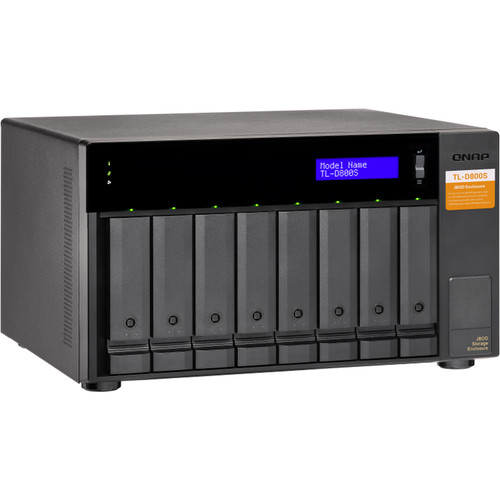
QNAP TL-D800S 8-Bay JBOD Enclosure
In Stock
SKU #
QNTLD800SUS
Mfr #
TL-D800S-US
Manufacturer
QNAP
Description
Back up and expand your QNAP NAS, as well as Windows and Ubuntu computers and servers, with the TL-D800S 8-Bay JBOD Enclosure from QNAP. This enclosure features eight 2.5/3.5" SATA III 6 Gb/s hard drive bays. It includes a QXP PCIe card for connecting the enclosure using an SFF-8088 (or SFF-8644) cable and provides reliable read/write performance for smooth storage and backup tasks. Each SFF port supports four drive slots and a lockable hard drive tray helps prevent accidental drive removal. Note: The included card does not support the Mac Pro. Connection to a compatible QNAP NAS requires SFF-8088 support or an available expansion slot supporting the QNAP QXP-3X4PES expansion module. General FeaturesHigh-Performance TL SATA JBOD The TL SATA JBOD supports multi-lane SATA III 6 Gb/s transfers. Each SATA lane directly connects to a single SATA drive to help improve performance. With the 1-1 high-speed channel, the TL SATA JBOD delivers excellent transfer performance.Flexible Storage Configuration and Management The TL-D800S provides a software-controlled storage configuration for greater management flexibility. You can configure RAID and monitor JBOD enclosure and disk health with Storage & Snapshots when connected to a QTS or QuTS hero NAS or with the QNAP JBOD Manager utility when connected to a computer.QTS Storage & Snapshots Manager Use the Storage & Snapshots Manager in QTS or QuTS hero to configure the TL-D800S as a storage enclosure for your QNAP NAS. The NAS expansion storage mode supports various NAS functions, including storage pools and snapshots. With the TL-D800S, you can easily expand storage capacity.Intelligently Monitor JBOD Enclosure Status on PCs & Servers with QNAP JBOD Manager The QNAP JBOD Manager is a desktop utility for monitoring the TL-D800S on Windows and Ubuntu computers. You can quickly obtain disk statuses, see JBOD information and health, view fan rotation speed, and check for firmware updates. All device events are recorded, and will generate desktop notifications when a system alert occurs.Flexibly Expand Connectivity with QXP PCIe Cards Install an exclusive QXP PCIe card onto your QNAP NAS, Windows system, or Ubuntu system to connect the JBOD enclosure via SFF-8088 (or SFF-8644) cable, for easy and flexible storage expansion.Expand Your NAS Capacity The TL-D800S provides an alternative method for users to expand their NAS storage capacity. By connecting the TL-D800S to their NAS and using Storage & Snapshots Manager in QTS or QuTS hero, users can easily configure and manage their storage expansion. The TL-D800S supports a variety of QNAP NAS storage and file management functions, allowing users to build storage pools, finding files with Qsirch, and organizing files with Qfiling.Use as External Storage for Your NAS You can use the TL-D800S to expand your NAS storage. You can select disks to create storage pools for expanding your NAS capacity, or you can treat each disk as an individual external storage space and use it as a removable drive for greater flexibility. Regardless of the mode you use, you can always use Storage & Snapshots Manager in QTS or QuTS hero to set up and manage your TL-D800S and use hard drive S.M.A.R.T and Notification Center to check disk status anytime and anywhere. Mode 1: Expand NAS Capacity with Storage Pool Mode You can use Storage & Snapshots Manager in QTS or QuTS hero to configure the RAID storage pool for your TL-D800S and expand NAS capacity. The TL-D800S can only be used as an individual storage pool or volume on the NAS. Its storage pool or volume cannot be combined into the connected NAS. NAS applications cannot be installed on the TL-D800S. Mode 2: Expand Your NAS with External Storage Mode You can treat each disk on your TL-D800S as an individual storage space and expand your NAS capacity. For example, it will show 8 independent external disks on an 8-bay NAS.The TL-D800S supports multiple disk formats, including NTFS (for Windows), HFS+ (for Mac), EXT4 (for
Product Information
Country of Origin:
TW
Availability:
In Stock
Unit of Measure:
EA