
- Products
-
Audio & Studio Equipment
See all
-
Cameras & Optics
See all
- Computers & Mobile Devices
- Drones & Aerial Imaging
-
Professional Video & AV
See all
- Security & Surveillance
- TVs & Entertainment
SubcategoriesSee all -
Audio & Studio Equipment
- About us
- Contact Us
- +1-888-219-0753
- Bulk Order

- Products
-
Audio & Studio Equipment
See all
-
Cameras & Optics
See all
- Computers & Mobile Devices
- Drones & Aerial Imaging
-
Professional Video & AV
See all
- Security & Surveillance
- TVs & Entertainment
SubcategoriesSee all -
Audio & Studio Equipment
- About us
- Contact Us
- +1-888-219-0753
- Bulk Order
HomeCatalogProfessional Video & AVPro Video StreamingStreaming Media SwitchersRoland V-1HD Portable 4 x HDMI Video Switcher & UVC-01 USB Capture Device Kit
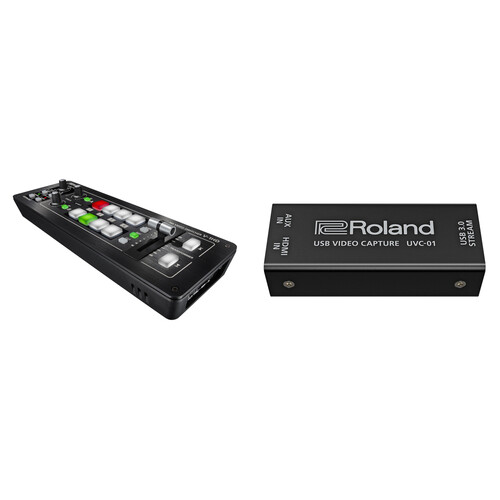
Roland V-1HD Portable 4 x HDMI Video Switcher & UVC-01 USB Capture Device Kit
In Stock
SKU #
ROV1HDSTRK
Mfr #
V-1HD STR
Manufacturer
Roland
Description
The V-1HD Portable 4 x HDMI Video Switcher & UVC-01 USB Capture Device Kit from Roland enables live switching between four HDMI sources and sending the resulting output via HDMI or converting it through the USB video capture device for importing into a computer for recording or live streaming. The kit, which includes Roland's V-1HD switcher and the UVC-01 USB Video Capture Device, facilitates uncompressed 1080p60 live streaming by turning the combined output of the switcher into a signal that the computer will detect as it would with an HD webcam, thus providing a smooth and reliable live streaming solution.HD Switcher This portable HD switcher supports four inputs of HD video, allowing you to select 1080i, 1080p, or 720p as your input source. Each input incorporates a frame buffer/TBC that allows you to use non-genlocked cameras, as well as play-out devices as video sources. You select the broadcast system (59.94/50 Hz) within the menu. The format selector switch is a global switch that affects the input and output format. However, with the switch in either of the 1080 options, the V-1HD enables input of both 1080i and 1080p signals.Audio Mixer The built-in 12-channel audio mixer allows you to de-embed audio from the HDMI stream, mix, and re-embed the audio into your output stream. The audio mixer is accessed by a connected PC running the available software.Output Modes The V-1HD features two HDMI outputs one output always shows your switched program output, while the other (preview) can be switched between program output and multiview of your four sources.Control Buttons The soft rubber backlit buttons allow you to easily see the condition of your switcher, even in dim lighting conditions.Red: Indicates the current source being outputGreen: Indicates the video source that will be output on the next transitionTransitions There are three buttons for applying transition effects: Cut, Mix (4 types), and Wipe (30 types).Beat-per-Minute Sync By using the T-fader bar and the BP-Sync button, you can deliver visuals synced to a music performance.Memory The Memory button allows you to save or recall up to eight presets, and the Freeze button can temporarily pause the incoming video.Transformer Buttons These buttons can be used to switch your video instantly or to apply effects.Transitions The T-bar lets you control the speed of your selected transitions.Keying The keying functionality permits picture-in-picture as well as green screen keying and graphics keying.Output Fade You can select to fade your output video to either black or white.Effects Picture-in-picture and split-screen functionsSupports chroma and luminance keyTwo separate bus effects knobs allow you to apply effects independently to each busNine types of filter effects are available, including silhouette, colorpass, negative, and findedgeAudio Effects EQDelayCompressorHPFGateReverbMastering effectControl Remote control is possible with the V-1HD RCS dedicated computer software for Mac OS X and Windows, or the V-1HD Remote iPad app connected via a USB cable. The application offers a detailed view of the connected V-1HD and can be used to switch video, mix audio, or change settings. You can control the unit from a music instrument or a sequencer via the MIDI input connector via MIDI. The V-1HD also transmits MIDI over USB and its controls can be mapped to popular visual performance software applications. Please use the Lightning to USB Camera Adapter to connect an iPad to the V-1HD.HDCP HDCP compliance can be enabled within the menu.
Product Information
Availability:
In Stock