
- Products
-
Audio & Studio Equipment
See all
-
Cameras & Optics
See all
- Computers & Mobile Devices
- Drones & Aerial Imaging
-
Professional Video & AV
See all
- Security & Surveillance
- TVs & Entertainment
SubcategoriesSee all -
Audio & Studio Equipment
- About us
- Contact Us
- +1-888-219-0753
- Bulk Order

- Products
-
Audio & Studio Equipment
See all
-
Cameras & Optics
See all
- Computers & Mobile Devices
- Drones & Aerial Imaging
-
Professional Video & AV
See all
- Security & Surveillance
- TVs & Entertainment
SubcategoriesSee all -
Audio & Studio Equipment
- About us
- Contact Us
- +1-888-219-0753
- Bulk Order
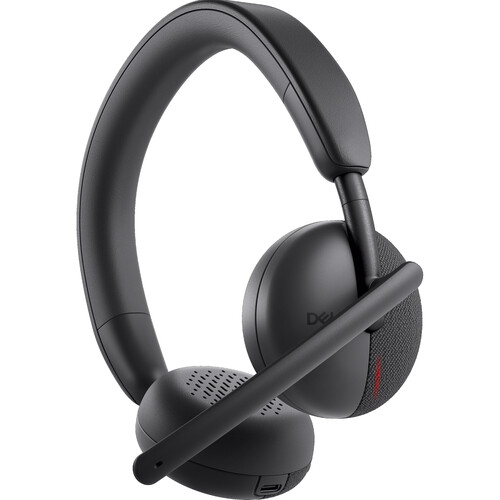
Dell WL3024 Wireless Headset
In Stock
SKU #
DEWL3024DWW
Mfr #
WL3024-DWW
Manufacturer
Dell
Description
Enjoy crystal-clear calls with the Dell WL3024 Wireless Headset. This lightweight Zoom and Microsoft Teams certified headset connects wirelessly to Bluetooth compatible devices while ensuring that you're heard with an AI-driven noise cancelling boom microphone that may be worn on either side of your head.With replaceable on-ear leatherette memory foam cushions and 28mm drivers, the earcups deliver long-lasting comfort and listening clarity. Additionally, the 90 pivot allows you to lay the headset flat for easy storage with the included carrying case. The 500mAH battery provides up to 26 hours of talk time and about 41 hours of listening with the LED light turned off. Integrated controls and a flip-to-mute mic boom allow you to make quick adjustments. A USB-C receiver is included alongside a convenient USB-A adapter for Windows 10/11 and macOS systems that don't already support Bluetooth. Customize your headset's settings with the Dell Peripheral Manager software and Dell Audio app.AI-Based Noise Cancellation Microphone With an Artificial Intelligence (AI) processing model, environmental noise cancellation is more intelligent, reliable, and accurate at distinguishing human voices from surrounding sounds.Control at Your Fingertips The headset is equipped with call control buttons on the ear cups and a rotatable boom microphone that can be worn on either the left or right side. Flip the mic up to mute or flip it down to unmute.Easy Charging Enjoy up to 41 hours of listening time on a full charge.Seamless Collaboration This headset is certified for Microsoft Teams (Open Office) and Zoom. It's also compatible with leading UC platforms.Multi-Link Connectivity Connect up to eight devices and pair up to two simultaneously. Bluetooth 5.3 increases connection reliability.Designed for Ease of Use The adjustable headband and replaceable leatherette memory foam ear cushions enable all day productivity and comfort while conferencing. Pair the wireless audio receiver via a USB-C or USB-A port to get started.Dell Pair Your headset is detected automatically and paired with only one click using Dell Pair, a simple and secure way to connect your headset to your PC.Personalize Your Settings The Dell Peripheral Manager allows the user to make changes to the audio and device settings with additional customization such as Audio Mode, Microphone Noise Cancellation Mode, Sidetone, Audio Output Preset, Busy Light, Battery Indicator, and more.
Product Information
Availability:
In Stock