
- Products
-
Audio & Studio Equipment
See all
-
Cameras & Optics
See all
- Computers & Mobile Devices
- Drones & Aerial Imaging
-
Professional Video & AV
See all
- Security & Surveillance
- TVs & Entertainment
SubcategoriesSee all -
Audio & Studio Equipment
- About us
- Contact Us
- +1-888-219-0753
- Bulk Order

- Products
-
Audio & Studio Equipment
See all
-
Cameras & Optics
See all
- Computers & Mobile Devices
- Drones & Aerial Imaging
-
Professional Video & AV
See all
- Security & Surveillance
- TVs & Entertainment
SubcategoriesSee all -
Audio & Studio Equipment
- About us
- Contact Us
- +1-888-219-0753
- Bulk Order
HomeCatalogComputers & Mobile DevicesComputer ComponentsDesktop ComponentsMSI PRO Z890-A WIFI LGA 1851 ATX Motherboard
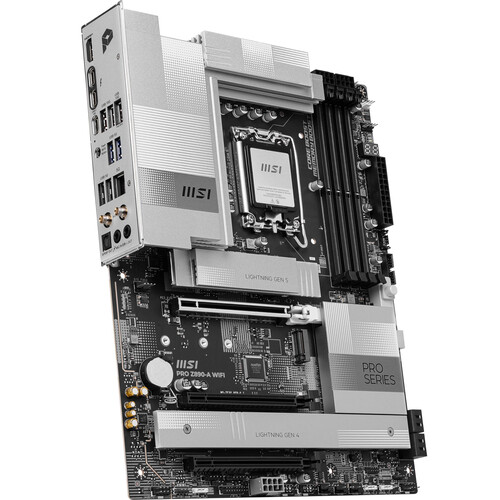
MSI PRO Z890-A WIFI LGA 1851 ATX Motherboard
In Stock
SKU #
MSZ890AWIFI
Mfr #
Z890AWIFI
Manufacturer
MSI
Description
Power up your workflow by including the MSI PRO Z890-A WIFI LGA 1851 ATX Motherboard in your computer build. Supporting Intel Core Ultra series 2 desktop processors with the LGA 1851 socket, professional content creators can outfit this motherboard to smoothly handle demanding applications and AI workloads. Designed to help simplify builds, MSI's EZ technology makes it easy to install one M.2 PCIe 5.0 and three PCIe 4.0 SSDs to store your applications and important files. There are also four SATA III connectors available alongside four DDR5 DIMM slots. With one PCIe 5.0 x16 slot and two PCIe 4.0 x16/x4 slots, you can install powerful graphics cards and other compatible expansions. The rear panel features two Thunderbolt 4 ports that can transfer up to 40 Gb/s with compatible devices or connect a USB-C compatible 8K display. The one USB-C and three USB-A ports work with 10 Gb/s devices. An internal header allows you to connect a front panel 20 Gb/s USB-C port. You may use the four USB-A 3.2 Gen 1 ports with 5 Gb/s peripherals. Built-in Wi-Fi 7 (802.11be) support and a 5 Gb/s Ethernet port provide you with connections to compatible network devices for smooth video streaming and fast file transfers. One FingerEZ M.2 Installation MSI's EZ M.2 Shield Frozr II and EZ M.2 CLIP II make M.2 installation seamless. Insert the SSD card into the slot and press it down to lock it in place with the clip. As you unfasten the SSD, flick the clip outwards and you'll be able to remove the SSD. The process is smooth and you don't need to use tools like before. One finger can give you the perfect DIY experience.EZ M.2 CLIP II Remover Introducing MSI's EZ M.2 CLIP II remover, a handle tool designed for simply switching or repositioning the EZ M.2 CLIP II on your motherboard. This tool allows users to detach the EZ M.2 CLIP II from the motherboard and reattach it to any desired M.2 slot. It is included in the accessory kit that comes with MSI motherboards.EZ GPU Installation & EZ PCIe Release An easy-to-access physical button release mechanism that can help remove any PCIe card with a single tap, making it much easier to upgrade to a new GPU or other compatible device, streamlining the entire process and enhancing user experience.Flash BIOS Button Flash the BIOS with only a connected power supply by following a few steps. CPU and memory are not required.
Product Information
Availability:
In Stock